

Keep one row for each potential job and record the evidence as it progresses: an accepted enquiry, a qualified lead, an accepted job and a payment. Keep website visits in a separate summary. A visit or form event does not tell you that a genuine customer hired you.
This guide includes an enquiry log, a payment log and a rules template. They are original blank worksheets for a small business to adapt. The worked example shows how six enquiries can reach different stages.
Agree What Each Stage Means
Write the rules before calculating results. A roofer, a consultant and an online shop may use different qualification and acceptance criteria. Use terms the owner and the person answering enquiries understand.
| Measure | A workable starting definition | Evidence to record |
|---|---|---|
| Website visits | Sessions reported by the chosen analytics report | Report, date range, time zone and source dimension |
| Accepted enquiry | A reviewed, genuine request for possible new business | Private enquiry record and review date |
| Qualified lead | An accepted enquiry that meets your documented criteria | Criteria checked, decision date and record reference |
| Accepted job | A customer has agreed to the job under your chosen rule | Written acceptance, confirmed booking or another defined milestone |
| Payment | Money received and verified in the business's payment records | Transaction reference, date, amount and currency |
For this worksheet, “accepted enquiry” means accepted into the new-business log. It does not mean you have accepted the job. An automated email notification is also a different measure: it is evidence of a notification, pending review of the underlying request.
Decide how to treat spam, sales pitches, recruitment, customer support and existing-customer work. For example, you might exclude support requests while counting a returning customer's new renovation as a new opportunity. Record that choice in the rules.
Qualification might require an offered service, a location you cover and enough information to assess the request. Budget or timing may matter for your business, but do not silently apply a rule nobody agreed to.
Give the rules a version and effective date. Keep earlier decisions explainable if the criteria later change. Until a decision is made, use “unreviewed” or “unknown”; missing evidence should not become a confident yes or no.
Give Each Potential Job One Record
A customer might submit a form, call the next morning and reply to a quote three times. If those contacts concern one proposed job, they belong under one opportunity ID.
Use a neutral local ID such as JOB-001 and keep names, phone numbers, addresses and message contents in your normal private customer system. The log can point to that private record without repeating it.
Record the first enquiry date, contact route, requested service and current status. When the same customer requests a separate job, use a new opportunity ID and retain the relationship in your customer system.
Before adding another row, check whether it is a follow-up or duplicate. Link duplicates to the original ID and exclude them from opportunity counts. Count neither a repeat notification nor a forwarded email as another buyer.
Record each stage decision and its date separately. That lets an owner distinguish a waiting quote from a lost job, and a booked job from one that has been paid.
Keep Reported Source and Observed Evidence Separate
Ask “How did you hear about us?” when it is practical. Record the answer as self-reported information. “Google” may mean an advert, Maps, an organic result or a later search for a name the customer heard elsewhere.
If you have a reliable tracking reference linking that enquiry to a recorded visit, keep the source evidence and method separately. Do not replace the customer's answer with the analytics label when they disagree. Record both and mark the relationship unresolved if necessary.
Useful source fields are:
- Customer-reported source: what they actually selected or told you.
- Observed source evidence: the report or record supporting a source label.
- Evidence type: linked technical record, self-report, conflicting evidence or unknown.
- Join method: how you established that the visit and enquiry belong together, if you did.
An enquiry arriving soon after a search click is not enough to join the two. A mailbox folder or message subject is not proof of a marketing source either. Keep unknown sources visible in the report.
Google describes (direct) / (none) as traffic without a clear referral source. It can have several causes. Do not allocate it to SEO, AI search or brand recognition just to make the source totals add up.
For AI-specific visibility checks, use our AI search reporting guide. It separates mentions, citations and recommendations from visits and enquiries. The opportunity log adds the later business decisions.
Use Analytics as Supporting Evidence
GA4's Traffic acquisition report uses session-level source dimensions to describe how sessions arrived. Sessions are not a count of distinct prospective customers. Do not mix that report with a first-user acquisition report without labelling the difference.
In current GA4 terminology, an important measured action can be marked as a key event. Its usefulness depends on what the event actually measures. A button click, a form attempt and a confirmed form acceptance are different actions.
Check the form's actual acceptance path before describing an event as a received enquiry. A success message on the screen does not independently confirm that the request reached the system where the business handles it. Review the relevant private record, then apply the agreed enquiry rules.
Google lists recommended lead events, including generate_lead, qualify_lead and close_convert_lead. Those stages need suitable implementation and business definitions; the names do not make qualification or a sale happen automatically. You can start the private manual log while that work is being assessed.
Keep personal information out of Analytics. Google's PII guidance covers information such as names, email addresses and phone numbers. Do not put customer details into tracking URLs or event parameters. The neutral ID in this worksheet is for your private log; this guide does not instruct you to send it to Analytics.
Record Payments as Transactions
An accepted quote is not a payment. An invoice is not evidence that money arrived. Record verified payments in the separate payment sheet and link them to the opportunity ID.
Use one row per transaction. A deposit and a later balance payment are two transactions for one job. A refund needs its own entry and a link to the relevant transaction. Set a clear amount convention in the rules: for example, positive amounts with a separate payment/refund type.
For a count of jobs with payment evidence, count each opportunity once. Keep deposit received, balance outstanding, fully paid and refunded states clear. A job with a deposit should not be described as paid in full.
Contract value, invoices, received cash and accounting revenue answer different questions. Label any money summary by the records and convention you used. The worksheet is an operational log, not an accounting system.
Read the Stages Using the Same Group of Enquiries
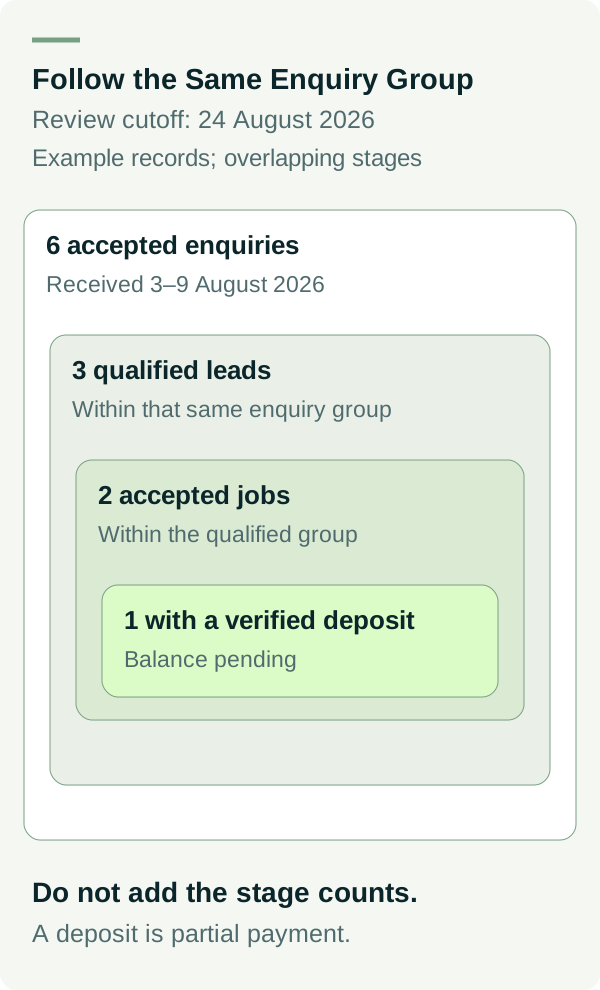
Suppose six genuine enquiries entered the log from 3–9 August 2026 and were reviewed on 24 August 2026. The following worked example uses made-up IDs with no customer details. At that review cutoff, all six have been assessed for qualification.
| Opportunity | Accepted enquiry | Qualified lead | Accepted job | Verified payment by cutoff |
|---|---|---|---|---|
| DEMO-001 | Yes | Yes | Yes | Deposit received; balance pending |
| DEMO-002 | Yes | Yes | Yes | No payment recorded yet |
| DEMO-003 | Yes | Yes | Not yet; quote pending | No payment recorded |
| DEMO-004 | Yes | No; outside service area | No | No payment recorded |
| DEMO-005 | Yes | No; service not offered | No | No payment recorded |
| DEMO-006 | Yes | No; outside agreed project scope | No | No payment recorded |
For that six-enquiry group, as at the stated review cutoff:
- Qualified leads: 3 ÷ 6 × 100 = 50%.
- Accepted jobs: 2 ÷ 6 × 100 = 33.3%.
- Opportunities with verified payment evidence: 1 ÷ 6 × 100 = 16.7%.
These are stage shares for this example group at one point in time. The stages overlap, so adding 3, 2 and 1 does not produce six separate wins. The payment share also does not say that one job is paid in full.
If qualification remains unknown for some real enquiries, show that number and the coverage. Do not silently drop them and present the smaller group as all enquiries. Keep pending outcomes visible; a job may be accepted or paid after the review date.
Keep Monthly Activity Separate From Enquiry-Group Progress
A monthly activity report might count new enquiries this month, jobs accepted this month and payments received this month. Those jobs and payments may come from earlier enquiries.
To calculate the progress of an enquiry group, start with the enquiries first received in a defined period and follow those same IDs to a stated cutoff. This is often called a cohort. It answers a different question from “what happened this month?”
Keep visits as a separate context measure unless you have a sound, stated method for the comparison. Check matching site coverage, dates, time zones, tracking continuity and source definitions. Recent Analytics figures can change while processing; see Google's data freshness guidance. A gap in collected data does not establish that the business had no visitors.
Make the Weekly Review Useful
Review unassessed enquiries, missing source evidence, open quotes and payment records. Assign the next action in the private log. Check enough underlying records to confirm that the stage counts still mean what the rules say.
The first useful result may be a finding such as “we cannot reliably connect these enquiries to their sources yet”. That gives the business a concrete measurement problem to fix. Filling unknown fields with guesses hides it.
If your reports stop at traffic and leave the business outcomes unclear, talk to Matt. Bring the reporting definitions and a summary of the gaps. Keep customer details in your normal private system.