
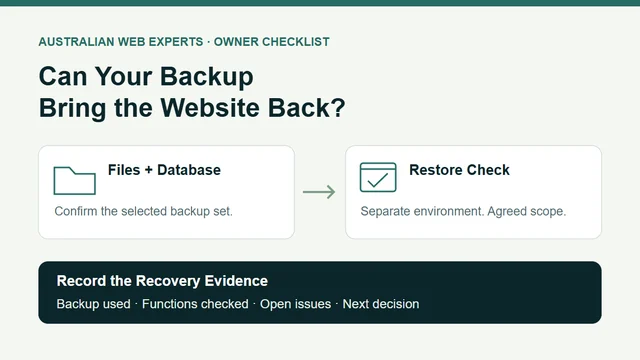
A “backup completed” message is a useful starting point. To know what it means for your business, ask your website provider which parts of the site were saved, which restore points are available and who can recover them.
Then agree on a controlled restore check in a separate test environment. Record the backup used, what was restored and which business functions were checked. That gives you evidence about the chosen backup and recovery process, while keeping the live site out of the test.
This checklist is for an owner of a WordPress business website who wants a clear recovery plan. It is something to complete with your provider before a problem occurs.
The useful question: “If we needed yesterday’s website back, which backup would you use, where would you restore it and what would we check before approving a live recovery?” Ask for a specific answer. A backup schedule alone does not tell you how much recent work could be lost or how long recovery will take.
Confirm What the Backup Contains
A typical WordPress recovery needs both the database and the website files. The WordPress backup guidance explains these as separate parts of a complete backup. Ask your provider whether the saved set covers both, and whether they belong to the same recovery point.
The files include items such as themes, plugins, uploads and site configuration. WordPress’s file backup documentation explains why downloading the website folder usually does not also capture the database.
Be precise about anything outside WordPress. Your booking platform, mailbox, domain registration or external enquiry system may have its own recovery arrangements. Record each relevant dependency and its owner. A website backup should not be treated as proof that those other services are covered.
Match Each Backup Claim to Evidence
Use this table to turn a general reassurance into questions your provider can answer. “Unknown” is a useful finding: it gives you something specific to resolve.
| Backup Claim | Evidence to Ask For | What Remains to Check |
|---|---|---|
| “Backups run regularly.” | Latest successful backup time, timezone and available restore points. | Which recent edits or stored records fall after the chosen point? |
| “The whole website is backed up.” | Included files, database and exclusions for this particular site. | Are required uploads, settings and external dependencies accounted for? |
| “We can restore it.” | Restore method, responsible person and any provider involvement required. | Can that person retrieve and use the selected backup in the agreed environment? |
| “We tested the backup.” | Test date, backup identifier, environment, checks and unresolved issues. | Did the test cover the functions your business needs, and what has changed since? |
Download the blank backup evidence worksheet and the worked example. Both use the same eight checks, so you can see what a useful answer looks like and where evidence is still missing.
Separate a Content Export From a Recovery Backup
If someone gives you an XML file from WordPress’s Tools → Export screen, ask what it is intended to recover. The official export documentation describes a content transfer file containing items such as posts, pages and other content data. It should not be accepted as evidence that the site’s files and database have both been backed up.
Similarly, having a download does not establish that you have access to the tool or person needed to restore it. For example, cPanel’s backup documentation says automatic restoration of a full backup is available through WHM rather than the cPanel interface, and directs users to their hosting provider. Ask about your actual hosting arrangement; other systems have different processes.
You do not need to learn server administration to ask who will do the recovery and what they need to do it.
Agree on the Restore Check Before Anyone Starts
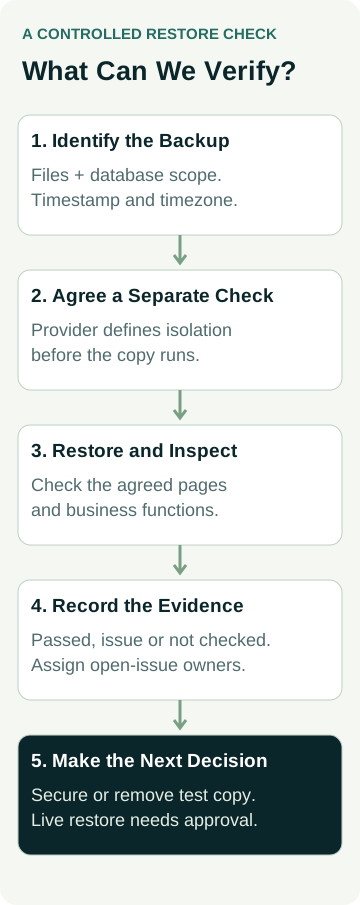
Ask the provider to propose a separate test environment and explain how it will be isolated from the live website and real business activity. Agree on the scope in writing, including:
- The backup: its identifier, timestamp and timezone, plus the files and database included.
- The destination: a separate environment, with no overwrite of the live site or change to its public address.
- The isolation: how access, customer data, outgoing email, payments, bookings, scheduled tasks and connected systems will be controlled before the restored copy runs.
- The checks: the pages, images, login and business functions you need to inspect, with any test messages or transactions separately agreed.
- The finish: who records issues, removes or secures the test copy and decides the next action.
Use the restore check record to capture the agreed scope and results. Keep passwords, recovery codes and customer records out of the worksheet; use secure references instead.
The provider should handle the technical isolation and restoration. Creating a second copy is only the first part of that work. If the isolation or restore scope is unclear, resolve it before running the copy.
Worked Example: Recent Job Photos Are Outside the Restore Point
Consider an example plumbing business. The owner adds three job photos on Tuesday afternoon. On Wednesday, they ask the provider to demonstrate recovery using a backup marked Tuesday 02:00.
The owner’s first question is whether that timestamp uses the same timezone as their editing records. If it does, the afternoon photos are later than the backup. Their absence from the restored copy would be consistent with that restore point, even if the restore process works correctly.
The example worksheet records the chosen point, the later photos and the evidence still needed. It leaves the restore result as not checked. There is no completed test or customer result behind this example.
The practical next step is to ask which later restore points exist and decide whether the available coverage suits the business. For a site that stores bookings or enquiries, include those records in the discussion. Agree on an acceptable amount of lost recent work and a recovery target with the provider; do not infer either from the backup frequency.
Record What Worked and What Is Still Unknown
After an agreed check, ask for a short record containing the selected backup, environment, person responsible and observed results. Include the start and finish times if recovery duration is being assessed, and state what preparation or provider waiting time those timings exclude.
Check the things that matter to your site: required pages, recent content expected at that restore point, images, access and agreed functions. A homepage loading is one result. It does not establish that every page, enquiry path or integration works.
Mark each item passed, issue or not checked, and assign an owner to open issues. A successful check supports confidence in that specific recovery path. Refresh the evidence after changes that affect the backup scope or restore process, such as a hosting move or a new booking integration.
Live recovery remains a separate decision. Before approving it, confirm the selected restore point, expected loss of recent work, affected services and the provider’s recovery plan. The worksheet records evidence; it does not authorise a live restore.
Ask for a Clear Recovery Plan
You should be able to find the backup scope, available restore points, access owner and recovery contact without guessing. Ask how long backups are retained, where copies are stored and what happens if the usual hosting account is unavailable. Have the provider explain the arrangement for your site rather than relying on a general package description.
If you need help reviewing your website’s hosting and maintenance, contact Australian Web Experts with your website address, current provider and the recovery question you need answered. The completed worksheet gives that conversation a useful starting point.