

If your XML sitemap contains more URLs than you expected, ask for the list and check what the entries represent before approving a clean-up. Compare the intended public pages with the listed addresses, identify unexpected groups and agree the reason for each change. A larger count alone does not tell you whether the sitemap is useful or incorrect.
For a small service business, the starting point is the information customers should find: your services, relevant business details and useful supporting pages. Ask your SEO and website people to explain how the sitemap reflects that public website and who maintains it when content changes.
You do not need to edit XML yourself. You need a clear inclusion decision, evidence from the actual site and a check that the agreed result stays correct after the website regenerates the file.
Review the list and the website separately. Removing an entry from a sitemap does not remove the page itself. Ask what each proposed change will do before approving it.
Find Out What the Count Includes
Ask the provider for the sitemap address, the observation date and an explanation of how they counted its entries. Establish whether they are looking at a sitemap containing page URLs or an index listing several sitemap files. A headline total without that context is hard to assess.
Have them identify the relevant child files if an index is involved. Agree whether the review concerns ordinary page URLs, media information or another part of the sitemap setup. Avoid comparing different kinds of entries as if they were all extra service pages.
Then group the page addresses in a way you can recognise: services, blog articles, business information and anything unexpected. Ask for a few actual examples from each unfamiliar group. A CMS label such as “archive” does not by itself tell you whether the pages are useful to your customers.
Keep the current list before making changes. Record the scope and method behind a count, including whether it covers the whole agreed sitemap set or a sample. An unexplained total can hide missing service pages as easily as unnecessary entries.
Agree Which Public Pages You Want Represented
Google's sitemap introduction explains that a sitemap provides information about pages and other files and helps search engines discover URLs. Inclusion does not guarantee crawling or indexing. Useful internal links also help Google find important pages.
Start your review with the business's intended public content. For each page group, ask what a customer gains from finding it in search and whether the page is ready for that audience. Include the person who knows the current service offer; a technical list cannot confirm which work the business accepts.
Have the provider reconcile important pages against the sitemap. Which expected pages appear, which are missing and which entries have no understood purpose? Keep unknown entries in an investigation list rather than treating unfamiliar names as permission to delete content.
Google's sitemap building guidance recommends listing the URLs you want in search results, using complete addresses. Where equivalent content has several addresses, it advises including the preferred version rather than every variant.
This is an inclusion review, not a target to make the list as short as possible. An informative article or distinct service page may belong even when it is outside the main menu. Equally, a long list does not establish that every entry deserves its own search result.
Investigate Unexpected Entries Before Changing Rules
Ask the reviewer to explain what each unexpected address does now. Does it open a useful page, redirect somewhere else, show an error or lead to content that was never intended for public discovery? Record the response and destination with the date of the check.
If several addresses present the same content, agree the preferred one with the technical owner. The canonical URL guide explains that wider decision and the distinction between a preference and Google's selected representative URL. Use that review rather than deciding equivalence from a similar-looking address.
A redirected or broken entry needs an explanation. The appropriate sitemap entry may be a working replacement, but first establish what the old address was for. Changing the list and repairing a broken customer link are different tasks. Keep any required page or link repair in the agreed scope too.
For pages with an intentional exclusion from search, ask why they are being proposed for inclusion. Do not remove an intentional restriction simply to make a report look cleaner. Have the responsible person resolve the purpose and implementation together.
Hold uncertain changes for investigation. Preview, administrative or private material deserves particular care. A sitemap is not an access-control system; removing an entry alone does not secure material that can still be reached. The website owner should assess any unintended exposure separately.
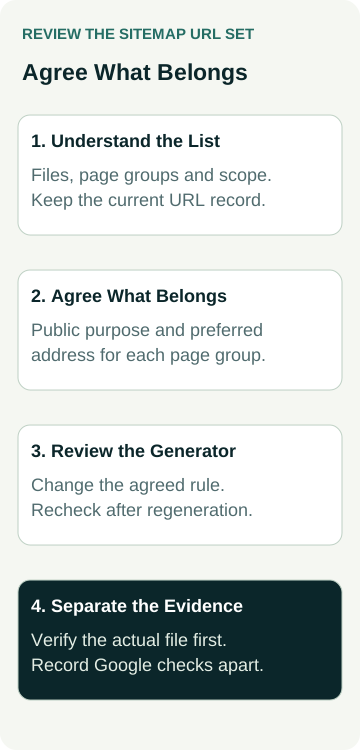
A Worked Example: Service Pages and Old Variants
This example is illustrative. It does not describe an AWE client, an inspected sitemap or a measured SEO result.
A landscaping business expects its sitemap to reflect its services and helpful project information. A report shows unfamiliar entries alongside those pages. The owner asks the provider to export the list and explain the groups before changing settings.
The reviewer identifies current service pages, useful articles, older addresses that redirect and several campaign variants. They also find a page the owner expected to see is absent. Each finding gets its own decision rather than a blanket instruction to remove everything outside the navigation.
The owner confirms the current offer. The technical person reviews the campaign variants and their preferred addresses, then proposes generator changes for the agreed page set. The missing page is investigated separately to establish whether it is ready for public discovery and why it was absent.
The review record looks like this:
| Entry Group | Decision to Agree | Evidence to Request |
|---|---|---|
| Current service pages | Represent the agreed public pages | Exact preferred URLs and current page checks |
| Equivalent variants | Use the agreed representative addresses | Content comparison and preference decision |
| Old redirected entries | Review the intended current destination | Response, final address and proposed list change |
| Unexpected or missing pages | Investigate purpose before changing rules | Owner decision, findings and unresolved items |
After implementation, the team compares the regenerated file with the approved decisions. They check both the intended changes and the pages that should remain. Any later Google processing or indexing evidence is recorded separately. The example provides an approval method; it does not establish that a smaller sitemap will improve rankings.
Fix the Generator and Explain the Dates
Find out what creates the sitemap: the website platform, a plugin, a build process or a manually maintained file. Ask who controls it and which settings or source records determine inclusion. A manual edit may be replaced when that process runs again.
Have the proposal identify the underlying rule being changed and the pages it affects. A change to an entire content type can reach more pages than the handful shown in a report. Ask for the intended exceptions and what will be checked after regeneration.
If the sitemap supplies last-modified dates, ask how those values are produced. Google says it uses that information when it is consistently accurate, and that the date should reflect a significant page update. Regenerating a file is not a reason to present every unchanged page as newly updated.
Keep the explanation tied to your implementation. You do not need a new plugin or a different platform merely because a report flags unexpected entries. First establish whether the existing generator can express the agreed rule and what work would be required.
Separate File Checks From Google's Evidence
Ask the reviewer to show that the sitemap is available, can be processed as intended and reflects the approved URLs after the relevant generation step. Record the file address, checked version, date, findings and any remaining limitation.
If the work includes Search Console, agree who checks the relevant sitemap report and what evidence they will provide. Google's building guidance describes submission as a hint, with no guarantee that Google will download or use the file. A successful file check and Google's report answer different questions.
Likewise, neither a submitted sitemap nor an entry count establishes that an individual page is indexed. Use the crawl and indexing evidence guide when that is the issue. Keep the exact page, observation source and date visible instead of translating “listed” into “found in search”.
Ask for a follow-up based on the actual findings. A current sitemap error may need a repair and recheck. A page missing from search may need a different investigation. Avoid repeating submissions or changing useful pages without evidence explaining the next action.
Put the Review Into the SEO Work Scope
Before approving the work, ask for the sitemap set being reviewed, the expected page groups, identified exceptions and proposed generator changes. Separate investigation, implementation and verification so you can see what is included and who owns it.
Agree what happens when you add a service, retire a page or change the website's structure. The sitemap review should be repeatable by the person maintaining the site. Keep the earlier decisions available so a later supplier understands why particular content was included or left out.
When discussing support with an Australian SEO agency, bring the actual list and the questions it raises. Ask for an explanation of the customer purpose and technical findings before accepting a clean-up proposal. A well-explained inclusion decision is a useful deliverable; rankings, suitable enquiries and paid work still need their own evidence.