

If the same service page opens at several web addresses, ask your website and SEO people to identify the versions, agree the preferred address and explain how the site supports that choice. Google may choose a different representative URL from the one you nominate. Keep the implemented preference and Google's recorded choice as separate evidence.
A canonical URL is the representative address for duplicate or very similar content. A canonical link on a page tells search engines your preference. It does not move a visitor to another address or prove that Google has accepted your choice.
For an Australian service-business owner, the first decision is whether the addresses describe the same thing. Two versions of one repair page need a different review from separate repair and installation pages that help customers choose different work.
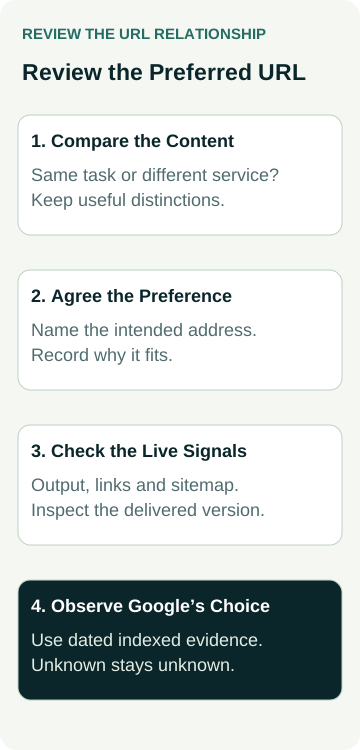
Ask for the exact URLs, what each page contains, the preferred version, the reason and a record of the live checks. Keep Google's selected canonical and its observation date alongside that record when available.
Find Out Whether the Content Is Really the Same
Open the addresses the provider has identified. Compare the main service explanation, available information and customer route. Record the final address if a URL redirects. A similar heading or shared footer does not establish that two pages are duplicates.
Extra versions can arise from site settings or functions. Google lists protocol, device and accidental variants among the reasons content may have several addresses. A campaign tracking parameter may also give a page another URL while leaving its main content unchanged. Have the technical owner confirm what your site actually does.
Google's canonicalisation explanation says some duplicate content is normal and does not violate its spam policies. Avoid assuming that every extra address means a penalty or requires deleting a useful page.
Ask what would be lost if the pages were treated as equivalent. A maintenance page might explain ongoing servicing, while a breakdown page explains urgent fault assessment. If customers need those different explanations, review their purpose before approving consolidation. Our service-page decision guide helps with that content question.
Agree the Preferred Address and Its Reason
Choose an address that leads to the intended public content and customer route. Have the website owner confirm that it works, represents the right page and fits the site's existing structure. Do not rename a stable page merely to make the address look tidier without reviewing the consequences.
Keep the nominated address in a short URL record. Include the other versions, why they exist and whether customers still need to use them. The reason might be that a campaign uses a tracking link to the same page, or an old site setting exposes an extra version.
Google's guidance on specifying a canonical URL describes redirects and canonical links as strong signals and sitemap inclusion as a weaker signal. These methods express a preference; Google still makes its own selection.
Ask the provider to explain any conflicting signals. For example, the page might nominate one address while internal links or the sitemap consistently promote another. Agree the intended version before asking the technical person to make those records consistent. A count of canonical tags does not show that their destinations are appropriate.
For a broader list review, agree which page URLs belong in the sitemap before changing its generator.
Distinguish a Canonical Link From a Redirect
A redirect sends someone opening one address to another. A canonical link can indicate a preferred representative while the current page remains available at its own address. Decide whether the alternate version has a continuing customer or operational purpose before choosing a treatment.
If an old duplicate is being discontinued, Google's canonical guidance identifies permanent redirects as an option. If both versions need to remain accessible, the provider should explain how a canonical preference fits that arrangement. Ask for the actual behaviour rather than accepting “the URLs are fixed”.
Do not use a canonical link to hide private material. It is not an access control. Equally, Google's guidance advises against using robots.txt or the URL removal tool for canonicalisation, and against using noindex to prevent selection of a canonical page within one site. Those controls answer different questions.
Have the responsible specialist review any access or index instruction against the page's intended purpose. Our blocked, crawled or unindexed guide explains the evidence needed for those separate conditions. Keep this task focused on representative URLs rather than making blanket crawl or removal changes.
Request Evidence for Each Part of the Decision
Agree what the handover will show before the work begins. An owner should be able to follow the page decision and see what was implemented without interpreting a large crawl export alone.
| Review Item | Evidence to Request | Decision It Supports |
|---|---|---|
| Content relationship | The exact versions and a comparison of their main information and customer task. | Treat them as equivalent, retain distinct pages or investigate further. |
| Preferred address | A working destination and the reason it represents the content. | Approve the intended public version. |
| Live implementation | Delivered canonical or redirect behaviour, relevant internal links and sitemap checked together. | Confirm the website expresses the agreed preference consistently. |
| Google selection | Dated indexed URL Inspection information showing the selected canonical where available. | Compare Google's recorded choice with the implemented preference. |
Google's URL Inspection documentation explains that the selected canonical is determined from indexed information. The live test cannot predict whether the tested version will be considered canonical. Ask which view was used and retain its date.
A newly corrected page and an older indexed record may describe different versions. Record that difference rather than claiming an immediate acceptance or declaring the implementation wrong from an old observation. If the selected canonical is unavailable, mark it unknown and agree the next check.
A Worked Example: Two Addresses for One Repair Page
Illustrative example: a heating business has a repair page and a campaign link that opens the same repair information.
The website owner checks the ordinary address and the campaign address. Both contain the same current repair explanation and quote route. The campaign version includes a tracking parameter; it is not a separate service offer. The provider records that relationship and nominates the ordinary public address as the preferred version.
The technical owner checks how the template supplies its canonical preference and whether the sitemap and normal internal links use the agreed address. They also check that the campaign link still serves its intended purpose. The record states what changed and what was checked on the public site.
The business also has an installation page. Its content explains a different customer task, so the owner does not approve pointing it at the repair page simply because both pages mention heating. The provider reviews its own purpose and representation separately.
At handover, the preferred repair address is confirmed in the delivered site output. Google's indexed-view selection has not yet been checked, so that field remains unknown. The next review is assigned to the SEO person. There is no assumed ranking lift, enquiry increase or search-engine acceptance in this example.
Read Search Reports With the Representative URL in Mind
An unexpected page address in a report deserves investigation before a business decision. Compare the recorded URL with the nominated and selected canonicals, and ask what the reporting source groups together. Do not assume a visible variant has no search activity solely because a different address appears in the report.
Our Search Console query-to-page worksheet explains how to keep the observed page and proposed target separate. It also discusses canonical attribution and reporting limits. Use that wider guide when connecting searches to service decisions; the URL record here explains which versions represent the same content.
Keep changes in traffic separate from completion of the URL work. A working destination and consistent signals can be verified on the site. Whether search visibility or suitable enquiries changed needs its own period, source and context. Several pages appearing for a query does not by itself establish harmful competition.
If a report suggests Google chose an unintended version, ask the provider to review the content relationship and current signals, then propose a specific next action. Avoid repeatedly changing settings just to make a report look clean.
Name Who Maintains the Preference
Ask which template, plugin or site setting controls the canonical output and who checks it when pages change. A new campaign, platform update or service-page edit can introduce another address or alter how the preference is supplied.
Keep the URL decision with an SEO change log. Record the scope, live evidence and any later Google observation separately. For a whole-site rebuild, a wider migration plan is needed; one canonical review does not replace the old-to-new page map or launch checks.
To discuss this work within your campaign, review AWE's SEO services or contact Australian Web Experts with the public addresses and the issue you have observed. Agree which pages, implementation checks and follow-up are included. A clear preference is a reviewable piece of work, while its later search and business outcomes need separate evidence.