

If Google shows a different title for your service page, record the result and compare it with the current page before changing anything. Check the destination, the page's title information, its main heading and what the business offers. Agree a correction when something is inaccurate or unclear; a difference by itself does not tell you what needs fixing.
For a small service business, the useful question is whether the wording helps the right customer understand the page. A shorter title may still describe the service accurately. An old service name or an offer you no longer provide deserves investigation.
Bring your SEO person the search wording, date, result URL and screenshot. Ask them to distinguish a website problem they can correct from a search presentation Google controls. That gives you a concrete task to approve.
Keep the website edit and search observation separate. Confirm what changed on the public page, then record what Google displays at a later check. One does not prove the other.
Identify the Part of the Result That Changed
Mark the linked title describing the individual page. The source name above it, the description below it and a Business Profile panel are different features. A cropped screenshot can make those differences hard to see, so keep enough context to identify the result and destination.
If the unexpected wording is the name identifying the whole website, use the site-name result guide for that task. Here, the concern is the title linking to one page, such as a particular repair or installation service.
Also distinguish changed words from words cut short on the screen. Google's title-link guidance explains that display width can limit how much title text appears. It also explains that Google generates title links automatically, drawing on several sources, including the page title, headings, prominent content and links.
Do not assume someone edited your website because the search wording differs. Have the reviewer inspect the current page and tell you what evidence supports that conclusion. If the destination is another website or an unexpected page on your own site, identify that before discussing a title change.
Make a Comparison Record for One Page
Start with one affected result rather than asking for a rewrite of every title. Give the reviewer enough information to reproduce the observation, while recognising that another search may look different.
Record the query as typed, observation date, device and country context. Keep the result's destination and the title wording visible in the screenshot. If you reach a different address after opening the result, note both addresses and ask why.
Then ask the reviewer to compare these items:
| Item | What to Record | Question It Helps Answer |
|---|---|---|
| Search result | Linked title, query, date and destination | What did the customer see? |
| Page title | Current public title information and page URL | What preference does the page provide? |
| Main heading | Prominent heading and relevant page content | Does the page explain one clear service? |
| Proposed correction | Exact wording, reason and affected location | What work are we approving? |
The wording saved in an editor is useful context, but ask what the published page supplies. A preview or unsaved field does not establish the current public version. If the reviewer cannot inspect an item, leave it marked as unknown rather than copying a guess into the record.
Keep the original observation when you add a later one. Otherwise, the team can lose the evidence that prompted the investigation.
Review Accuracy Before Chasing an Exact Match
Read the title and main heading alongside the service information. Do they describe the same offer? Check practical facts such as the work included, service area and any dated wording. A title should not advertise an excluded service or a broader coverage area than the business accepts.
Google recommends descriptive, concise page titles and identifies problems including missing text, outdated or inaccurate wording, repetition and an unclear main title. Its guidance also notes that a site name may be omitted from the title link when it repeats the source label already shown.
Use those points as questions for the review. Ask whether there is a specific defect on this page and what would become clearer after the proposed change. Avoid adding repeated service names and suburbs merely to make a title look more optimised.
A different but accurate result may need observation rather than an edit. Ask the reviewer to explain the customer problem before approving work. If the title is misleading, agree the correction around the genuine page purpose, without assuming the correction will force Google's exact wording.
If the page itself mixes several unrelated offers, record that as a separate content or page-structure issue. Changing one title cannot resolve unclear service information throughout the page.
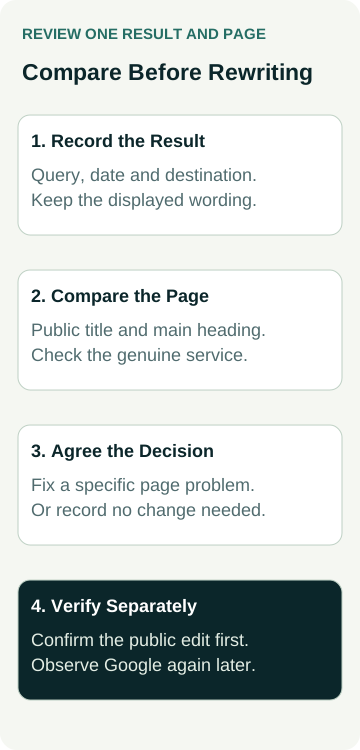
A Worked Example: Installation and Repair Wording
This example is illustrative. It does not describe an AWE client, a live search result or a measured SEO improvement.
An air-conditioning business notices a result title mentioning installation for a page it now uses to describe repairs. The owner first confirms that the result opens the intended repair page.
The reviewer finds that the main heading and service text describe repairs, while the public page title still describes the earlier installation offer. The owner confirms the repair scope and coverage. Together they approve a descriptive title reflecting that page, with a concise business name where appropriate.
The review record includes the earlier public title, exact approved replacement, affected page and reason. After implementation, the reviewer checks the public page again. That establishes the website correction; the search-result field remains pending until a later observation.
At the later check, the record states the actual query, date and displayed wording. If Google still shows something different, the team compares the new evidence with the corrected page before deciding whether another investigation is useful. They do not keep changing accurate wording simply because the result is not identical.
For a second page where the business name has merely been shortened in the result, the reviewer records that the service remains clear and no factual problem has been identified. The owner can accept an observation-only decision. Both outcomes have a reason; neither needs an invented ranking benefit.
Approve a Defined Website Change
Ask the proposal to name the page, current wording, proposed wording and reason. Confirm whether the change affects only that page's title or a shared template used elsewhere. A global title pattern can reach more pages than the example under discussion.
Have the person making the change explain which public locations they will check afterwards. If the work includes a heading, social-sharing title or page content, list those changes separately so you can assess each one. Do not assume every related field should contain identical text.
Agree who checks the business facts and who implements the approved wording. Keep a recoverable record of the earlier version. For a shared template change, ask for the affected page set and exceptions before approval, then check that the resulting scope matches the agreement.
Add the change and its evidence to the SEO work log. “Updated title” is less useful than a record showing which page changed, why it changed and what was verified. A decision to leave an accurate title alone belongs in the record too.
Recheck Search Without Promising a Deadline
Google says it must recrawl and reprocess changed sources before recognising updates. Its title-link guidance does not provide a way to manually choose an individual site's displayed title link. Treat any proposed follow-up date as your review plan, not a promise about Google's response.
At follow-up, record the actual result under the conditions you observed. If it is absent, write that down; absence in one search does not establish why. The crawl and indexing evidence guide helps distinguish those wider questions when investigation is needed.
Keep ranking, clicks and enquiries in their own fields. If you review performance, use comparable periods and relevant page/query information, and record other changes that could affect the comparison. A changed title link alone cannot tell you whether suitable enquiries or paid work improved.
Stop repeated edits when there is no new evidence of a page problem. Agree what would trigger another review, such as an inaccurate service claim, a change in the offer or a new observation that the reviewer can investigate.
Ask for an Explanation You Can Act On
Before approving title work, ask your SEO person to answer three questions: what is inaccurate or unclear, which public page information should change, and how will the change and later search result be recorded?
If the answer is “Google changed it”, ask for the comparison record. It may support a narrow correction, a broader page-content review or a decision to keep watching. Those are different tasks with different scope.
When discussing help with an Australian SEO agency, bring the affected result and page details. Agree the investigation, any implementation and follow-up evidence before work starts. The goal is clear, accurate service information and an accountable review, with search and business outcomes measured separately.