

Before approving the next round of SEO work, ask what changed, why it changed and what evidence supports the next decision. A useful change log connects a specific piece of work to its intended purpose, its live verification and a later review.
It helps you distinguish a completed task from a measured business result. A corrected service description can be confirmed on the website today. Whether that correction affected search traffic or suitable enquiries needs separate evidence.
Use the owner's SEO change-log template alongside your report. It is a decision record, not a replacement for Search Console, Analytics or your enquiry records.
Start With a Change Someone Can Point To
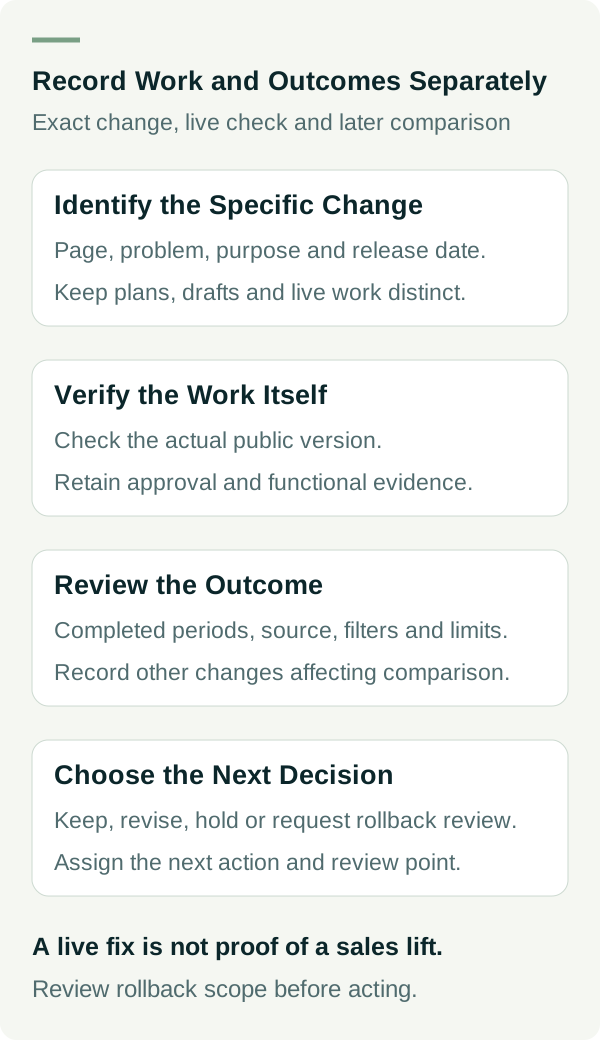
“On-page optimisation completed” is too broad to review. Ask for the page, the previous problem, the specific change and the date it went live. A useful entry might say that a service paragraph incorrectly included work the business does not offer, and that the paragraph was corrected after the owner confirmed the scope.
Keep planned work, drafts and live changes separate. A draft has not changed what a customer can read. A deployed change still needs a check that the right version appears at the public address. The evidence should make that state clear.
For a small business, one row per meaningful change is often enough. Group related edits when they share a purpose and release, but do not hide several different experiments inside “website updates”. If the page wording and the enquiry form changed together, record both and acknowledge that their effects cannot easily be separated.
Record the Reason as a Hypothesis
A hypothesis is simply what you expect the work might improve. Write it in ordinary language. For example: “Customers may be requesting the wrong service because this paragraph includes it. Correcting the description should make the offer clearer.”
That reason is more useful than “Google likes fresh content”. Google's helpful content guidance focuses on usefulness to people and cautions against changing dates or content just to appear fresh.
Some changes repair a known fault. A broken enquiry link should be fixed even if there is not enough traffic to measure a reliable lift. Record the fault, the fix and the functional check. Do not turn the repair into a claimed increase in sales without evidence.
Other changes are proposals that need more information. If someone recommends a new service page, ask which customer question it answers and whether the business offers that service. “Hold for evidence” is a valid decision when the inputs are missing.
If the next proposal includes projected traffic or enquiries, check the forecast inputs and assumptions before relying on its headline number.
Ask for Evidence at Two Different Stages
First, verify the work itself. The log should show who approved it, what was checked and where the live result can be reviewed. Evidence may include a dated public-page capture, a relevant before-and-after extract and the result of a controlled functional check. Keep a rollback reference with the website person where appropriate.
Then, review the outcome under an agreed comparison. Record the reporting periods, source, filters and limitations. Search clicks, website sessions, contact actions, accepted enquiries and won jobs answer different questions. A movement in one does not establish a movement in the others.
Google's traffic debugging guidance discusses factors such as seasonality, changing demand and technical issues. Although that guide addresses drops, it is a useful reminder that traffic can change for reasons outside a single edit. A chart moving after your release does not by itself prove the edit caused it.
Avoid deciding from an unfinished reporting period. Note any tracking changes, promotions, availability changes or other website releases that could affect the comparison. If several things changed together, write that limitation directly rather than assigning the entire result to one task.
Use the Log to Make a Decision
At review time, choose a next action that follows from the evidence:
| Decision | When it makes sense | What to record |
|---|---|---|
| Keep | The change is accurate and works as intended. | Functional evidence and any outcome evidence separately. |
| Revise | A specific remaining problem has been found. | The problem, proposed correction and responsible person. |
| Hold | The comparison is incomplete or the next proposal lacks evidence. | Missing input and when it can be reviewed. |
| Request rollback review | The release introduced a fault or an inappropriate claim. | Exact issue, urgency and website owner's rollback assessment. |
The owner does not need to manipulate code or analytics settings to make that decision. Ask the responsible person for the evidence and record the decision. A rollback can affect other recent work, so have the website owner review its scope before acting.
An Example Entry Without a Made-Up Result
Imagine an example fence business whose service page says it installs gates, although the owner confirms it only repairs fences. The log records the inaccurate phrase, the approved correction and a public-page check showing the new wording. The hypothesis is that the correction will reduce confusion about the offer.
At the first review, the page is correct, but the business has too few enquiry records to assess a change in unsuitable requests. The decision is to keep the accurate wording and continue recording request types. The outcome field says “Not enough evidence to assess enquiry effect”.
That is a useful result: the known error was fixed, and the limits are clear. It would be misleading to write “SEO improved lead quality” just because the paragraph changed. The worked example sheet shows how to keep those statements apart.
Keep Sensitive Material Out of the Shared Log
Use a change ID and evidence reference rather than customer names, phone numbers or private enquiry text. Keep account access details and credentials in the appropriate secure system. If evidence contains private information, share a redacted extract with the people who need it.
The accompanying worksheet instructions explain the fields and decisions. The template has no macros or account connections. It documents work; it does not approve changes automatically.
Put Three Questions Into the Next Review
Ask: what is live, what was learned and what should happen next? If the answer to the second question is uncertain, ask what evidence would resolve it. The next month's plan should address an identified need, with a person responsible and a sensible review point.
You can add the log to a monthly SEO report without copying every dashboard number into it. Keep the report for performance context and the log for the work and decisions behind it.
Need help reviewing what changed on your website and what the next step should be? Talk to Matt about your SEO work.