
If Google shows an unexpected name above a result for your website, first identify the exact part that looks wrong. The site name, page title, displayed address and Business Profile details need different checks. A website edit and a changed Google result are separate things to verify.
Bring your SEO or website person the search wording, result URL, date and a marked screenshot. Agree the genuine name the site should use before changing settings. That gives them a specific problem to investigate instead of an instruction to replace every title or rename the business.
This guide concerns the site name identifying a website in an ordinary Google web result. If the problem is on a Maps or Business Profile card, an advertisement or a page you do not control, identify that separately before choosing the work.
Record what Google displayed, the approved site identity and the exact proposed change. Confirm the public website implementation first; keep the later search observation in its own field.
Identify the Label That Looks Wrong
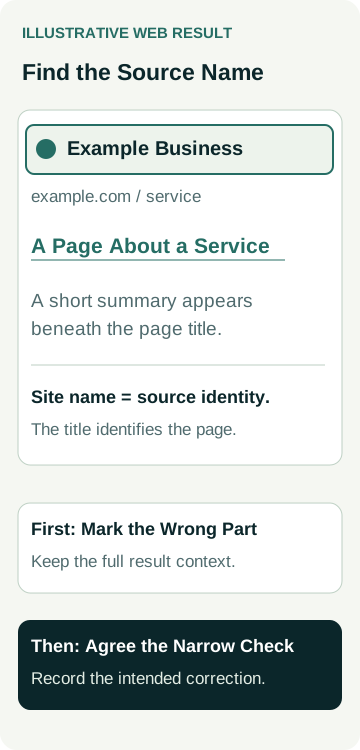
Google's site-name guidance distinguishes the name of a site from a title link describing an individual page. A site can have many useful service pages while keeping one recognisable source identity.
If the linked page title is the issue, compare the result with that page's public title and heading before approving an edit.
Look at the whole result rather than cropping away its context. Mark the unexpected wording and note whether the destination is your actual website. If a link leads to another business, that is a different issue from your own site appearing under an unexpected label.
Use these questions to describe the observation:
| Part of the Result | What to Record | Review to Request |
|---|---|---|
| Site name | The source label above the page result, plus the domain it accompanies. | Check the site's identity preference and relevant homepage information. |
| Title link | The linked page heading shown in that particular result. | Compare it with the page purpose and title information. |
| Displayed address | The address or path shown, and the destination after opening the result. | Investigate the actual URL and any redirect rather than assuming a naming problem. |
| Business Profile card | The particular profile and the incorrect field. | A separate review of that listing; do not assume a website tag controls it. |
Google's title-link documentation explains that title links are generated from several sources. A changed page-title field is therefore not proof that the displayed link title has changed. Keep a description or snippet question separate too; this article does not provide a new writing worksheet for those fields.
Agree the Genuine Site Identity
Ask the person responsible for the business to confirm the current public name and any genuinely used shorter form. Record the approved spelling and the website it belongs to. If you are uncertain which name is authorised, resolve that business question before asking a developer to choose one.
A correction is different from a rebrand. A rebrand can affect the website, listings, customer communication and other records. Do not treat that wider decision as a small metadata fix. Describe the actual scope and obtain the appropriate approval for it.
Google recommends a concise, recognised and non-misleading site name, used consistently on the homepage. That supports checking your real identity; it does not justify replacing the business name with a string of services and suburbs to chase visibility.
If the name is already correct on the site, retain that observation. The provider still needs to inspect how it is supplied and what Google displayed. An unexpected result alone does not establish that someone entered the wrong name in the website editor.
Review the Homepage Information as One Task
Google identifies homepage WebSite structured data as the most important way to state a site-name preference, alongside other homepage signals. Ask the website person to review the delivered information together and flag contradictions with the approved name.
Find out which template, plugin or setting controls the relevant output. Agree who will correct it, what will be retained and how the final public version will be checked. Adding another plugin without reviewing existing output can leave the underlying question unresolved.
The site-name feature applies at domain or subdomain level, not individual subdirectories. Ask which site the proposed preference describes before accepting a plan to give every service folder a separate site name.
Our schema buying guide helps define a technical deliverable and its checks. The narrower task here is the site's source identity. Do not add unrelated markup or rewrite all service-page content without an identified reason and agreed scope.
Also ask whether a recent website move, old homepage or unintended destination is relevant. If several addresses serve the same information, the technical owner should establish their relationship. Keep that URL investigation distinct from deciding what the site is called.
Ask for Evidence That Fits the Feature
Have the provider record the approved preference, affected homepage and exact implementation. Request the public-page check and the result of an appropriate syntax check, with any issues explained. You should be able to see what was changed and why.
The Rich Results Test does not support site names. Google's site-name documentation instead discusses syntax validation and homepage access checks. A successful test for another structured-data feature does not establish that this naming task is complete.
Agree who will check the public homepage and any relevant variants. Do not broaden access settings or remove intentional restrictions merely to obtain a passing screenshot. A specific access issue belongs with the website owner and needs its own explanation.
Our blocked, crawled or unindexed guide explains why a browser view, a diagnostic test and Google's recorded information answer different questions. Use those distinctions when the provider reports a check; avoid turning current access into an assertion that Google has processed the correction.
A Worked Example: An Old Name Above a Service Result
Illustrative example: a window-repair business sees an old trading label above a Google result for its current repair page.
The owner records the query, date, result address and unexpected source label. The linked page title accurately describes window repairs, and the link opens the intended business website. That evidence supports investigating the source name rather than rewriting the repair title by default.
The owner confirms the approved current site name. The website person finds an old name in the homepage's configured output and checks where that information is controlled. They propose a narrow correction, identify the affected homepage information and explain how it will be verified after the authorised update.
At handover, the public-page record shows the approved preference in the delivered version. The Google result has not yet been observed again, so the search-outcome field remains “not observed”. The owner accepts the completed implementation within its scope and assigns a later observation to the SEO person.
If the later result still uses the old name, the next step is a review of the evidence and current guidance. It is not proof that the owner approved a different business name or that every service-page title should change. No actual client, website correction, ranking improvement or enquiry increase is claimed in this example.
Observe Search Separately After the Change
Google selects site names automatically and may use a different name from your preference. Record the actual display after an update instead of filling the observation field with the wording you wanted to see.
For a useful comparison, retain the query, date, device context, result destination and displayed name. Note if you are observing a different page from the original example. One result is a bounded observation; it is not evidence about every searcher or every page from the site.
Where appropriate, the authorised Search Console user can consider a recrawl request. Google's recrawl guidance says a request does not guarantee immediate inclusion, or inclusion at all. Repeated requests for the same URL do not make crawling faster.
Agree a sensible follow-up with the provider and record what remains unknown. Do not accept an exact-day correction guarantee from a tool screenshot. If your preferred name remains unselected, ask for a specific review against the current site-name guidance rather than an open-ended sequence of website changes.
Keep the Correction and Its Outcome in the Review
Put the approved identity, implementation evidence and later observation into an SEO change log. Name the person responsible for each next check. Keep an unresolved result visible instead of marking the entire issue fixed when only the website work has been completed.
A correct source label can help people recognise the site, but this guide supplies no measured effect on visits, suitable enquiries or paid work. Review those outcomes separately if you have valid records and comparable periods. Do not attribute a traffic change to this correction solely because it happened afterwards.
To discuss the issue within your search work, review AWE's SEO services or contact Australian Web Experts with the public result example and the name your business has approved. Agree the investigation, implementation and follow-up scope before assuming a particular correction or ongoing review is included.