
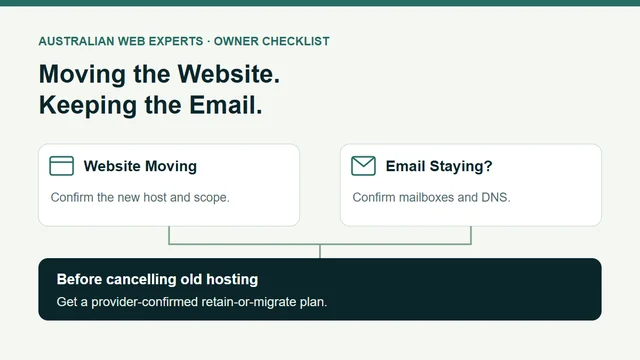
Before moving your business website, confirm where your email is hosted, who manages your DNS and what the old hosting account contains. A website can move while email stays with its current provider, provided the services and settings email depends on remain in place.
The trouble starts when “move the website” also means changing nameservers or cancelling an account that holds the mailboxes. A working new homepage does not establish that email, stored messages or website enquiries still work.
Use the email dependency worksheet to record the services, owners and checks before agreeing to a change. It is a planning sheet for your provider to confirm, rather than a set of DNS values to paste into an account.
Identify the Services Behind Your Domain
Ask your current provider to identify these separately:
- Domain registration: the account that manages registration and renewal of your business domain.
- DNS hosting: the service holding the records that direct traffic for that domain. Nameservers identify the DNS service responsible for answering those lookups.
- Website hosting: the service running your website.
- Email hosting: the service holding your mailboxes and handling your business email.
- Other senders: tools sending mail using your domain, such as a website form or invoicing system.
One company may supply several of these. Separate invoices do not prove that the technical dependencies are separate, and a single invoice does not tell you which components can be retained.
Google's DNS terminology guide explains the record types. Website records and mail records perform different jobs. Write down the provider and accountable contact for each service; keep passwords and recovery codes out of the worksheet.
Establish What Is Changing
Ask the person moving the site to give you a short written scope. Which account or records will change? Which services will remain? Who is checking email afterwards?
| Proposed change | What needs confirming | Decision before proceeding |
|---|---|---|
| Website moves; current DNS and email stay | Website record changes leave mail records and required mail-related hostnames intact | Agree the specific website changes and email checks |
| Nameservers change; email stays | New DNS service contains the complete required records, including email dependencies | Have the provider compare the old and new DNS configuration first |
| Website and mailboxes share the old hosting account | Whether email and DNS can remain independently, or need a separate migration | Obtain an explicit retain-or-migrate plan before cancellation |
| Email provider also changes | Mailboxes, addresses, aliases, stored data and device settings have their own migration scope | Treat email as a separate work item with its own acceptance checks |
This table helps you ask the right questions. It cannot determine the correct changes for an unseen account.
Preserve the Mail Records the Provider Requires
MX records direct incoming email towards the configured mail servers. Google's Workspace MX guidance illustrates that relationship. An MX lookup is useful evidence about the configured destination; it does not establish who pays for the service, which messages are stored there or whether all required settings are correct.
Email also uses authentication records. Cloudflare's email DNS guide describes SPF, DKIM and DMARC and says the required values depend on the email provider. Ask the provider to confirm the records required for your actual sending services, including any relevant mail hostnames or service-discovery records. Avoid replacing them with a generic example from another business.
If nameservers are changing, compare the existing configuration with the new one before switching. Cloudflare's nameserver setup guidance warns that an automatic record scan may miss records. A successful import is a starting point for review.
Give one person responsibility for the DNS change and email verification. Keep the approved scope, previous configuration and recovery plan available to that person. Coordinate any nameserver or DNSSEC work with the provider rather than adding it casually to a website-only move.
Check Whether Old Hosting Still Holds Something You Need
For an example electrical business, the website is moving to a new host while the team keeps its existing email addresses. There are two possible plans:
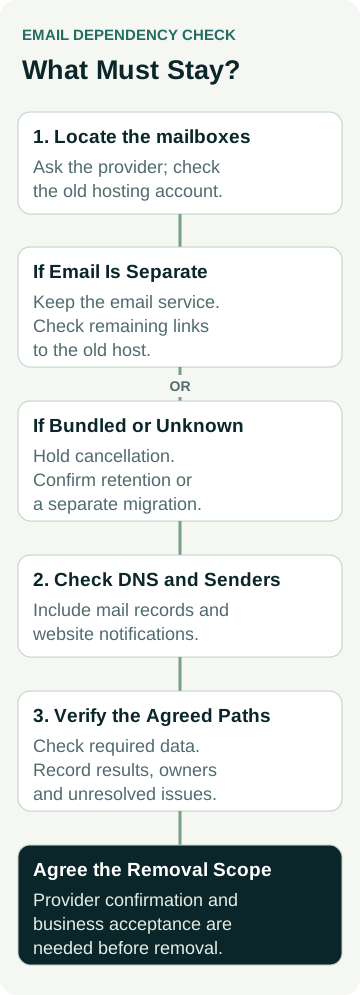
- Its mailboxes are with a separate email provider. The old web host still needs checking for DNS hosting and website sending dependencies before cancellation.
- Its mailboxes are inside the old website hosting account. The business needs confirmation that they can be retained, or a completed email migration before that account is removed.
Neither plan can be chosen from the email address alone. Ask the provider to confirm the mailbox location and the exact services a cancellation would remove.
Changing DNS does not copy old messages into a new mailbox. If email is moving too, agree which messages, folders and other data must be transferred, and how completion will be checked. Google's data migration overview describes a separate import process for supported source accounts. Your provider should define the process for your accounts.
The worked example worksheet shows how the example business records a hold on cancellation while a bundled mailbox dependency remains unresolved. It is a planning example, with no real customer data or measured outcome.
Include Website Enquiries in the Email Check
The site may use an email account or sending service to deliver form notifications. Ask the website owner which sender it uses, where notifications go and whether any old-host account is required. A form showing “thank you” is only one part of that path.
Use the change acceptance sheet to agree checks with your provider:
- Confirm incoming and outgoing mail using an agreed external address, then check the reply path.
- Check the mailboxes, aliases or shared addresses the business relies on, including any forwarding arrangements.
- Check access on the devices staff use and access to the stored messages that must be retained.
- With the business owner's approval, make one clearly labelled website-form test and confirm its notification reaches the intended inbox. Check any enquiry record the form is meant to create.
- Have the provider confirm the relevant DNS and authentication configuration, and record unresolved issues.
Record what was checked, by whom and when. These checks cover the agreed paths; one successful message cannot prove delivery to every recipient or guarantee future uptime. Handle test messages through the normal support process so they are not mistaken for customer work.
Agree Cancellation Only After the Dependencies Are Clear
Before closing the old service, get a written record of what stays, what moves and what can be removed. Resolve any remaining mailbox, DNS or website-sender dependency, check the agreed data transfer where needed, and have the business owner accept the result. Agree the retention and recovery arrangements with the provider rather than assuming a standard waiting period.
If you are planning a move, review our hosting and maintenance service and talk to Matt about the current setup and proposed change. Bring the domain name, provider names and a summary of what needs to stay. Confirm the scope before authorising changes; send account access through the agreed secure process.