

When an SEO audit flags an orphan page, ask which URL it found, where it found it and which internal links it checked. Then review the current page and its intended audience before approving a change. A useful service page may need a better route from relevant content; an old or intentionally separate page needs a different decision.
An orphan-page warning concerns incoming links from your own website. Ask the provider to explain exactly what that label means in their report. Keep the report's finding separate from a claim that nobody can reach the page, that Google has never discovered it or that the page should be deleted.
For a small business owner, the useful deliverable is a clear record: the reported address, the evidence behind the warning, the page's purpose and the route or other action you agree. The aim is to help suitable visitors reach useful information.
Check the warning before adding links. Confirm the current address and the audit's coverage, then decide what role the page should have on the website.
Ask How the Audit Found the Page
Start with the exact reported URL and the report date. Ask whether the address came from the website crawl, a sitemap, an imported list or another source. Also ask which part of the website the audit examined when looking for incoming links.
Have the provider explain relevant limits, such as excluded sections, the starting address and how the scan handled content that appears after scripts run. These are questions about the particular audit, not assumptions that every tool behaves the same way.
If the report compares several sources, ask what each one contributes. Finding an address in a list and finding a link to it on a current public page are different observations. Keep that distinction in the explanation rather than accepting a total headed “orphan pages” without examples.
Record whether the report concerns all incoming internal links, only certain link types or another condition defined by that tool. If the provider cannot establish the scope, leave the conclusion open while they investigate. Do not turn an uncertain scan into a confident instruction to alter the whole site.
Check the Current Address and Existing Routes
Open the reported address and ask the reviewer to record its current response and final destination. A live page, a redirect and a not-found response raise different questions. An older audit may also describe a version that has since changed.
If a visible link already seems to lead there, identify its source page and location. Ask the technical person to compare the link's actual destination with the reported address, including any redirect or URL variant. Two similar-looking addresses are not enough to settle whether the report and the link refer to the same version.
The canonical URL guide explains how to review equivalent addresses and the preferred version. Keep that decision visible when comparing an audit's URL list with the site's links.
Also ask whether something that looks like a link is implemented as one a search engine can follow. Google's link guidance explains that links generally need an anchor element with a usable destination address for reliable crawling. Script-driven controls need the technical person's attention; appearance alone does not establish the link's behaviour.
Have the provider distinguish an actual missing link from a report limitation or a link implementation problem. Those findings can require different work, even when they originally appeared under the same warning.
Confirm Who the Page Still Helps
Read the page as a customer. Does it describe a current service, answer a relevant question or support an existing customer task? Ask the business person responsible for the offer to confirm that the information remains accurate.
For an important public page, identify where a visitor would reasonably expect to find it. That may be a service overview, a related explanation or a relevant navigation section. It should make sense within the surrounding content rather than appear as an unexplained extra link.
Other pages may have a narrower purpose, such as an approved campaign route or information supplied to a particular audience. Ask the owner to explain that purpose and the intended access and search treatment before making the page part of general navigation. Lack of a normal navigation link is not a privacy control.
If the page promotes work the business no longer offers, review the service change first. The service-retirement guide covers the old offer, customer message and address decision. Adding a new link to outdated sales information can create a new customer problem.
Keep uncertain pages in review. Do not choose deletion, redirection or wider promotion solely to clear an audit label. Each action needs a reason tied to the actual content and its intended use.
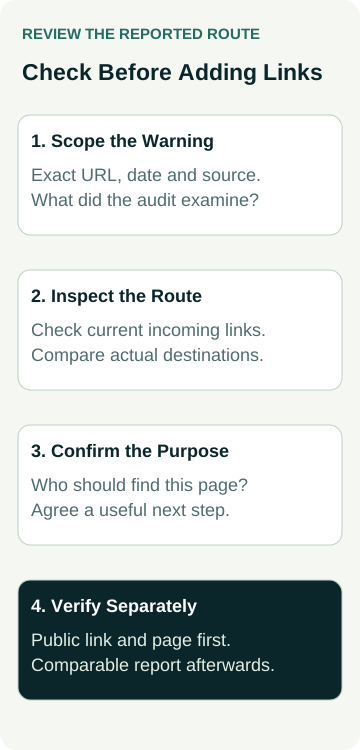
A Worked Example: A Pool-Maintenance Service Route
This example is illustrative. It does not describe an AWE client, an actual audit or a tested repair.
A pool-service business receives a report flagging its maintenance page as orphaned. The owner confirms that maintenance is a current service and that customers need its separate explanation of the work and enquiry process.
The provider first records the report date, exact address, discovery source and crawl coverage. On the public services overview, a maintenance card looks as though it should provide a route to the page. The technical reviewer checks the control and its destination instead of assuming a new footer link is needed.
In this example, the visible card uses a script-only action without the ordinary link destination the reviewer expects. The proposed correction is to make that existing, relevant route work as an appropriate link, using wording that identifies the maintenance service. The owner approves the scope and the technical person records the implementation and checks.
The evidence record separates four questions:
| Review Item | Evidence to Request | Decision It Supports |
|---|---|---|
| Audit coverage | Report date, discovery source and included sections | Whether the warning has enough context |
| Existing route | Source page, control and actual destination | Missing link or implementation/report issue |
| Page purpose | Current offer and intended customer task | Whether wider discovery is appropriate |
| Revised route | Public source and destination checks, then a comparable report | Whether the agreed correction was delivered |
After the change, the reviewer follows the route from the services overview and checks the public link and destination. A comparable audit is then recorded separately. A cleared warning would describe that report's result; it would not establish indexing, improved rankings or more enquiries.
The example shows why checking an existing route can be more useful than adding unrelated links. Your actual finding may instead be a genuinely missing route, a different address or a page that needs another decision.
Choose Links That Explain the Next Page
If a useful page genuinely lacks an incoming route, ask for proposed source pages and exact placements. Read each link in context. Would a customer at that point want the destination, and does the destination fulfil the expectation created by the wording?
Google recommends descriptive, concise and relevant link text, with surrounding context that helps the reader. Its guidance also says that pages you care about should have a link from another page on the site. It does not prescribe a universal ideal number of links on each page.
Use that guidance to assess the proposal rather than requesting a fixed link count. A useful link from a relevant service overview may serve a different purpose from a navigation change across the whole site. Ask the provider to explain the reach of each proposed edit.
Avoid forcing service keywords into unrelated paragraphs or placing every flagged page in a large footer list. Keep the destination and wording accurate, and check that the source page remains easy to read. If a navigation pattern changes, include its affected locations in the implementation scope.
Verify the Route and the Report Separately
Ask for a public-site check showing the source page, link location, actual destination and final page. Record the date, tested environment and any limitation. If the link appears through an interactive section, include that state in the check.
Then ask for a fresh audit comparison using an explained scope. If the warning remains, investigate what the new report can and cannot see before repeating edits. If the scan configuration changed, retain that detail so a lower count is not presented as proof of a website repair.
Discovery through an internal link, Google's recorded crawl and indexing are separate matters. Use the crawl and indexing evidence guide if the page's search state also needs investigation. A successful click does not establish that Google has processed the changed route.
Keep business outcomes separate too. If the page later receives suitable enquiries, assess those using attributable records and comparable periods. The audit label alone cannot explain a change in rankings, traffic, accepted jobs or revenue.
Agree the Scope Before Approving the Repair
Ask the proposal to identify the reported pages, verified findings, purpose decisions and exact changes. Distinguish missing-route work from URL consolidation, service retirement or broader navigation changes so each part can be assessed and checked.
Name who approves the business facts, who makes the website changes and who reviews the result. Keep the earlier report and public-page observations alongside the later checks. That gives the next person enough context to understand why a route was added, repaired or left unchanged.
When discussing work with an Australian SEO agency, bring a few reported URLs and ask for this explanation before accepting a large clean-up. Start with what the report actually established, then agree a useful customer route and evidence that matches the work.