

Before approving work based on a low PageSpeed Insights score, ask for the tested URL, test conditions and evidence behind the proposed repair. A screenshot of a number leaves out information you need to judge the recommendation. Keep the lab test, real-user history and business outcome separate when agreeing what happens next.
For an Australian service business, the useful question is specific: what problem was observed on a page customers use, what change is proposed, and how will you check it? You can ask those questions without becoming a developer or commissioning a complete website rebuild.
Ask for a report you can identify and a repair you can verify. A better score alone does not establish that more suitable customers enquired or more jobs were won.
Start With the Page and the Run
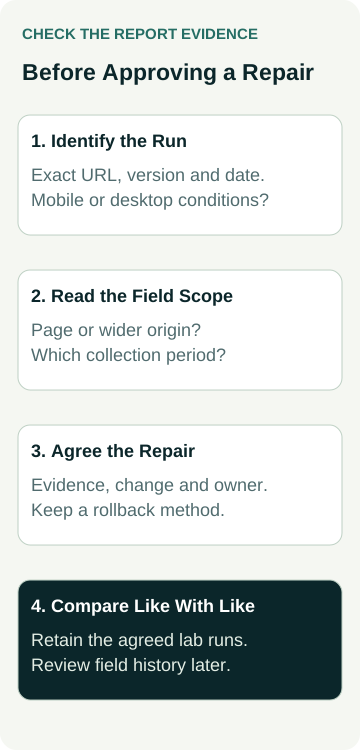
Ask the provider to share the report link or saved report, the complete tested address, the observation date and whether the result is for mobile or desktop. Check that the address belongs to the current public page. A homepage test is evidence about that test; it is not a measurement of every service page.
Also record which page version was tested. A result captured before an image replacement or layout change may describe an older version. If a redirect led to another address, identify the final page before discussing the fix. Keep the original report alongside any later comparison so the basis for the recommendation remains visible.
Ask which tool and settings produced the finding. “Mobile” is a test mode, not a description of every Australian customer's phone and connection. If someone ran Lighthouse locally rather than sharing a PageSpeed Insights report, record that distinction and the conditions they used. You need a like-for-like baseline before judging a claimed improvement.
Avoid converting a single screenshot into a site-wide diagnosis. If several important pages need investigation, agree the pages and why they were chosen. The scope might include a key service page and a contact route, but the actual selection should follow your website and customer needs.
Separate the Lab Test From Real-User History
Google's PageSpeed Insights documentation distinguishes lab data from field data. A lab test observes a page under controlled conditions. Field data describes experiences collected from real users. They answer different questions, and the results can differ without either being a complete account of your customers.
A lab result can help a developer investigate a loading problem and compare a proposed change. It does not reproduce every visitor's device, connection, location or actions. The performance score from that run should not be treated as the same result as the field-data Core Web Vitals assessment.
The web.dev explanation of lab and field differences describes why controlled tests and real-user distributions can disagree. Ask the provider to explain the particular discrepancy in your report rather than assuming that whichever result looks worse must be the right one.
For example, a mobile lab finding and a desktop lab finding are not interchangeable baselines. Nor does a good field assessment make every lab diagnostic irrelevant. A provider should connect a recommendation to an observed issue and explain what the chosen evidence can establish.
Check the Field-Data Scope and Period
PageSpeed Insights uses Chrome User Experience Report field data covering a previous 28-day collection period. Read the displayed scope and period with the result. This is historical evidence, rather than an instant reading of the page immediately after a change.
Google explains that when there is insufficient data for an individual URL, PageSpeed Insights can show origin-level data. An origin covers a wider set of pages on the same scheme, host and port. Ask whether the displayed assessment is for the specific page or that wider origin before accepting it as evidence about a service page.
If neither scope has enough data, the report may have no field data to show. Record that as unavailable. Missing field data does not demonstrate that the page is fast, slow, passing or failing. It also does not justify inventing a result from the lab score.
Save the displayed period and scope with the baseline. After a repair, a rolling field window can still include experiences from before the change. Agree when the provider will review it again, what period will be compared and how any scope change will be handled. Do not treat a scheduled review as a promise that the result will pass.
Use a Short Evidence Record
The following record helps you commission a defined investigation or repair. It is a set of questions for your provider, rather than a finding that your website has a performance problem.
| Part of the Report | Evidence to Keep | What It Can Establish |
|---|---|---|
| Tested page | Complete URL, final destination, date and page version | Which page the observation concerns |
| Lab run | Tool, mobile or desktop mode, conditions and relevant diagnostics | What happened in that controlled test |
| Field view | URL or origin scope, displayed collection period and available assessment | Which historical user evidence is being shown |
| Proposed repair | Observed issue, change, owner, rollback and agreed retest | The work being approved and how it will be checked |
Keep the report and the provider's explanation together. If the explanation changes after another test, retain both and record why the recommendation changed. A clear revision is more useful than replacing the original screenshot with a better-looking one.
You do not need to approve every diagnostic in a report at once. Ask which finding supports the proposed first change and why that change is suitable for the page. If the cause remains uncertain, agree an investigation scope before treating a suggested fix as established.
A Worked Example: An Electrician's Service Page
Illustrative example only: this is not an AWE client audit, measured result or completed repair.
An electrician receives a proposal headed “poor mobile speed”. The screenshot shows a low lab performance score. The accompanying field assessment is for the origin, while the work is proposed for one electrical-installation service page. The desktop result was captured on a different day.
The owner asks for the exact service-page URL, the mobile report and its date. The provider identifies an image-related diagnostic and proposes replacing the service-page hero image with an appropriately prepared version. That is a narrower proposal than removing images across the entire website or replacing the hosting on the strength of the screenshot.
Before work starts, they agree the image involved, the intended appearance, who will make the change and how the previous version can be restored. They save the baseline report and specify the mobile lab conditions for the comparison. The provider will retain the results of the agreed runs, including an explanation if they vary.
After the approved change, they check that the image still shows the work clearly, the service information remains readable and the contact route remains usable. They compare the relevant lab evidence under matching conditions. The origin-level field assessment remains a separate historical observation, with a later review date and its actual collection window recorded.
The example ends with a documented change and checks. It does not assume a particular score gain, a field-data pass, higher rankings or additional electrical jobs.
Agree the Repair and the Acceptance Check
Ask for a plain-language explanation of the proposed change and the evidence linking it to the observed issue. Include the affected page or component, who owns implementation, any dependencies and a rollback method. Confirm whether the quote covers investigation, implementation, verification or a combination of them.
Define acceptance before the work. That might involve comparing the relevant loading diagnostic in matched lab runs and checking that the changed component still works. Keep the results of the agreed runs rather than selecting only the best score. Record material differences in conditions or page versions so a comparison does not imply more than it shows.
Check useful customer tasks as well. A lighter page still needs to communicate the service and offer an appropriate next step. Use the separate mobile enquiry-path check to define a service-to-contact journey. Agree any real form submission or other external action before including it in the test.
If someone proposes removing a feature, ask what purpose it serves and how that purpose will be preserved. The decision depends on the actual feature and evidence. There is no universal instruction here to remove chat, maps, video, reviews or useful service information.
Keep the Technical Result and Business Result Separate
A completed repair can have several distinct records: the public change, the comparable lab result, a later field-data review and any valid business measurement. Record each at the point it can actually be observed. Do not label a repair successful solely because an invoice was paid or a screenshot changed colour.
If you also want to assess enquiries, agree the relevant pages, measurement period and what counts as a suitable enquiry. Sales records are needed to connect accepted jobs or paid revenue to that activity. A lab score supplies none of those business results by itself.
Our technical SEO guide provides broader context for website maintenance. For a specific performance recommendation, bring the report and evidence record when discussing SEO support for your business. Agree the investigation, repair and verification scope for the actual website before authorising changes.