
Choose one real customer task and follow it on a phone: find the right service, assess whether it fits, then reach the appropriate contact option. Record what you actually observe, the device and the page. “Mobile friendly” on a report does not tell you whether this particular journey worked.
This is a repeatable check for an existing website, useful after a content or layout change. It does not replace a complete launch review, accessibility audit or measurement of customer behaviour.
Start With a Specific Customer Task
Write the task before opening the site. For example: “A homeowner wants to know whether this business handles a complete bathroom renovation in their area, then find how to ask about the project.”
Use the business's actual service and coverage in your own task. Do not turn an excluded repair job into a test of a service the business does not offer.
Choose a starting page someone could reasonably land on, such as a service page or homepage. Record the URL, phone/browser, orientation and date. Note relevant conditions such as an overlay, consent choice or connection problem. These are test conditions, not results to generalise to every visitor.
Follow the Journey Before Fixing It
Read the service information, check suitability and look for the next step. Can you find the actual coverage and important exclusions? Does a project photo or process explanation help you assess the work? Is the contact route clear without guessing what an unlabeled icon means?
If customers need to visit, check the map destination and visiting instructions as a separate task.
Record an obstacle before changing it. A useful finding names the page, the action attempted and what happened. “Contact button covered by the sticky banner on this phone” is more actionable than “mobile needs work”.
Before adding a persistent strip, agree the mobile contact bar’s display and overlap rules.
Avoid relying on a desktop preview alone. It can help reproduce a layout problem, but a phone check can reveal different interaction and input behaviour. Record which you used.
Check the Contact Route You Agreed to Test
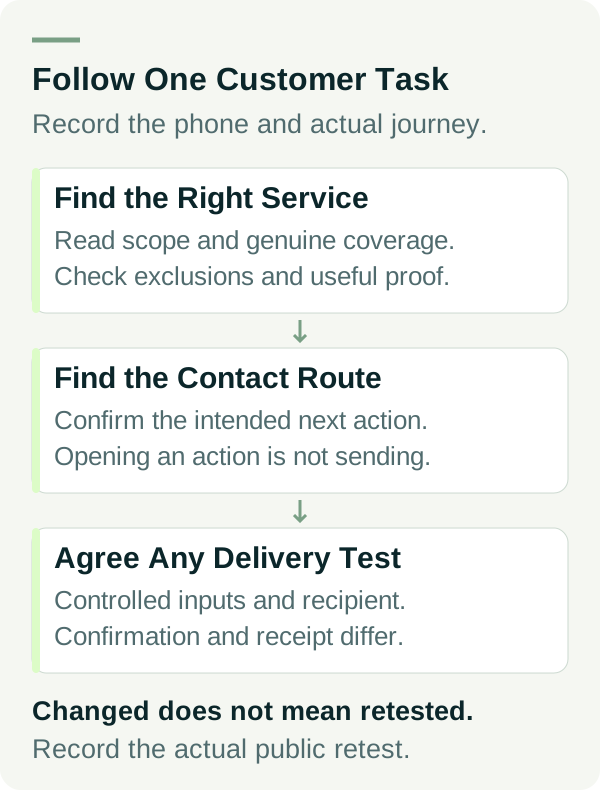
Tapping a phone link should open the intended dialling action. Check the number and stop before placing a call unless a call test has been agreed. Opening an email composer is not proof that a message was sent or received; do not send a test without agreement.
For a form, read the labels and instructions. W3C's labeling guidance explains how controls need associated labels. Its validation guidance describes identifying errors and helping a user correct them. A short visual check is not a finding of complete accessibility conformance.
Use a preview/test mode or an agreed flow when checking errors. Only submit when the owner has agreed the test, inputs, recipient and cleanup. Skip booking, payment or other actions that could create a real commitment unless that exact test is authorised.
A form confirmation and receipt in the agreed inbox are separate checks. Use controlled test details, retain no customer records in the worksheet and verify the intended delivery if submission is in scope. If delivery cannot be checked, record it as not tested.
Use the Mobile Journey Worksheet
The mobile enquiry-path worksheet starts with not-tested steps. The worked defect record shows how to report a problem without inventing a completed retest.
| Step | Evidence to record |
|---|---|
| Find the service | Starting URL and the route actually used |
| Assess fit | Scope, coverage, exclusions and useful proof found or missing |
| Find contact | Visible wording and what action it suggests |
| Open phone/email action | Correct destination; whether you stopped before sending or calling |
| Use the agreed form flow | Labels, input/error behaviour and authorisation scope |
| Confirm the next step | What the page says after the agreed action |
| Verify delivery if authorised | Agreed recipient's receipt evidence, or not tested |
| Retest a change | Same task/conditions where practical, date and actual result |
Use clear states: not tested, passed within this scope, issue observed, blocked or needs retest. “Fixed in the editor” is a change report; it is not a successful public retest.
An Example Defect and Retest Record
This example is invented. No actual business, customer action or test result is being reported.
On an example phone check, a sticky enquiry banner covers the last line of the service exclusions. The owner records the page and screenshot, then asks the website specialist to adjust the layout.
The record remains needs retest after the proposed change. The same service-fit task must be repeated on the relevant public version. A passing check would show the text accessible under the recorded conditions, rather than simply confirming that a CSS value changed.
A separate delivery row stays not tested because no form submission was agreed. That does not prevent reporting the layout issue accurately.
Repeat the Useful Task After Relevant Changes
Keep the task and observation record so another person can repeat it. Review it after a service-content edit, a new contact form, a navigation change or a change to an overlay used in the journey.
If a performance report prompts the change, agree comparable speed evidence as a separate check.
W3C's target-size guidance discusses pointer target size and spacing, with exceptions. Use it as a technical reference for the website specialist; do not turn a quick tap test into a blanket compliance claim.
Prioritise obstacles to understanding the service or contacting the business. Track the public retest separately from sessions, qualified enquiries and won work. A working path is useful evidence about that task; it does not establish a conversion uplift.
If you are agreeing the scope of a new build, our web designer quote questions cover what testing to ask for before buying. For an existing enquiry-path problem, talk to Matt with the page, task and what you observed.