

Start with the services you want enquiries for, then use Search Console to see which reported searches bring up which pages. Match each relevant query to a page that answers the customer's need. A query with plenty of impressions can still be a poor fit for your business.
This is a page-planning exercise for an owner and their SEO provider. It helps you decide whether to improve an existing service page, answer a useful customer question or leave an unrelated search alone.
Use the query-to-page worksheet alongside the steps below. The worked example shows the decisions without inventing search volumes or rankings.
Write Down What You Actually Sell
Before opening a report, list your offered services, the areas you genuinely cover and any work you exclude. Add practical limits such as residential work only, minimum project size or a service you have stopped providing.
For example, a business that renovates whole bathrooms may not want enquiries for replacing a single tap. Both searches contain bathroom-related words, but they describe different jobs.
Next, list the pages that currently explain those services. Record the actual page address and what the customer can do there: ask for a quote, book an inspection or learn whether the service suits them.
This gives you a business test for every query: would an enquiry for this need be useful, and can we fulfil it? If the answer is no, more visibility for that search is not a sensible goal.
Set a Clear Reporting Window
In Search Console, open the Search results performance report for the correct property. Record the date range, search type, country, device setting and any other filters before exporting anything.
For a business serving Australian customers, an Australia filter can make this review more relevant. The country dimension concerns the searcher's location; it does not prove that the customer is inside your service area. Keep your own service-area check separate.
For this query-to-page review, choose Web: text-based. Web: multimodal does not provide text query rows, so review that traffic separately. Use the same search type and filters in both periods, and keep any separate AI performance report distinct.
Use a recent completed period with enough observations to review. A month may be convenient, but a quiet business may need a longer window. Label recent or preliminary data and avoid comparing an unfinished week with a complete month. Standard Search Console date groupings use Pacific Time; its 24-hour view uses the browser's local time. Record the reporting basis rather than assuming it matches your local calendar.
Google's performance report guide explains the measures and setup. Clicks, impressions and average position describe reported search activity. They do not establish that a genuine buyer contacted you or paid for a job.
Read a Query as a Customer Need
Open the Queries tab and review the searches the report makes available. Give each candidate a plain-language intent label:
| Query type | Customer's likely task | First question for the owner |
|---|---|---|
| Service and location | Find a provider for a particular job | Do we provide that service in that area? |
| Cost or suitability question | Understand the job before choosing | Can we give an accurate, useful answer? |
| Business name | Find or check a known business | Does the result lead to the right business information? |
| Recruitment, unrelated service or excluded area | Find something else | Should this be excluded from our page plan? |
| Broad or unclear wording | Several possible needs | What evidence would clarify the intent? |
These are working labels, not certainty about the person behind a search. A short query can be ambiguous. Check the current result pages and the services you offer before deciding that it deserves a new page.
Keep branded, non-branded and uncertain queries identifiable in your sheet. If you use a platform's automatic classification, review it rather than assuming every label is correct. A business name can also be an ordinary word.
Find the Page Google Reported for the Query
For each query worth investigating:
- Select its row in the Queries tab to apply a query filter. Record the exact query and whether the filter is exact or a broader match.
- Open the Pages tab. Record the page addresses returned under that query filter, along with any metrics you decide to keep.
- Compare those observed addresses with the page you would want a customer to reach.
- Remove the query filter before reviewing the next query. Keep the agreed date, country, device and search-type settings consistent.
You can reverse the exercise: select a page, then inspect its reported queries. Google's filter and comparison guide explains how selecting rows changes the report filters.
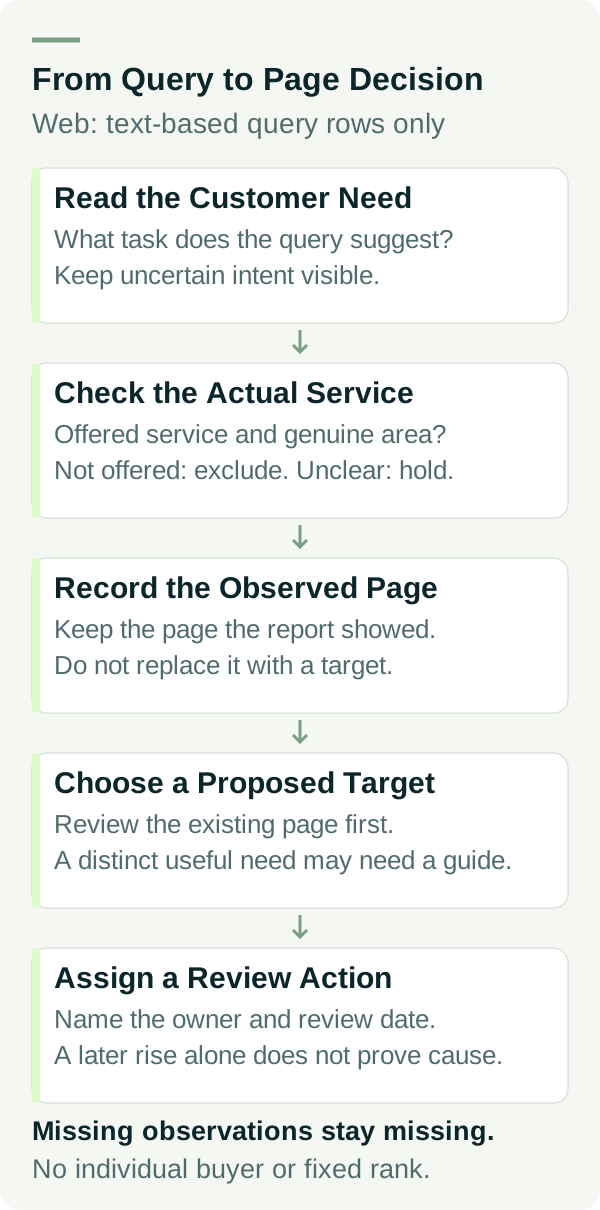
Keep observed page and proposed target page in separate columns. The first records what the report showed; the second records your decision. Do not overwrite the evidence with the address you hoped to see.
One query may show more than one page. That alone does not prove the pages are competing harmfully or explain a ranking change. Check what each page answers and whether the customer has a clear route to the service.
Use the Report Within Its Limits
The visible query table is incomplete. Google omits some queries for privacy and retains a limited set of rows. An absent query is not proof that nobody searched it. Filtering by a query can also change the totals you are comparing.
Search Console normally assigns performance data to the canonical URL, which Google treats as the representative version of a page. If the reported address is unexpected, check canonical handling before assuming the visible URL received no search activity. See Google's dimensions and data groupings guide.
Property totals and page-level totals can use different aggregation. Do not add page rows and promise that they will equal the headline property total. Google explains these differences in About the data.
Leave a missing observation marked as missing. If you record average position, treat it as an average under the selected reporting conditions, not a fixed rank that every customer sees. This worksheet cannot identify an individual buyer's search query.
Turn the Evidence Into a Page Decision
The worked example below uses an example business. Example Bathrooms renovates whole residential bathrooms in its confirmed service area. The addresses are illustrative paths, not published pages or recommendations to create all of them.
| Example query | Fit with the business | Page decision | Next check |
|---|---|---|---|
| bathroom renovations in our town | Offered service, relevant area | Review the existing bathroom-renovation service page | Does it explain scope, coverage, real work and the next step? |
| how much does a bathroom renovation cost | Relevant research question | Consider a useful cost guide, linked to the service page | Can the owner explain cost factors without a misleading fixed price? |
| emergency tap repairs | Service not offered | Exclude from this page plan | Make sure existing copy does not imply emergency repair work |
| Example Bathrooms | Branded navigation | Check the home or business-information page | Are the name, contact details and service description correct? |
| bathroom renovation jobs | Recruitment intent | Exclude from the customer service-page plan | Keep any genuine recruitment information separate |
| renovations | Unclear | Hold for review | Inspect the result context and ask which work the business wants |
For a relevant service query, first assess the page you already have. It should tell the visitor what you do, who and where it is for, what evidence supports your work and how to enquire.
Several close variations may belong on that same page. You do not need a separate URL for every wording change. Create another page when it answers a distinct, useful need you can support with real information.
A research question can deserve a guide if customers need the answer and the owner can contribute something useful. It should explain the question fully and give readers a natural path to the service. Avoid making an informational article pretend to be a local service page.
Choose One Next Action and Review It
Write a specific action in the worksheet: clarify excluded work, add real project evidence, improve the enquiry route or draft a distinct customer guide. Assign an owner and a review date.
Keep the original observation date and note when the page changes. At the next review, use comparable report settings and separate any preliminary data. Search demand, competitors and Google's results can change too; a rise after an edit does not by itself prove the edit caused it.
Do not delete pages or redirect addresses solely because they had few reported queries in one window. Review their purpose, current links and other useful evidence first.
Finally, check whether the enquiries fit the work you want. Search visibility can identify a page worth investigating, but the business needs a separate record of genuine requests and their outcomes.
Bring the Map to Your Next SEO Discussion
A useful discussion starts with the service, the reported query, the observed page and the proposed action. That is easier to assess than a long list of keywords with no connection to the work you can accept.
If you want help choosing the next page changes, review our SEO services or talk to Matt. Bring your actual service list and the report settings so the discussion has a clear starting point.