
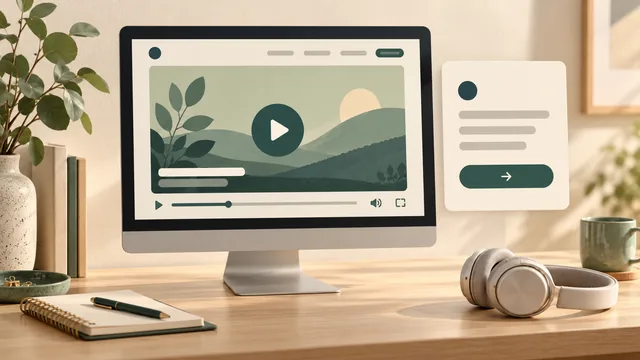
Before adding a video to your business website, agree what it helps a customer understand, how they control playback and what they can do without watching it. Include captions, any other needed alternatives, loading behaviour and the next step in the website brief. A finished video file is only part of the job.
For an Australian service business, a useful clip might explain what to prepare before requesting a quote or demonstrate a process that is hard to describe in a photograph. Give it a specific purpose on a specific page. Then ask your website provider to show how that page will work with the finished clip.
You do not need to choose the player settings yourself. You do need a clear agreement about the result, who supplies each item and how it will be checked.
Keep essential information on the page. A customer should be able to understand your service and find the appropriate next step even if they cannot watch the video.
Start With One Customer Question
Write the question the video should answer before choosing its position or format. “What information should I have ready for a cabinetry quote?” gives the team a clearer task than “make the homepage more engaging”.
Check whether the proposed footage answers that question. A tour of completed projects may show the business's work, but it may explain little about preparing an enquiry. Choose the material around the customer's task rather than the amount of footage available.
Decide which page provides the right context. A preparation video may belong beside the relevant service information or enquiry instructions. A general introduction may have a different role. Ask what the customer should know before playing it and what they should do afterwards.
Keep the surrounding wording useful on its own. State the main instructions in page text, with the video offering explanation or demonstration. If your material is mainly a collection of completed jobs, the job-photo gallery guide can help you consider a simpler presentation.
Agree What Happens Before and During Playback
Ask whether the visitor starts the video or whether it starts automatically. For an informative service clip, a visible play control is a sensible starting point to discuss. Do not assume movement or sound should begin as soon as someone opens the page.
Have the provider demonstrate the proposed behaviour on a phone and desktop. Can someone pause, adjust the sound, find captions and return from full screen? Can they operate the agreed controls with a keyboard? Check the actual player rather than approving a still image of its appearance.
Distinguish the preview image from the video itself. The preview should help a person decide whether to play the clip, and its nearby title should explain the subject. Avoid a misleading image that suggests a different job, service or result.
Also ask what happens when the video finishes. Will the visitor see your page, an external platform's suggestions or a different screen? Agree where the next action remains visible. A button mentioned only in the spoken ending leaves the customer searching for it.
Record the intended playback behaviour, including any automatic start or looping, rather than leaving those choices hidden in implementation. Ask the provider to explain a proposed exception in terms of this video's purpose and audience.
Plan Captions and Other Needed Alternatives
Ask who prepares and checks the information people need when they cannot hear or see the clip. Captions convey speech and meaningful audio. A transcript provides a text version; when important information is visual, that information needs appropriate treatment too.
W3C's media planning guidance helps teams identify the alternatives relevant to the media and the accessibility requirements they are working towards. It distinguishes the needs created by audio and visual content. Plan those requirements while preparing the video, rather than discovering missing material at handover.
For your clip, ask the reviewer to identify what a customer would miss without the soundtrack and what they would miss without the picture. A spoken explanation may cover a demonstrated action. A silent close-up of a measurement or selected finish may contain information the words do not explain.
Agree the caption delivery method with the person building the page. Ask how viewers access the captions, how readable they are on a small screen and how corrections will be made. If automatic transcription is used to prepare a draft, nominate a person to check the words and timing against the final recording, including names and instructions.
Keep a separate approved text version where it serves the customer task, and agree who updates it when the clip changes. A transcript, captions and a general website check are different pieces of work. The website accessibility scope guide explains how to specify the wider review and its limits.
Ask What Loads and Who Controls the Hosting
Find out where the video will be stored, whose account controls it and what the website loads before a visitor presses play. Hosting the file yourself and embedding an external platform's player involve different arrangements. Ask the provider to explain the proposed choice, any ongoing charges and the account handover.
web.dev's video loading guidance discusses different ways to defer video work and explains that behaviour depends on the implementation and browser support. Use that guidance to start a practical conversation: what loads initially, what waits and how will the team check the actual page?
Ask to see the page on a phone before and after playback begins. Check that the preview appears sensibly, the surrounding content remains usable and controls are available when needed. Have the provider explain how they assessed loading, with the page version and conditions recorded. A small-looking player is not enough evidence about the work happening behind it.
For an external embed, ask what other components it loads and whether privacy or consent handling needs to be included in the project. Have the responsible provider assess the actual service and setup. Do not assume the surrounding website agreement covers every third-party account or setting.
Agree what the page shows if the video cannot load or the host removes access. The service summary and enquiry route should still be usable. If an alternative viewing link is offered, check its destination and explain where it takes the visitor.
A Worked Example: Preparing a Cabinetry Enquiry
This example is illustrative; it does not describe an AWE client project or a tested video.
A cabinetmaking business wants a short clip showing customers what information to gather before asking about a new kitchen. Its owner selects a service page where those preparation instructions already belong.
The proposed clip shows sample finishes and explains the useful enquiry details. During review, the owner notices that one finish is identified only by pointing at a board. The team agrees how to explain that visual information as part of the media alternatives. They also check the captions against the final spoken instructions.
The page repeats the essential preparation list in ordinary text. A clearly labelled enquiry link sits outside the player. Someone can read the list and take the next step without completing the video, turning on sound or opening the host's website.
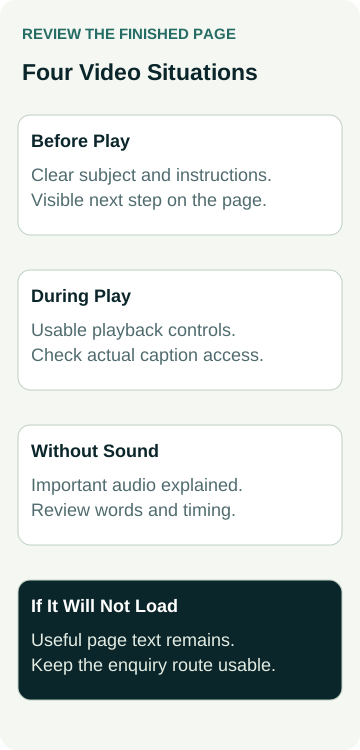
The owner then reviews four situations with the website provider:
| Situation | What to Check | Evidence to Keep |
|---|---|---|
| Before play | Subject, preview and essential instructions are clear | Approved page and video version |
| During play | Agreed controls and caption access work | Tested device, browser and findings |
| Without sound | Important audio information is available through the agreed alternative | Reviewed caption version and corrections |
| Video unavailable | Service information and enquiry route remain usable | Recorded fallback state and destination |
This is a review plan. A blank finding means the situation still needs checking; it does not mean the player passed. Any wider accessibility conclusion needs an evaluation matching the agreed requirements and scope.
Confirm the Files, Permissions and Update Owner
Name the person supplying the approved video, preview image, captions and any transcript or other alternatives. Identify the version of each file so the website team does not publish an earlier cut with a later caption track.
Keep evidence of the permitted website use for the footage, soundtrack and other supplied material. Check the publication arrangements for any people, premises and identifying details shown. If the necessary permission is uncertain, hold that material while the responsible person resolves it. Keep private approval records out of the public page.
Ask who retains the master files and who can replace the website copy. An external account controlled by a departing staff member can leave an awkward handover. Agree account responsibility, recovery arrangements and who handles charges or supplier changes before the site depends on it.
Also decide what happens when the underlying instructions change. Replacing a clip may require new captions, text alternatives, preview wording and page instructions. Assign one owner to coordinate those updates and another agreed reviewer to check the finished page.
Put the Video Work Into the Website Quote
Give the provider the intended page, customer question and proposed next step. Ask them to distinguish video production, editing, media alternatives, hosting, player integration and testing in the quote. Confirm which work you supply, which work they provide and which needs another specialist.
Agree what evidence you will receive before approval: the actual page, final media versions, tested environments, findings and remaining limitations. Recheck the customer route after any repair. A working play button alone does not establish that the whole page is ready.
When comparing small business website packages, bring this brief to the conversation and ask what can be included or separately scoped. Package descriptions do not settle the requirements for your particular video. Start with a useful customer question, then agree the media and website work needed to answer it clearly.