

Before you accept a website quote, ask what “accessible” means in that project. Get the pages, customer tasks, testing methods and responsibility for fixing problems written into the scope. A score from an automated checker gives you one kind of evidence; a person reviewing how the site works gives you another.
For a small service business, start with what a customer needs to do: understand the service, find the area you cover and make an enquiry. Someone may use a keyboard instead of a mouse, enlarge the text or use software that reads the page aloud. Those ways of using the site need attention during the build, alongside the visual design.
You can compare quotes without becoming an accessibility specialist. Ask each designer to explain the work they propose, what they will report and what their conclusions will cover.
Put the accessibility requirement in the brief before the design is approved. Agree who checks it, who fixes issues and what evidence you will receive.
Define the Requirement Before Comparing Quotes
“Accessible website included” leaves important questions open. One proposal may include basic design and code checks. Another may include a detailed evaluation against a named standard, with an issue report and a second review after repairs. Compare those commitments before comparing the total price.
If the proposal refers to the Web Content Accessibility Guidelines, usually shortened to WCAG, ask for the version and level it targets. For example, a written target of WCAG 2.2 Level AA is more specific than “WCAG friendly”. Also ask whether the designer is promising to build towards that target, evaluate conformance to it, or both.
W3C’s conformance requirements explain that Level AA includes the Level A and AA success criteria. Conformance applies to full pages; where pages form a process, the whole process must meet the specified level. Responsive variations are part of the full page. A good result on one page or one screen does not establish a wider claim.
A quote should therefore describe its coverage and limits. If you need a formal assessment or a particular procurement requirement, provide that requirement at the start and ask whether the proposed reviewer can cover it. A basic build check and a formal evaluation involve different work.
Add the requirement to your website brief so it is considered with your page list, content and customer actions.
Include the Pages and States Customers Will Use
The homepage is a useful starting point, but your service and contact routes deserve attention too. Identify the different layouts and features in the proposed website, then ask how they will be covered.
A contact form has more than its empty starting state. A customer might enter incomplete details, receive an error, correct the mistake and read a confirmation. A menu may open over the page on a phone. A gallery may show extra information after a picture is selected. These states can behave differently from the first screen the designer shows you.
Give the reviewer the important customer tasks. For a repair business, that might be finding the relevant service and requesting help. For a studio, it might include reading a timetable and using an external booking service. Ask which pages, states and steps the review will include, and which remain outside it.
If the reviewer proposes a representative selection of pages, have them explain how it was chosen and what conclusions it supports. Keep the claim within the tested scope. A sampled review should not quietly become an assurance about every unreviewed page, uploaded file or third-party service.
Ask What Each Type of Check Can Tell You
W3C’s evaluation overview recommends checking accessibility early and throughout development. It also explains that no tool alone can determine whether a site meets accessibility standards; knowledgeable human evaluation is needed.
Ask how the proposed methods fit together. This comparison can help you read the scope.
| Proposed Work | Useful Evidence to Request | Limit to Clarify |
|---|---|---|
| Automated checks | Pages scanned, tool and date, findings reviewed by a person | A tool result covers its checks; it does not establish complete accessibility |
| Manual review | Tasks, page states, environments and barriers recorded | A quick keyboard or zoom check is narrower than a full standards evaluation |
| Evaluation with disabled users | Agreed tasks, participant coverage and observations | A small group cannot represent every disability or way of using the site |
| Conformance evaluation | Named standard, defined coverage, findings and conclusions | The conclusion must match the pages, processes and requirements evaluated |
An automated report can help find issues and guide repairs. Have the reviewer explain which findings need interpretation and which checks require a person. W3C’s guidance on selecting evaluation tools describes these limits, including inaccurate results and checks that cannot be automated.
When manual work is included, ask who performs it and what relevant experience they have. “Tested on mobile” describes a device context. It still leaves open whether keyboard operation, enlarged content and assistive technology were considered.
Evaluation with disabled users can add useful evidence about the experience of completing tasks. W3C’s guidance on involving users recommends combining that work with standards evaluation and reporting the study’s scope. Results from a few participants cannot be generalised to everyone.
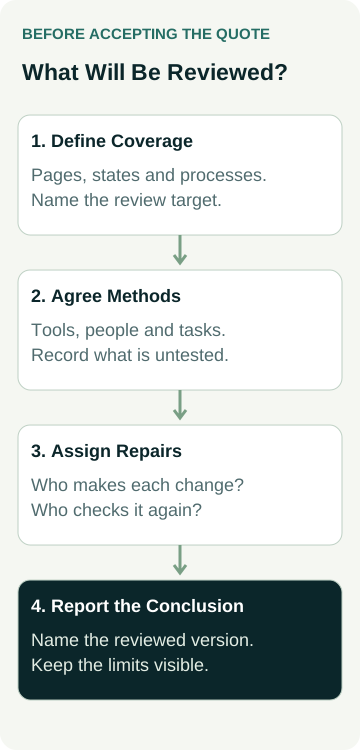
A Worked Example: A Repair Business Enquiry
Consider an example appliance repair business commissioning a website. Its owner wants customers to identify the relevant repair service and request a visit. The quote says “accessibility tested”, but does not describe the work.
The owner asks for clarification. The designer proposes automated checks and a manual review of the service-to-enquiry route, including the mobile menu, form errors and confirmation. A broader conformance evaluation is listed separately. That gives the owner a concrete choice about coverage and cost.
During the agreed review, the tester records that a form error appears visually but does not give a screen-reader user enough information to identify the field requiring correction. The report includes the tested page, environment, steps and expected behaviour. The developer corrects the implementation, and the reviewer repeats the task on the revised version.
The owner receives the original finding and the retest result. Other items are marked as unresolved or not evaluated. This example shows the evidence to ask for; it is not an AWE customer result or a promise that a short review proves conformance.
The business already has a separate process for confirming whether the enquiry reaches its inbox. Keep that delivery check too. Your mobile enquiry journey and accessibility review can cover related customer actions while answering different questions about them.
Set Responsibility for Content and External Features
Ask which problems the designer can correct directly and which depend on someone else. Your website might use an external scheduler, embedded map, payment service or document viewer. The surrounding website and the external feature need clear responsibilities.
Have the proposal identify who investigates an issue in an external component, whether a supplier change is possible and what work would be separately quoted. A feature being outside the designer’s control does not make it irrelevant to the customer’s task. If it prevents a customer completing that task, you need a workable plan and an accurate record of the remaining limitation.
Your own content also needs an owner. Ask who prepares image descriptions, checks uploaded documents and handles captions or other agreed media requirements. Confirm how the site editor supports that work and what instructions you receive at handover.
For an informative clip, agree playback, media alternatives and the next step on its website page.
For a gallery of completed jobs, useful image descriptions should reflect the actual work shown. Give the writer accurate information. For a service document, ask whether customers need a web page alternative or an accessible document, and who supplies it. The right scope depends on what the material contains and how customers use it.
Make these responsibilities specific to the content and features you intend to publish. Avoid assuming every future upload will be reviewed because the original build was checked.
Separate Review, Repairs and Retesting
A report identifying problems does not tell you whether repairs are included. Ask each provider to distinguish the evaluation fee, implementation work and follow-up review. If a proposal bundles them, have the included scope stated clearly.
Useful questions are:
- Who receives and explains the findings, and who makes the changes?
- Which repairs are included in the build or quoted separately?
- How will unresolved barriers affect the launch decision?
- Who retests the changed pages and affected customer tasks?
- What record will identify the reviewed website version and remaining limitations?
Ask for findings you can act on. An issue needs enough detail for the responsible person to reproduce it and enough explanation for you to understand its effect on a customer. You do not need to interpret a long technical report alone; agree how the reviewer will explain priorities and recommended action.
Keep the earlier result when a problem is fixed and add the retest. If something was not evaluated, record it that way. A blank entry is easy to mistake for a passed check when the project changes hands.
Put the Agreed Work Into the Website Scope
Before accepting the quote, check that its accessibility wording answers four practical questions: what is covered, how it will be reviewed, who fixes problems and what conclusion the evidence supports.
Ask when the work happens. Checking an early design or prototype gives the team an opportunity to change an unsuitable pattern before it is repeated across the site. Review of the implemented site and relevant public release is still needed; an approved design image does not prove the finished controls work.
Agree which later changes should trigger another review. A new form, navigation pattern, external feature or substantial content update may affect the earlier findings. Confirm who maintains the content, how an accessibility problem can be reported and how follow-up work is quoted.
Use these decisions alongside the broader questions to ask a web designer before accepting a quote. Accessibility work should have a clear place in the agreed build and support scope.
If you are planning a new site or a practical update, view our small-business website options or talk to Matt about the requirements you need covered. Confirm the proposed accessibility work, reviewer and any specialist assessment separately before committing to the project.