

A customer portal is worth considering when customers repeatedly need private information or need to complete a task that your team can reliably support online. Before paying for one, name that task and compare it with the process you already use. A login screen alone does not establish that customers will find useful, current information behind it.
For an Australian small business, the buying decision includes the work after launch. Someone must maintain the records, manage access and help customers who cannot use the service. Start with one useful customer task, then agree the information, permissions and ongoing responsibilities needed to make it work.
Choose a Recurring Customer Task
Describe the task from the customer's point of view. “View the latest approved job document” is more specific than “access a dashboard”. “Check whether an appointment request has been accepted” is different from choosing a time that the business can confirm immediately.
Ask your team for examples of the requests they currently handle. What does the customer need, where does the answer come from and what happens next? Record the time or difficulty only if you have evidence for it. Repeated questions suggest something to investigate; they do not prove that a portal will reduce administration.
Keep the first scope small enough to explain. A portal that tries to manage documents, bookings, payments, messages and project changes from the start can contain several different workflows. Choose the part that has a clear customer purpose and an owner inside the business.
If the task concerns appointments, first choose the right booking or quote-request route. Giving a customer an account does not change what your business can confirm about a job, price or available time.
Compare a Portal With the Process You Already Have
List the systems and follow-up methods your team uses now. An existing booking, job-management or document service may already support the required customer task. Ask the supplier to assess that option before assuming the website needs a separate custom build.
A reviewed manual follow-up process may also remain suitable. Compare how often customers need the task, what information they need and who currently supplies it. Do not assume that email, a shared link, a hosted tool or a new portal is automatically appropriate for every kind of information.
Ask what customers would have to do differently. Would they need an invitation, a new account or another place to check for updates? Agree how the public website will explain the route and how customers can obtain help if they cannot use it. Do not put routine public information behind a login without a reason.
Keep the implementation options separate in the quote. Linking to an existing service, connecting systems and building a new customer area involve different work. Confirm what is being proposed, what remains with another supplier and which accounts or subscriptions your business would need to maintain.
Name the Source of Every Customer-Facing Update
For each piece of information, identify the record your team treats as authoritative. A job status might come from the person managing the work; an approved document may have a version controlled by someone else. Agree who changes that record and when customers should see the update.
Ask how the portal obtains the information. It may be entered by staff, copied from another system or supplied through an agreed connection. Have the developer explain what happens when an update is delayed, a connection fails or two records disagree. Avoid describing information as live or automatically current unless the actual setup supports that wording.
Decide what customers may change themselves. Updating a contact preference is different from changing a job specification or accepting a revised appointment. Define whether an action takes effect immediately, creates a request for staff review or needs a separate approval.
If the portal accepts files, agree the file-handling process as a related scope. Matching a document to the right customer, controlling access and managing copies still need decisions. A portal does not settle those requirements simply by having a document tab.
Define Access Beyond the Login Screen
Write down who should see each type of record and what they may do with it. A customer might view their own job information while a staff reviewer updates it. Where a customer organisation has several contacts, agree who may invite another person and who approves a change in access.
OWASP's authorisation guidance distinguishes proving a user's identity from deciding what that user is allowed to access. It recommends limiting permissions to what is needed and checking permissions on requests. Ask the developer to demonstrate the intended access rules in an authorised test environment, rather than treating a successful login as the complete check.
Agree what happens when a customer relationship ends or a contact leaves their organisation. Name the person responsible for reviewing and changing access. Include staff departures and supplier changes in that discussion, along with any records the business needs to retain.
Plan recovery and help as part of the feature. If the proposed system uses passwords, OWASP's forgot-password guidance describes a separate recovery process with protections against misuse. The developer needs to select suitable controls for the actual setup. Your business needs to know who helps the customer and how identity is checked before access is restored or changed.
A useful demonstration shows the right task with the right information for the intended customer. It also checks that another customer's records remain unavailable to them.
Put the First Task in a Scope Record
Use one short record for the proposed starting task. The table below describes evidence to request from the business and supplier; it is not a claim that a particular platform already provides these features.
| Scope Decision | Evidence to Request | Responsibility to Agree |
|---|---|---|
| Customer task | A real recurring need and the current process | Who decides whether the portal is worthwhile |
| Information and actions | Source record, update method and meaning of customer changes | Who maintains the information and handles requests |
| Access and help | Intended customer and staff permissions, invitations and recovery route | Who approves, reviews and removes access |
| Acceptance and upkeep | Sample task demonstration, unresolved cases and ongoing support scope | Who checks the result and maintains the service |
Separate setup from ongoing costs and work. Ask about service subscriptions, user or storage limits, connections, support and changes to the task. Confirm how your business can obtain its records and manage the transition if it leaves a supplier.
Agree what would cause the first scope to be deferred. Missing source records, unclear staff ownership or an unresolved access model can be reasons to keep using a reviewed existing process while those questions are settled. A portal should not make an unclear business process harder for customers to understand.
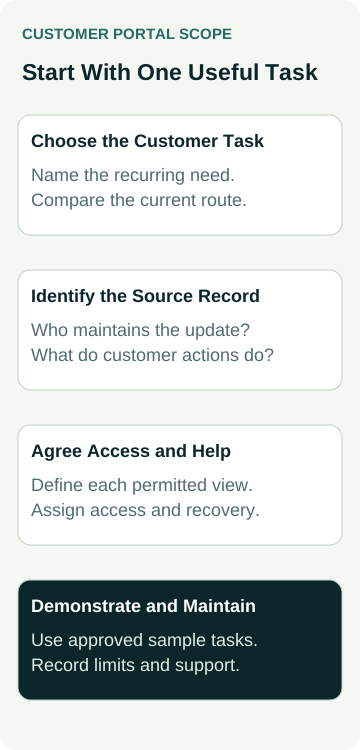
A Worked Example: Documents for Repeat Maintenance Customers
An example maintenance business has repeat customers who ask for the latest approved service document. The owner considers adding a customer portal to the website so each customer can find the appropriate material without requesting another copy.
The owner first checks where the approved document is kept and who controls its version. A supplier is asked to compare the existing system's customer-access option with a separate website build. The first proposed task is limited to viewing the customer's approved documents; new booking, payment and job-change features remain outside that scope.
Before approving a build, the owner requests a demonstration with non-sensitive sample records and two test customers. Each should see only the material intended for them. The planned checks also cover an out-of-date document, an invitation problem and a customer contact whose access needs to end.
The decision waits on three answers: who publishes the approved version, who handles access questions and what happens if the source system is unavailable. This is an example of scoping work, with no real customer records, portal implementation, access test or administrative saving implied.
Agree Acceptance and Support Before Launch
Ask the supplier to show the complete intended task in an appropriate test environment. Use approved non-sensitive samples and record what was demonstrated, what failed and what still needs a decision. A polished mock-up shows presentation; it does not establish that the connected records, permissions or recovery process work.
Include checks that reflect the agreed scope:
- A customer reaches the correct record and understands what they can do next.
- An update or request has the meaning the business agreed, including any staff approval.
- Access boundaries, invitations, changed contacts and recovery are checked by the responsible developer.
- A phone user and someone needing help have a workable route through the task.
Keep a named owner for updates and unresolved issues after launch. Review the task against evidence such as successful customer use, incorrect or stale information, support needs and the work staff still perform. Portal registrations alone do not establish customer satisfaction, time saved, enquiries or paid work.
If the feature is part of a website proposal, bring the task record and unresolved questions into the build discussion. Our website packages provide a starting point for discussing the site; any portal, existing-service connection and ongoing support need their own confirmed scope.