

Use online booking when a customer can choose a clearly defined service and a time your business can honour. Use a quote request when you need to assess the job before agreeing on the price, duration or appointment. If the time needs your approval, make it a booking request and say so before the customer submits.
The key decision is what your business can confirm at that point. A website can offer different routes for different services. You do not have to put every job through the same calendar or send every customer through a long enquiry form.
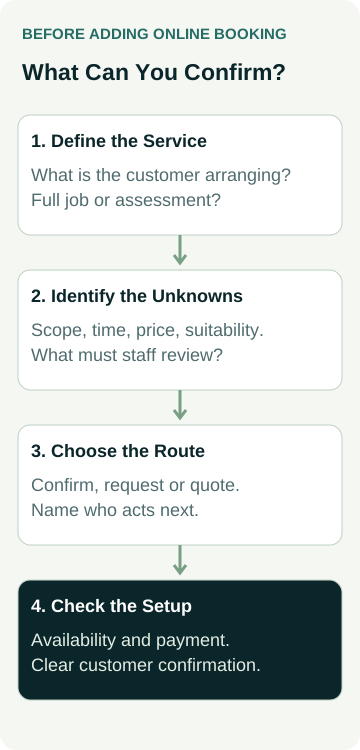
Before asking a designer to add booking software, describe what happens between a customer's first request and your agreement to do the work.
Start With What You Need to Know Before Accepting the Job
Think about a recent straightforward job and one that needed more discussion. What did you know before accepting each? What changed after you spoke to the customer or inspected the item or site?
For a defined appointment, you may know the service, duration, location and person doing the work. A customer can choose from genuinely available times. For a variable repair or project, you may first need to understand the condition, materials, access or extent of the work. A calendar selection cannot resolve those questions on its own.
Write down the facts that change your ability to accept a request. These might include whether the job is within your service area, whether a particular staff member is needed, or whether an assessment must happen first. Avoid adding questions simply because a booking product lets you add more fields.
Ask what the customer is trying to arrange, too. They might be booking a consultation, requesting a price for the eventual work, or arranging an assessment. Those are different commitments. An assessment appointment can be bookable even when the repair itself still needs a quote, provided the page makes that distinction clear.
Choose the Route That Matches the Commitment
The following comparison is a starting point for deciding the customer journey. It does not prescribe a particular booking product or promise that every system can implement each option.
| Customer Route | When It May Fit | What the Customer Should Understand |
|---|---|---|
| Confirmed online booking | The service and duration are defined, and the displayed availability can be honoured. | The appointment is confirmed after the required booking steps are completed. |
| Booking request | A customer can suggest a service and time, but you need to approve the request. | The time is requested and remains subject to your response. |
| Quote request | Price, scope or suitability needs assessment before you agree to the work. | You will review the details; submission does not confirm a job or appointment. |
| Book an assessment, then quote | An initial assessment has a defined appointment, while the eventual work varies. | The booking covers the assessment; the later work and price still need agreement. |
A request-based booking flow is a real option in some products. For example, Wix Bookings documents appointment approval, including a customer request followed by acceptance, rejection or a suggested change. It also lists restrictions: clients cannot pay online for appointments requiring approval, and the option does not apply to appointments connected to a membership plan or package.
That illustrates why “online booking included” is too broad a description for a website quote. Ask the designer to demonstrate the exact customer route using the intended product and service configuration. Features, subscriptions and restrictions need checking for your actual requirements.
If a chatbot introduces the request, agree its answer limits and human handover so an automated conversation does not imply an appointment has been confirmed.
You may decide to keep the first version simple. If every new project needs an inspection, a clear quote request with a workable response process may fit better than a calendar for the whole project. If customers repeatedly arrange the same defined session, direct booking may be worth investigating.
Make the Button and Confirmation Say the Same Thing
A button labelled “Book Now” creates a different expectation from “Request a Time” or “Request a Quote”. Use wording that describes the action the customer is actually taking, then carry that meaning through the page, submission message and email.
For a booking request, explain that approval is still needed and how the customer will hear from you. For an assessment, state what the appointment covers and whether the service itself is decided later. For a quote request, explain the next practical step without inventing a response time the business cannot maintain.
Check the information immediately before submission. Can the customer see the service they selected, the date and time where relevant, the location or meeting method, and any amount they are being asked to pay? If something requires later agreement, say that clearly.
After submission, the customer should know whether they have a confirmed appointment or are waiting for a response. The staff member receiving the request should be able to recognise the same status. A reassuring success message is unhelpful if it tells the customer the job is booked while your team sees only a pending enquiry.
Check How Availability and Payment Really Work
List every place the business records commitments: the booking system, staff calendars, phone bookings and any existing scheduling tool. Ask which one determines the times customers can select, who keeps it current and what happens when an appointment is arranged elsewhere.
Travel, preparation and shared equipment may affect availability. Give the designer concrete examples, such as a staff member who cannot move directly from one location to another, or two appointments that cannot use the same resource at once. Ask them to show how the proposed setup handles those examples.
Also establish what happens while a request is pending. Does it hold a time, leave that time open to other requests, or expire? The answer should come from the actual configuration. Do not assume that the word “pending” has the same effect in every product.
Payment needs its own check. WooCommerce Bookings documents different confirmation and payment flows. In its approval-required flow, the customer cannot pay until the administrator confirms, then receives a payment link. It also explains that an unpaid confirmed booking can continue holding availability.
These product examples show why booking status, payment status and available time must be understood together. They are not a recommendation to choose Wix or WooCommerce. Ask the designer to confirm the proposed system's behaviour, any required additions and the ongoing costs before you approve the work.
A Worked Example: Lessons and Upholstery Quotes
Imagine a guitar tutor who offers a defined introductory lesson at a fixed location. The tutor can identify the duration, relevant teacher and available times. If the intended booking setup correctly represents those facts, allowing a customer to choose and confirm a lesson may suit the service.
Now imagine an upholsterer assessing dining chairs. The amount of work depends on condition, fabric choice and the repair required. The owner needs photos or a discussion before agreeing to the job. A quote request can start that assessment without implying that an entire repair is booked into a short calendar slot.
The upholsterer might separately offer a defined showroom consultation. In that case, the site could let customers book the consultation while making clear that upholstery work is quoted afterwards. Booking the conversation does not settle the scope of the repair.
For the tutor, the designer needs to show the intended availability and confirmation flow. For the upholsterer, the designer needs to show the quote request reaching the right person and the customer receiving a clear acknowledgement. If a consultation is also bookable, its purpose needs to stay clear on both routes.
These are hypothetical examples, not actual client results or rules for every tutor or upholsterer. The business owner must confirm the real service conditions. The point is to select the website journey from those conditions rather than choosing software first and forcing the business to fit it.
Give the Designer a Specific Build and Review Brief
For each service, tell the designer which route you want and what counts as a completed customer action. Identify what your team must do next and who owns that task. Use the trade business website brief to place this decision alongside the rest of the site requirements.
Your booking or enquiry scope should identify:
- The services customers can book directly, request for approval or enquire about.
- The business rules for availability and the person who maintains them.
- The wording customers see before and after submission.
- The system, accounts, subscriptions and integration work included.
- The staff handover and support arrangements after launch.
If you are choosing the questions for a quote request, our guide to trade website enquiry fields covers that next decision. Keep the initial information useful for assessment without requiring customers to write a full specification before they can contact you.
Agree how the proposed route will be reviewed before it goes live. Ask to see a normal request, a time that is unavailable, and a request needing staff approval. Include any payment or cancellation behaviour relevant to the agreed scope. Use an authorised demonstration or test environment so a review does not accidentally create real appointments, charges or customer messages.
The designer's check should show both sides: what the customer sees and what the responsible staff member receives. You then confirm that the business can operate the process. A working screen alone does not establish that someone will notice and act on pending requests.
Review the Journey After Launch
Once the agreed route is live, check it after relevant changes to services, availability or staff responsibilities. Our mobile enquiry-path guide explains how to review the customer journey on a phone. The booking or quote route needs to remain understandable beyond the homepage button.
When judging whether the change helps, distinguish requests received, appointments confirmed, appointments attended and work paid for. A booking count does not tell you how many suitable jobs the business completed. Keep observations over stated periods and look at the requests your team actually handled.
If customers choose the wrong route or misunderstand an assessment as the full service, review the service description and confirmation wording before adding more software. If staff cannot keep availability current, revisit the operational responsibility or consider an approval step where appropriate.
For a new site or a change to an existing one, see our small business website packages and contact Australian Web Experts to discuss the journey you need. Any booking system, integration and ongoing charges need to be confirmed in the actual scope. Start with what the business can agree to, then choose how the website should help the customer reach that agreement.