

Add file uploads to your website enquiry form when a photo or document helps your team make the next decision. Before paying for the feature, agree which files you need, how customers will send them and how the right person will find them beside the enquiry. A working file picker is only one part of that job.
For a trade or service business, uploads might help explain a repair, show access to a site or provide an existing plan for a proposed project. Buy the complete handling process, including clear limits, a route for customers without files, private access and a plan for removing material you no longer need.
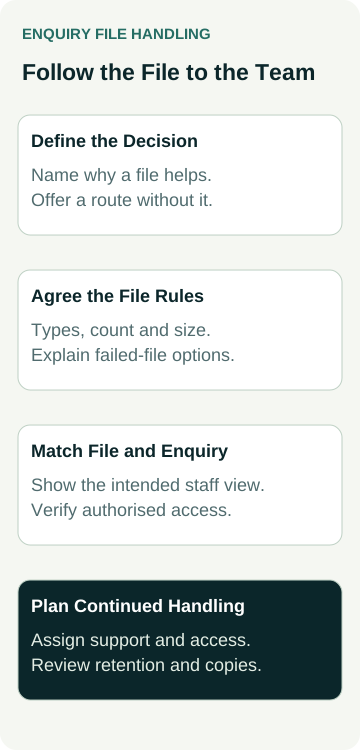
Decide Whether Files Are Needed at First Contact
Ask the person handling enquiries what they would do differently after seeing a file. A photo of a damaged gate might help identify the type of work. A full set of house plans may add little until someone has checked whether the project fits your services and coverage.
Use that decision to choose between three approaches: an optional upload with the first enquiry, a later request for specific material, or no upload feature. You do not need to collect everything a future quotation could require at first contact.
Our guide to trade enquiry form fields covers the wider field decision. For uploads, take the next step and name the person who will use the file, the decision it supports and the alternative if it is unavailable. If those answers are unclear, defer the feature while you settle the workflow.
Keep expectations realistic. An image can add context without establishing a diagnosis, an accurate measurement or a fixed quotation. Write any customer prompt around the information you can use at this stage, rather than suggesting that attaching a photo guarantees an answer or price.
Agree the Files and Explain the Limits Early
Give the developer a short list of formats your team can use. That might include common image formats or a PDF plan, depending on the task. Do not advertise every format a form tool happens to support. Ask your team whether they can open the proposed examples using their normal working setup.
Agree a maximum file count, a per-file size limit and any total submission limit. Have the developer explain what the website, upload service, storage and notification route can support together. A large file accepted in one part of the system may still be unsuitable for the intended handoff.
Show useful instructions before the customer chooses a file. Explain what would help, which formats are accepted and what to do if their material does not fit. Avoid requiring people to convert specialist plans or compress phone images without a workable alternative.
MDN's file-input documentation explains that a browser's accepted-file setting guides selection; it does not validate the file type. Appropriate server-side checks are still needed. Ask the developer how the actual implementation checks files, rather than treating a file-picker filter as proof that handling is safe.
Trace the File Into the Business Workflow
Ask the supplier to show where a submitted file will be stored and how it will be associated with its enquiry. The person reviewing the request needs enough context to recognise which job and message the file belongs to. An unlabelled attachment in a shared inbox can be difficult to place later.
Clarify what a notification contains. It might include an attachment, a link to an authorised workspace or only an alert that a record exists. Agree how the intended staff member will open the material, including when they use a phone or work away from the office. Forwarding the notification should not be assumed to provide the right access.
The OWASP file-upload guidance recommends multiple protections, including allowed file types, size limits, suitable storage and access controls. It warns that a single technique is insufficient. The developer needs to choose and verify controls for your setup; this buying guide does not certify a tool or prescribe its technical architecture.
Keep enquiry material within the agreed private process. Ask who can view, download, share and remove it, and how additional copies in emails or connected systems will be handled. Agree a retention decision with the business owner and any relevant advisers. Do not assume that deleting the main enquiry record removes every copy or resolves every record-keeping requirement.
Ask to see one sample file beside its matching enquiry in the intended staff workflow. A filename on the customer's screen does not prove that handoff happened.
Put the Upload Scope in One Record
Use a small record to compare what a supplier proposes with what your business needs. The entries below are decisions to make together, not claims about features already present on your website.
| Decision | Evidence to Request | Owner to Name |
|---|---|---|
| Purpose and alternative | A useful file example and a way to enquire without it | Business person assessing the work |
| Types and limits | Accepted formats, counts, sizes and customer instructions | Developer with the business reviewer |
| Matching and access | Sample file beside the correct enquiry in the intended staff view | Developer and authorised staff reviewer |
| Failure and removal | Agreed recovery route, retention decision and copies to consider | Business owner with technical support |
Include the ongoing work in the quote. Ask about storage or service charges, monitoring, access changes and support when a file cannot be retrieved. Confirm who maintains the feature when the website or connected service changes.
Separate the acceptance evidence from a feature list. “File uploads included” does not explain whether staff can find the file, whether a failed upload blocks the whole enquiry or who resolves an unexpected result. Record unresolved questions before approving the work.
A Worked Example: Photos for a Gate Repair Enquiry
An example gate-repair business wants customers to add photos of the area needing attention. The owner wants to identify whether an enquiry concerns a kind of gate the business works on before arranging further discussion.
The owner chooses optional photos at first contact. Customers without suitable images can describe the problem and leave contact details. Larger documents are left for an agreed follow-up route because the team does not need them to make this first decision.
The developer is asked to demonstrate the proposed file rules with non-sensitive sample material. One sample fits the rules; another exceeds the agreed size. The owner checks the explanation given for the rejected file and whether the customer can continue with an enquiry under the agreed rules.
For the accepted sample, the intended staff reviewer must be able to locate the matching enquiry and open its file using the proposed access. The owner also asks what happens if the staff member leaves and how retained copies will be reviewed. These are requested checks in an example, with no actual business, upload test or security result implied.
Check the Accepted and Failed Paths Before Launch
Arrange controlled testing with the website owner in an appropriate test environment. Use non-sensitive samples that represent the agreed formats and limits. Keep test records identifiable so they do not become genuine customer enquiries in reporting.
Include more than one successful desktop upload:
- Choose, remove and replace a file using the supported phone and desktop routes.
- Try a permitted file, an unsupported format and material beyond the agreed limits.
- Check the enquiry route when a customer has no file or an upload is interrupted.
- Verify that authorised staff can open the accepted file beside the correct request.
Ask the developer to check labels, keyboard operation, errors and progress wording as part of the form review. A preview thumbnail or progress indicator needs a clear meaning. The business should understand what counts as a selected file, an accepted upload and a stored enquiry before approving the public wording.
For the wider submission messages, plan the enquiry confirmation and next step separately. Keep a successful file transfer distinct from a successfully accepted enquiry, a delivered notification and a person reviewing the job. If any stage is uncertain, agree the recovery path before launch.
Buy a Feature Your Team Can Keep Using
Use the scope record to decide whether to proceed, ask for changes or collect material during follow-up instead. A simpler first enquiry can be the right choice when the team cannot yet manage additional files or demonstrate their intended handling.
Keep a named owner for access, support and the retention review after launch. When staff or systems change, check that the agreed workflow still works. Uploading a customer image for an enquiry also does not make it approved marketing material; any later gallery or testimonial use needs its own review.
If uploads are part of a new website brief, bring the purpose, sample formats, staff workflow and unresolved questions into the scope discussion. Review our website packages with those needs in mind, so the proposed build can identify the work, checks and ongoing responsibilities your business requires.