

Before giving an SEO provider Search Console access, confirm the work, the property, the recipient and the permission being requested. Someone reviewing reports needs an explained assessment scope. Someone proposing actions needs to identify those actions and the approval they require.
An access request can be a normal part of assessing a business website. It should still make sense alongside the proposal. A request for broad control should not be accepted merely because a standard onboarding email asks for it.
For an Australian small business, the practical aim is to let the provider do the agreed job while keeping business responsibility clear. Use the platform's account permissions and a confirmed recipient, rather than send your personal Google login or recovery details to another person.
Start With the Work They Need to Do
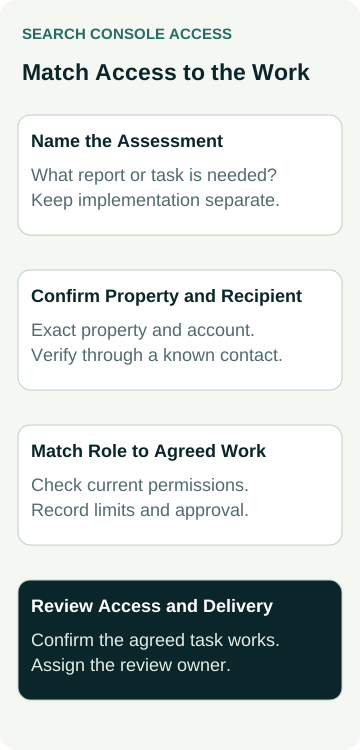
Ask the provider to name the reports it needs to review and what question the assessment will address. Is it investigating visibility for a service, examining an apparent indexing issue or preparing a campaign recommendation? “We need access for SEO” leaves the task too broad to assess.
Google's guidance on hiring an SEO recommends granting only read access to Search Console when considering an audit at that stage. It separates reviewing the site from giving the prospective provider write access.
Use that distinction in the proposal discussion. If the provider asks for more than viewing access, ask which agreed task needs it and why. The answer may identify legitimate implementation work, but that work and its permissions need their own explanation and approval.
Keep the assessment deliverable visible too. Ask what findings, explanation and recommendations you will receive, who reviews them and whether implementation is included. Access being supplied does not establish that an audit has been completed or a useful change made.
Confirm the Property and the Recipient
Have the provider identify the exact Search Console property it needs. A business may have more than one property referring to its website, and a shortened label in a reporting dashboard may leave the scope unclear.
Our Search Console property comparison guide explains why different property scopes can produce different reports. For an access request, the immediate check is that the proposed property matches the work, rather than simply choosing the first familiar website name.
Confirm the recipient's Google Account address through an established contact route. If an unexpected message changes that address or asks for a broader role, resolve the difference with the provider before acting. Do not use a public tutorial's example address as the recipient for your own engagement.
Ask the person responsible for the business's existing Search Console setup to check current access. If nobody can identify the appropriate owner or property, record that as a gap to resolve. Creating another property or sharing a personal login should not become an automatic workaround.
Understand the Requested Role
Google's Search Console permissions guidance distinguishes owners, Full users and Restricted users. Owners have broad control, including managing users. Full users can view all data and take some actions. Restricted users have viewing rights on most data. These labels describe different capabilities; Full is not a synonym for read-only.
Ask the provider to match the current permission details to its actual task. A role that supports ongoing implementation may be broader than the access needed to prepare an initial assessment. Avoid turning either arrangement into a universal rule for every provider and stage.
Keep ownership requests separate from ordinary report access. Ask why ownership is proposed, who will retain business control and what other actions the role would permit. Being paid to analyse a website does not, by itself, explain a need to manage every other user's access.
Google also distinguishes verified and delegated ownership. If verification or ownership changes are involved, have the responsible administrator explain the method and dependencies using the current documentation. That is additional work to understand, rather than another name for receiving a report.
Put the Request Beside Its Purpose
Use a short request record when comparing the access email with the proposal:
| Requested Work | Question to Resolve | Decision to Record |
|---|---|---|
| Initial audit or assessment | Which reports are needed for the agreed investigation? | Appropriate read access, exact property, recipient and review point |
| Continuing reporting | What information will be reviewed and supplied to the business? | Role justified by those tasks and responsibility for reviewing access |
| Agreed implementation | Which specific actions require a different capability? | Approved work, required permission, action owner and completion checks |
| Ownership or verification change | Why is this needed beyond ordinary user access? | Separate explanation, business control and administrator review |
The record should identify an approving business contact and a reason to review the arrangement. That might be the assessment handover, a change in scope or the end of the engagement. Agree the point rather than assume access will be reviewed automatically.
Keep passwords, recovery codes and private account screenshots out of the record. Use an appropriate private reference for the property and recipient where needed. A working note should explain the decision without becoming a bundle of credentials.
The provider should be able to identify any missing capability clearly. Ask it to explain the blocked task before increasing a role simply to make an error disappear. A limitation can also reveal that the wrong property or account was selected.
A Worked Example: An Audit Before a Campaign
An example floor-sanding business commissions an assessment of its existing website before deciding whether to start an ongoing SEO campaign. The provider's onboarding message requests Full user access to Search Console, while the proposal describes report review and recommendations.
The owner asks which tasks require that role. The discussion confirms that the current stage is an assessment, with implementation to be scoped later. The proposed access record therefore follows the read-access requirement for that stage and identifies the intended property, confirmed recipient and review point.
If a later recommendation needs an action that the supplied role does not support, the provider should identify the action and ask for the appropriate approval. The owner can then consider the implementation scope and permissions together, rather than treating the original audit as permission for every later change.
This example describes an access decision and proposed review process only. No user has been added, role changed, property verified or account inspected here. No assessment result, ranking improvement or new customer is assumed.
Verify the Arrangement Without Expanding It
After authorised access is supplied, ask the provider to confirm that it can reach the intended property and perform the agreed assessment tasks. Have the responsible business contact check that the recorded recipient and role match the decision. A message saying “access sent” is a different observation from the recipient confirming the required access works.
Keep account capability separate from authority to carry out work. A platform may permit an action that the business has not approved. The proposal and change process should still identify what the provider may do and when it needs a further decision.
Search Console access also does not establish permission to edit the website, change domain records, manage Google Analytics or administer another service. If those are needed, assess each request against its own product, task and responsible owner.
Keep the approved task beside the access record. A working login establishes a capability, not completion of the SEO work.
If a report is shared outside the platform, agree who may receive it and how it will be handled. Access to useful business information deserves a clear purpose even when nobody is changing a public page.
Review Access When the Work Changes
At the agreed review point, check whether the provider still needs the same access. A completed assessment, changed team or new delivery arrangement can change that answer. Preserve the business's required access and coordinate changes with anyone still responsible for continuing work.
Where verified ownership is involved, Google's documentation explains that remaining verification tokens can allow a removed owner to verify again. It also warns that removing a token can affect other services using it. Have the administrator review that situation; deleting a website file or domain record without understanding its dependencies is not a routine user-removal shortcut.
For a wider provider change, our SEO agency handover guide covers continuing services, history and changeover responsibility. Keep that wider handover separate from the narrower decision about one Search Console request.
To discuss AWE's SEO services, bring your website address, the assessment question and the work you want help completing. Ask what information is needed and how access, findings, implementation and review will be handled in the agreed scope.