

Check product discovery, the business profile and the Business Agent separately. An Australian Shopify store should not treat a product appearing in ChatGPT as proof that every profile or agent feature is available to it.
Shopify’s current ChatGPT channel guidance allows an eligible store to be based outside the US, but requires it to sell to US customers for this channel. An Australian store therefore needs to check its selling markets and actual eligibility, not just the country in its business address.
This guide is for a retailer deciding what to inspect before commissioning work. It does not assume that the store, its products or an Australian shopper have access to every experience described in an overseas announcement.
Separate the Three Questions
Start with the outcome you want. Do you want to check whether product data is available for discovery, manage information about the business, or provide an agent that customers can chat with?
| Question | Where to Start | What It Does Not Establish |
|---|---|---|
| Can ChatGPT discover the store’s eligible products? | Shopify’s Agentic section, Catalog status and ChatGPT channel requirements | That every product will be shown for every query or shopper |
| Can the business claim and manage its profile? | The supported ChatGPT Business Hub or Shopify app route | That an agent is available or product data needs a separate manual feed |
| Can the store offer a Business Agent? | Current OpenAI requirements and the options available to that business | That an Australian store qualifies merely because it sells to US customers |
Shopify describes its ChatGPT Business app as optional for product discovery. OpenAI’s profile setup documentation separately limits Business Agents to eligible US ecommerce and online service businesses. Selling to US customers and being a US-based business are different tests.
Do not buy an agent setup on the assumption that completing a catalogue or profile task will unlock it. Have the provider identify the exact feature, account and eligibility it proposes to use.
How to Check Shopify Catalog Eligibility for ChatGPT
In Shopify admin, review Sales channels → Agentic and the entry for Sources → Shopify Catalog. Shopify’s Catalog guidance describes an eligible product count or an Ineligible warning. Inspect the displayed reason when the store is ineligible. If details are temporarily unavailable, treat that as unresolved rather than a successful check.
Then compare the ChatGPT channel requirements with the store’s real operation. Confirm the US customer market, eligible products and required store policies. Any terms acceptance or account change should be made by someone with the necessary authority, after reviewing what the action does.
Keep the observation specific: store checked, date, displayed status, affected products and next action. “We have Shopify” is not a catalogue eligibility result. Nor does a catalogue product count establish that a particular ChatGPT user will see a product.
Ask for the exact issue before agreeing to additional work. A missing source field, a store eligibility restriction and a product that simply was not selected for one answer need different investigation.
Check the Product Information Being Shared
Shopify documents mapping for fields including titles, descriptions, options, images, prices and availability. If important information is stored in custom fields, review which data the catalogue mapping actually uses. Do not assume the storefront’s visible layout and the catalogue’s selected fields are identical.
Choose a representative item and compare its live product page with the mapped data. Include the customer’s practical questions: what the item is, which option is selected, whether it is available and where the buyer can check delivery and returns.
Our catalogue-or-online-store guide helps define the underlying buying route. A product discovery channel does not replace the store’s responsibility for clear product information and an appropriate checkout or enquiry path.
Keep any proposed data cleanup distinct from claiming the business profile. Identify the products, fields, responsible person and checks in the scope. This article does not add a product-feed management service to AWE’s offers.
Why Is ChatGPT Showing an Old Product Price?
First record the exact example: product link, selected option, currency, displayed amount, source link and observation time. Check the matching live store page. An old screenshot or a different variant can otherwise be mistaken for the current product price.
If Shopify Catalog is involved, inspect its data mapping and the selected price fields. Shopify allows the catalogue’s list-price mapping to use the price or compare-at price. Check that choice before diagnosing an outdated feed.
Shopify also notes that products may be found through web crawling or other discovery routes. If the answer’s source is unknown, say so; do not assume every visible price came from the same catalogue record.
A corrected store field and a corrected ChatGPT result are separate observations. Keep the original example, record what was changed and repeat the relevant public check. Do not promise an immediate update in every answer or clear a mismatch because a save operation succeeded.
For Shopify admin, catalogue settings or merchant reports, OpenAI directs merchants to Shopify’s guidance. Send the appropriate support team the specific unresolved example, with sensitive account and customer information removed.
Which Shopify Product Variants Can Appear in ChatGPT?
Start with eligible products and the options represented in the catalogue data. Shopify supports grouping separate products that are variants of the same product. That is a data-organisation capability, not a promise that every size, colour or configuration will appear in a particular ChatGPT response.
Review a product with meaningful options. Can the customer identify the intended variation on the linked store page? Does the observed price belong to that variation? Can the team distinguish an unavailable option from an unavailable product?
Record any uncertainty about grouping or mapping before changing it. Follow the current Shopify controls for the store’s actual setup, particularly where custom fields or separate products are involved. Do not manufacture a universal variant rule from one successful search.
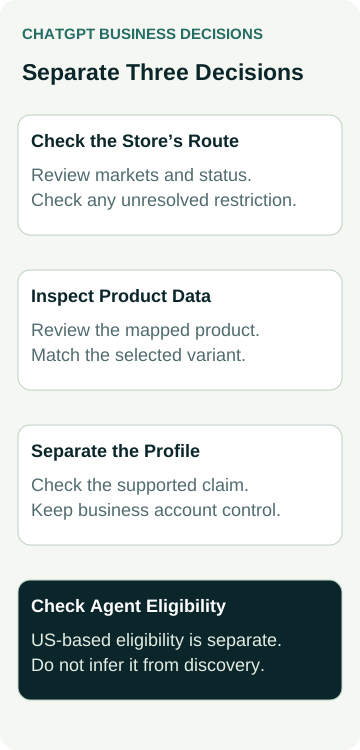
A Worked Example: An Australian Homewares Store
An example Australian homewares retailer sells within Australia and to US customers. It wants to understand why one product appeared in ChatGPT and whether it should also claim a business profile.
The owner checks the store’s Agentic section and records its Catalog status. They then inspect a lamp offered in two finishes, comparing the live product page, mapped option information and the price shown in the observed answer.
If the quoted amount looks wrong, the next action is to identify the exact variant and price source, then inspect the relevant mapping. The owner does not commission an entirely new feed merely because one result needs investigation.
The business-profile question is handled separately. The owner checks the supported claim route and retains control of the account. A business-agent proposal would require another eligibility check; selling to US customers does not turn this Australian business into a US-based store.
No store, product feed, claim or purchase was tested in this example. It shows a practical order for gathering evidence before approving work.
Claim the Profile Without Confusing It With Product Discovery
If profile assistance is the task, get help claiming your store’s ChatGPT business profile. Bring the store URL, business location, selling markets and the status you have observed. Confirm the actual profile and website scope before agreeing to work.
For owner-led steps, use the Australian ChatGPT profile claiming guide. A retailer with a physical shop can also compare Google and ChatGPT business-profile eligibility to keep its online and local-location questions separate.
Keep three results in the record: catalogue eligibility, profile status and agent eligibility. One confirmed result does not fill in the other two.
Shopify describes purchases from ChatGPT as completing through the merchant’s online-store checkout. Review the relevant product and customer route there too. Product discovery, a website visit, an order and a paid sale remain different outcomes to measure.