

Australian eligibility last checked: 11 November 2026. If you want to manage the information your business supplies to ChatGPT, start at OpenAI’s Business Hub. Look for the business you own or represent, then follow the claim or add route actually offered to you. You can do this yourself.
There’s a second question people often mean when they ask how to get on ChatGPT: Will it recommend my business when someone asks for a supplier? Claiming a profile doesn’t control that answer. If discovery is your main concern, our guide to helping ChatGPT understand your business covers that work separately.
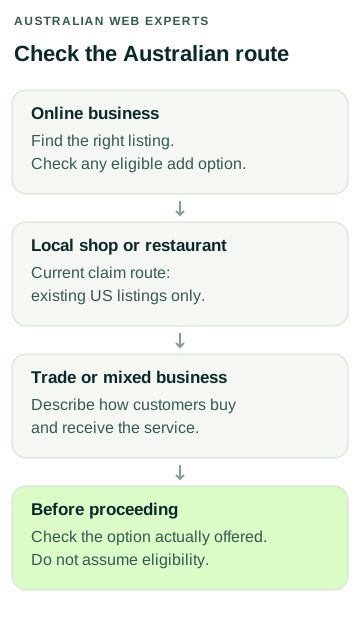
Check Which Australian Route Applies
OpenAI introduced Businesses in ChatGPT in beta on 10 November 2026. Australia is a supported ChatGPT country, but access to ChatGPT and eligibility to claim a particular business are different things. Check the current setup instructions before acting.
| Business | What to check |
|---|---|
| Australian online store or online service | Search Business Hub for an existing match. If none appears, an eligible online business may be offered an add option. A Shopify store is not necessary for every claim. |
| Australian local shop or restaurant | OpenAI’s current local-store and restaurant route is limited to claiming an existing US listing. Don’t create a duplicate or give a false address to get around that limitation. |
| Australian trade or mixed business | Work out what happens after the enquiry. Does the customer buy and receive the service online, visit a premises, or have someone attend their property? Check the options offered for the actual business. |
For example, a business that sells cabinet hardware online and also has a Sydney showroom shouldn’t assume that a claim for the online brand covers the physical location. Check which record you are looking at. If the current options don’t describe the business accurately, stop before submitting and seek clarification.
Before You Open Business Hub
Choose the account the business intends to use to manage its profile. Decide who has authority to act and who can approve the information going public. This matters when an outside agency, franchisee, former employee or web developer already has access to part of the business’s online presence.
Prepare a short record of the approved public facts:
- The business and trading names customers know, plus the correct website address.
- A short description of what customers can buy, where they can get it and any important limits.
- Public contact and location details you are comfortable sharing.
- Brand images that belong to the business or that it has permission to use.
- Current delivery or return policies where those are relevant to the business.
- A named owner for future corrections, separate from any temporary agency contact.
A delivery policy can look fine in a document but point to an old page on your site. Open the links as a customer would. Check the destination, read the important conditions on a phone and resolve conflicting information before supplying it elsewhere. Keep identity documents and account credentials out of this public-facts record.
1. Find the Right Listing
Sign in to the chosen ChatGPT account, open Business Hub and search for the business name. Compare the result with the correct business, not just the first familiar name. If the listing is a match, select it and check which account will manage it.
If no match appears, look for an option to add a business. Whether that option appears is part of eligibility. If a listing is locked or appears to be controlled by someone else, use the access or ownership route offered by OpenAI. For example, a former agency may still have management access. Establish who controls the existing business before trying to start again.
2. Verify Your Connection to the Business
Follow the verification choices shown for that business. OpenAI lists routes that can include the business phone, business email, website domain or Shopify store. You may not see all of them.
Use a phone or inbox controlled by the business. If you select a website-domain method, involve the person authorised to manage the domain and review the exact change separately. A verification request is not permission to change hosting, email routing or crawler settings. For Shopify, read the permissions on screen and make sure you have selected the correct store.
A submitted claim may still be under review. Save the date, the managing account and the case status in the business’s own records. Don’t keep submitting because an approval email hasn’t arrived.
3. Understand What Identity Approval Can Publish
Verifying your connection to a business and verifying the representative’s identity are distinct steps. OpenAI uses Persona for identity checks and may require official evidence of identity, business registration or authority. Complete sensitive steps in the provider’s own flow.
For a new profile created through Persona, approval can publish the profile without a further publish step. Treat submission as a decision about what you are ready to make public. In particular, check that a personal mobile number or residential address hasn’t accidentally been substituted for the intended public contact details. Do not rely on being able to remove a published listing through an ordinary setup request.
If the review is pending, wait for OpenAI’s decision. If it asks for more information, follow that request and check that the submitted details match the official records. OpenAI makes the decision; a third party cannot issue a badge or approve the claim.
4. Review the Profile and Set Up Access
After the required approvals, open the business profile and review the available fields. Depending on what is supported, these can include website, description, category, logo, cover photo and applicable policies. Start with the fields that help someone distinguish the business and decide what to do next.
The administrator can invite teammates or grant agency access where supported. Each person should use their own ChatGPT account. Workspace membership may affect invitations. If an invitation fails, use the support route rather than sharing a password or passing on a personal claim invitation.
Check the public result when available and record any differences from what you submitted. ChatGPT can draw on other sources, so correcting a profile does not instantly correct every answer. A product feed or a Business Agent is a separate feature. Business Agents currently have US-specific eligibility; neither an agent nor advertising is a prerequisite for claiming a profile.
5. Read the Available Insights Carefully
Verified businesses may see aggregate activity such as mentions, clicks to the website and discovery topics over a 28-day window. For an online business, the platform’s mention measure relates to a reference to its website. Hearing the brand name in one answer is not necessarily the same thing.
Keep the reporting window with the figure. Don’t record a blank as zero unless the product establishes that it means zero, and don’t label a click as an enquiry. If you want a fuller picture, compare available platform figures with your own visibility and referral records and what actual customers tell you. You won’t receive individual users’ conversations through these insights.
If You Can’t Claim Yet
Write down what you checked, the date and which option was missing. That record is useful if the product changes. In the meantime, check whether your website gives customers a current service description, an accurate service area, clear booking or buying instructions and a working contact route. Fixing an old trading name on a frequently visited page is worthwhile even when there is no profile to manage.
If you’d like a second set of eyes, ask Australian Web Experts about ChatGPT business profile setup. Tell us what your business does and what Business Hub showed you. Leave passwords, identity documents and verification codes out of the enquiry.
Primary sources: OpenAI’s product announcement, Businesses in ChatGPT, setup and verification help and business profile policies.