

Choose a product catalogue when customers need information and a conversation before buying. Consider an online store when they can select suitable products and complete the intended order process using information your business can maintain. Agree the customer’s next step before paying for the features.
You can also propose different routes for different product groups. Standard items might be suitable for online ordering while custom or delivery-dependent products need a quote. Ask the designer to explain how the proposed website will make that distinction clear and how your team will manage it.
Start with one real product group. Work through the price, availability and delivery questions before choosing a catalogue, quote request or checkout route.
Start With What the Customer Needs to Do
Describe what a visitor should achieve on a product page. They might compare specifications, identify a part, ask whether an item suits their needs, request a delivered price or place an order. Those tasks need different information and different work from the business after the visitor acts.
A catalogue can present organised product information and a clear contact or enquiry route. For an online store, the scope also needs to explain the intended selection, ordering and payment process. Product photos and categories alone do not establish that the business is ready to fulfil online orders.
Business Queensland’s online sales and payments guidance describes a typical ecommerce website as including a product catalogue, selection tool and ordering/payment tools. It also addresses delivery arrangements and clear ordering, shipping and price information. Use those topics to define the work you need.
Give the designer a small set of representative products rather than only a request for “an ecommerce site”. Include a standard item, an item with options and one that regularly needs advice. The differences will help expose what the website needs to handle.
Use a Catalogue When the Sale Needs a Conversation
A catalogue may fit when the customer needs help identifying the right product or when your team must assess requirements before supplying a price. Explain that process on the product page. Tell the customer what information to provide and what the business will do next.
Keep the enquiry tied to the chosen product where practical. Ask whether the request will include the product reference and selected options, so your team can understand what the customer was viewing. Agree any additional questions that help you assess suitability, quantity or delivery.
Decide how public prices and availability will be described. If a final price depends on a quantity, specification or delivery assessment, have the owner approve wording that explains the limitation. A catalogue still needs accurate information and a person responsible for keeping it current.
For appointment-based services, our online booking or quote request guide addresses the related question of what the business can confirm before accepting a booking. Product sales add their own stock, options and fulfilment requirements, which need a separate scope.
Check the Information Needed for Online Orders
Before choosing checkout, establish who supplies and maintains the product information. Identify the relevant options, units, quantities, prices and availability. Ask how changes made at the counter or in another sales system will reach the website, where that is part of the proposed setup.
Describe how the customer will receive the product. Is the intended route collection, delivery or a choice? Which destinations and product combinations can the proposed process handle? If a delivery price needs manual assessment, ask how the website will route that request rather than assuming every order can be completed immediately.
Agree what the business needs to see after an order or request arrives. The person fulfilling it should be able to identify the selected items, customer details and relevant delivery or collection information. Ask which records show the order and payment states in the proposed system.
Some systems support a later payment step after staff prepare an order. For example, Shopify’s draft orders and invoices documentation describes creating orders on a customer’s behalf and sending an invoice with a checkout link. That is a product-specific capability, not evidence that your proposed website includes it. Ask the provider to demonstrate the actual arrangement.
Agree the Route for Each Product Group
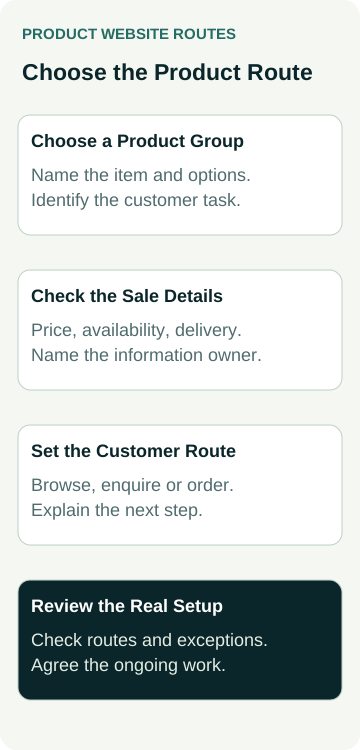
You do not have to make one assumption about every product. Group items by the information and decisions needed to supply them. Then ask the designer which routes the proposed platform and budget can support, including any ongoing work left with your team.
Use this record to compare product groups. Fill it from real business information; an unanswered question stays open until someone can confirm it.
| Decision | Establish Before the Build | Effect on the Proposed Route |
|---|---|---|
| Product selection | Can the customer identify the correct item and options? | Supply clear product information or route suitability questions to staff |
| Price | Can the applicable product and delivery amounts be established? | Define checkout pricing or explain the quote step |
| Availability | Who maintains the relevant stock or supply information? | Agree the availability wording and handling of unavailable items |
| Fulfilment | Can the chosen delivery or collection arrangement be supported? | Define eligible routes and what happens to exceptions |
Record the exceptions as well as the standard path. A mixed approach needs clear buttons and messages so customers understand whether they are browsing, asking for a quote or progressing through an order. Agree who checks that wording against the actual business process.
A Worked Example: Bags and Bulk Garden Supplies
Illustrative planning example only: no actual supplier, stock record, website configuration, transaction or sales result is being claimed.
An example garden-supplies business wants to show bagged products and bulk materials online. For a small selection of bagged items, the owner can supply the relevant product details and proposes a collection route. Bulk deliveries need staff to assess the destination, access and requested amount before supplying a final quote.
The owner asks the designer to scope the bagged-item ordering route separately from the bulk-material quote request. The quote enquiry should identify the material and requested quantity, with enough delivery information for staff to assess it. The customer should understand that sending the request does not confirm a delivery.
For the proposed collection route, the designer is asked to demonstrate product options, availability handling, the customer’s final message and the record received by the business. The owner must also confirm that the team can maintain the information and operate the collection process.
The mixed route is a proposal to evaluate. It does not prove that a particular platform supports every requirement, that stock is synchronised or that checkout will improve sales. The next step is to check the scope, configuration and day-to-day responsibilities.
Ask for a Demonstration of the Exceptions
Have the provider show the ordinary customer route and a few relevant exceptions using the proposed setup. What happens if an item is unavailable, an option changes the price or the customer requests delivery outside the supported area? Check whether the message gives the customer a useful next step.
For a quote route, review the submitted information and the notification the responsible person receives. For an order route, ask the provider to explain the order and payment states, including an interrupted payment where that applies. A screen saying something succeeded needs to agree with the business record.
Agree a safe demonstration method with the provider. Use approved test details and the platform’s appropriate test setup where available. Keep live payments, customer messages and stock changes outside a casual design review; any necessary live check needs its own authorised scope.
Review the route on a phone too. The customer should be able to find the useful product information, choose an available next step and understand the resulting message. Record the exact setup checked and any issue still requiring work.
Put the Content and Ongoing Work in the Quote
Ask the quote to identify which products will be loaded, who prepares the descriptions and images, and how options and categories will be organised. Include the agreed enquiry or ordering routes, required integrations, recurring charges, demonstrations and handover work.
Our questions to ask before accepting a website quote cover the wider scope, access, costs and provider-change discussion. For a catalogue or store, add the person responsible for product updates, availability and requests that arrive after launch.
Measure the steps separately. Product-page visits, quote requests, orders, payments and fulfilled sales are different observations. Use actual records before describing a business result, and review any recurring customer confusion with the people handling enquiries and fulfilment.
When discussing website packages with Australian Web Experts, bring representative products and your current sales process. Ask what catalogue, enquiry or ordering work the proposal can support and what your team would need to maintain.