
Before accepting a new website, check that the business information is right, customers can use the site on their devices and the agreed contact route reaches the right person. Record the result against the agreed scope, then repeat the important checks on the public site after launch.
A preview approval and a verified live website are different stages. Your developer may have tested the build, but you still need to confirm that it describes your business correctly and does what you agreed it should do.
Use the editable launch acceptance checklist to record pass, fail or not tested. The sheet includes space for the environment, evidence, person responsible and retest. It is a practical starting point for a small brochure website; add the specific requirements in your quote.
Agree on What You Are Accepting
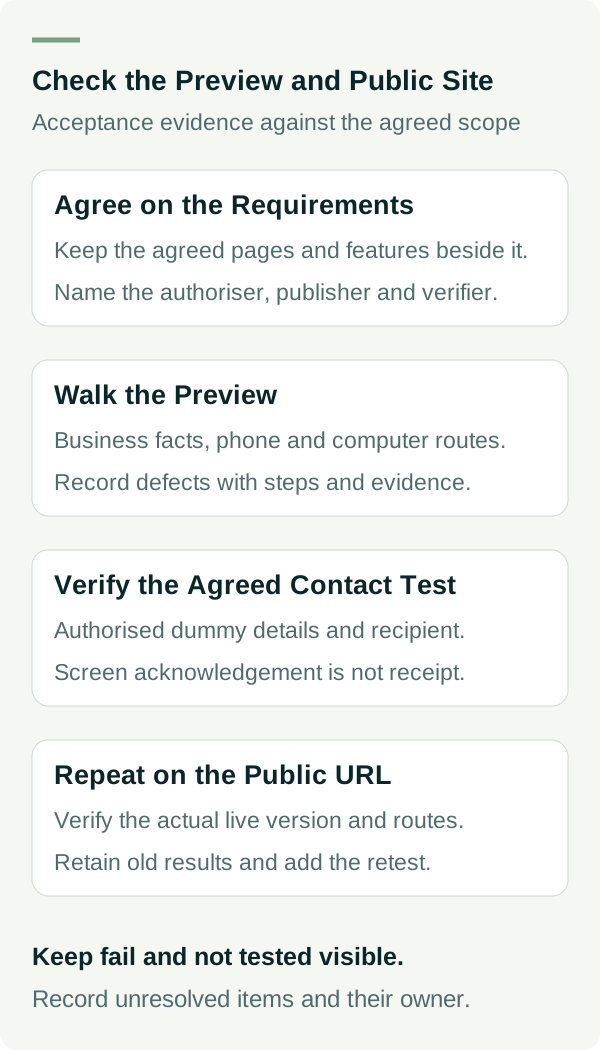
Keep the agreed page and feature list beside the checklist. Check each item against that scope. A missing booking feature is a defect if it was included; it may be a new request if it was not. Record the difference so both sides can make a clear decision.
Agree who can authorise the launch, who carries it out and who verifies the public result. The owner should sign off business facts. The website person should explain technical checks and the recovery plan. Where possible, have someone other than the builder walk through the customer journey.
If you are still deciding what the site needs, use a trade business website brief first. If the quote is unclear, these questions to ask a web designer help settle the scope before acceptance.
Check the Facts a Customer Will Rely On
Read the service descriptions, coverage, phone number, email address and opening information. Check any displayed prices, availability, qualifications and promises against what the business has approved. Look for leftover sample text, example projects, stock-image captions presented as your work and links to the developer's temporary contact details.
Ask whether photographs and reviews are approved for the way they are displayed. A picture that looks good may still be the wrong project or lack the relevant permission. Check captions as well as images.
Read the page as a customer with a particular job in mind. Can you find the relevant service, understand any limits and see the next step? You do not need to judge every design detail to notice that an important service or enquiry route is missing.
Walk the Site on a Phone and a Computer
Open the preview on the devices available to you, record the browser and screen used, and follow the menu and main buttons. Check that text is readable, important content is not cut off and controls can be reached. Rotate the phone if that matters to the layout.
Business.gov.au's website guidance recommends testing navigation, links, content and different browsers and devices before launch. Your own check should focus on the routes customers actually need, rather than a quick glance at the homepage.
Use the keyboard to move through links and controls. Check that you can see which control has focus and that menus and forms can be used without a mouse. Ask the website person to investigate anything that traps you or hides the selected control. This is a useful check, not a complete accessibility assessment or a compliance certificate.
Test the Contact Journey Through to Receipt
Agree a controlled test with the person receiving enquiries. Use an authorised test address and clearly labelled dummy details. Confirm the expected acknowledgement and that the intended recipient receives the message. A success message on the screen alone does not prove delivery.
Try leaving a required field blank and entering an invalid email format. The form should explain the problem and let you correct it. W3C's form validation guidance describes useful validation and correction behaviour. Do not use someone else's personal information or repeatedly submit tests without the recipient's agreement.
Check that phone and email links open the intended destination. Opening a dialler is enough to check the number; placing a call is a separate action that should be agreed. For booking, payment, upload or CRM features, use the approved test method. Avoid creating real appointments, charges or misleading sales records to prove a button works.
If tracking is included, ask what its contact event means and how it was tested. A button click may be a contact action rather than a received enquiry. Keep those results separate from the delivery test.
Let the Website Person Verify the Live Technical Basics
Ask for a check of the intended public address, secure connection, important page responses and links. Agree which pages should be eligible for search indexing. A password-protected preview may be intentional; carrying preview restrictions onto the public site can prevent the intended pages from being indexed.
Google's robots meta documentation explains that a noindex directive prevents an indexed page from appearing in search when Google can crawl and see it. Do not blindly remove restrictions from private pages. Have the website person verify the intended public/private scope, including any HTTP header directives.
Successful launch does not guarantee immediate indexing or a search position. Record the technical observations you can verify and any follow-up separately. For an existing site replacement, preserving old addresses, email and other dependencies needs its own migration plan; this checklist does not replace one.
Record Defects With Enough Detail to Retest
“The form is broken” is hard to act on. Record the page, device, steps, expected behaviour and what happened. Attach a redacted screenshot if it helps. Avoid including credentials or private messages in the evidence.
Mark an item as fail when an agreed requirement does not work, and not tested when you have not checked it. For each unresolved item, assign a person and decide whether it blocks launch. A failed enquiry delivery check usually matters more to a service business than a minor spacing issue, but agree the decision against your scope.
After the fix, repeat the steps in the same environment, then check other affected routes. Retain the old result and add the retest. That makes it clear what was corrected and what still needs attention.
Repeat the Important Checks After Launch
Open the actual public URL, preferably in a fresh browser session, and repeat the main service, mobile and contact checks. Verify the live version rather than relying on the preview screenshot. Record the actual release time and who checked it.
The final acceptance record should state what passed, what remains unresolved, who owns follow-up and how support is requested. Keep the checklist somewhere you can find it when a future update changes the same route.
Need a practical website with a clear scope and customer journey? View our small-business website options, or talk to Matt about what your site needs.