
A useful website brief tells a designer which jobs you want, who your customers are, where you work and what someone should do next. Add the facts, photos and practical constraints needed to build it. You can start with a short document and fill the gaps in a conversation.
“We need a modern website” tells the designer very little. “We want bathroom renovation enquiries from homeowners in our actual service area, with enough information to decide whether an on-site discussion makes sense” gives them something to build around.
The Australian Government's guide to setting up a business website starts with website goals and customer needs. The brief below turns that planning into a document you can send with a quote request.
Start with the Work You Want to Win
Write down your main service and the customers you want to reach. Then list the work you do not take on. Both help the designer write accurate service information.
For example, an example renovation business might want complete bathroom renovation enquiries from owner-occupiers. It might exclude small repair jobs and labour-only subcontracting. A homepage that lists “all building work” would miss that distinction.
Choose one main customer action. It could be a call, a quote request or a booking through an existing system. You can offer more than one contact option, but decide which one needs the most attention.
Define a useful enquiry in plain language. For that renovation business, it could mean a homeowner in its service area describing a full bathroom project and leaving details for a callback. You can then assess enquiries against the work you want, rather than counting every form submission as a success.
Describe the Customer Questions the Pages Must Answer
Start with questions you already hear on calls or site visits. Write down the answers you are comfortable publishing.
A customer might need to know whether you take on their type of job, whether you work in their suburb, how your quoting process starts and what information to prepare. They might also ask who supplies materials or whether they can keep using the property during work. The right questions depend on your service.
Be specific about the limits. If timing depends on an inspection or supplier availability, say that. If you do not publish a fixed price, explain the information needed for a quote. Avoid putting an attractive number or turnaround on the site when you cannot stand behind it.
Google's SEO starter guide recommends useful, clear content and descriptive page titles. Answering real customer questions gives the designer material for that work; it does not guarantee rankings.
Use This Trade Website Brief Template
Copy the fields below into a document. Write “needs discussion” when you are unsure, and name the person who will decide it. Do not put passwords or customer records in the brief.
| Field | What to write |
|---|---|
| Business and contact | Trading name, public contact details and who approves the website |
| Main services | The work you want to promote, in order of importance |
| Work you exclude | Jobs, customer types or locations you do not take on |
| Customers | Who hires you and what usually makes them contact you |
| Actual service area | Places you service and any travel or availability limits |
| Main website action | Call, request a quote or use an existing booking system |
| Useful enquiry | The details that help you assess and respond to a request |
| Customer questions | Common questions and accurate answers for each service |
| Proof and permissions | Job photos, testimonials and credentials you can publish |
| Proposed pages | Pages you think you need and the purpose of each |
| Content responsibility | Who writes, checks and approves words and images |
| Existing website | Current address, useful pages and functions to preserve |
| Connected services | Email, booking, enquiry and other systems the site relies on |
| Editing and support | Changes you want to make yourself and support you need |
| Budget and timing | Available budget, tax basis, ongoing costs and real deadline |
| Launch acceptance | What you and the designer will check before it goes live |
Download the trade website brief worksheet (CSV) or the editable brief template (Markdown).
This is an AWE planning template. Adapt it to the job and discuss the scope with your designer.
A Completed Example for a Bathroom Renovator
This is an example business and brief. The example shows how to make choices clear; it is not a client case study or a suggested service promise.
Business: Example Bathroom Renovations. The owner checks the facts and approves the finished site.
Work wanted: Complete bathroom renovations for homeowners. Full projects take priority over minor repairs. Small repair jobs and labour-only subcontracting are excluded.
Service area: The owner's confirmed list of suburbs. The website must use that list. Requests outside it should be discussed before any availability is promised.
Main action: Request a callback about a renovation. The customer can also call during the business's stated contact hours.
Useful enquiry: Name, contact details, suburb and a short description of the project. Photos can be discussed during the follow-up rather than required to make the first enquiry.
Questions to answer: What a full renovation includes, how the initial discussion works, what affects the quote and how materials are chosen. The owner must supply the answers before those sections are approved.
Proof: A small selection of completed projects with permission to publish the photos. Captions describe the work without customer addresses. Credentials are checked before being displayed.
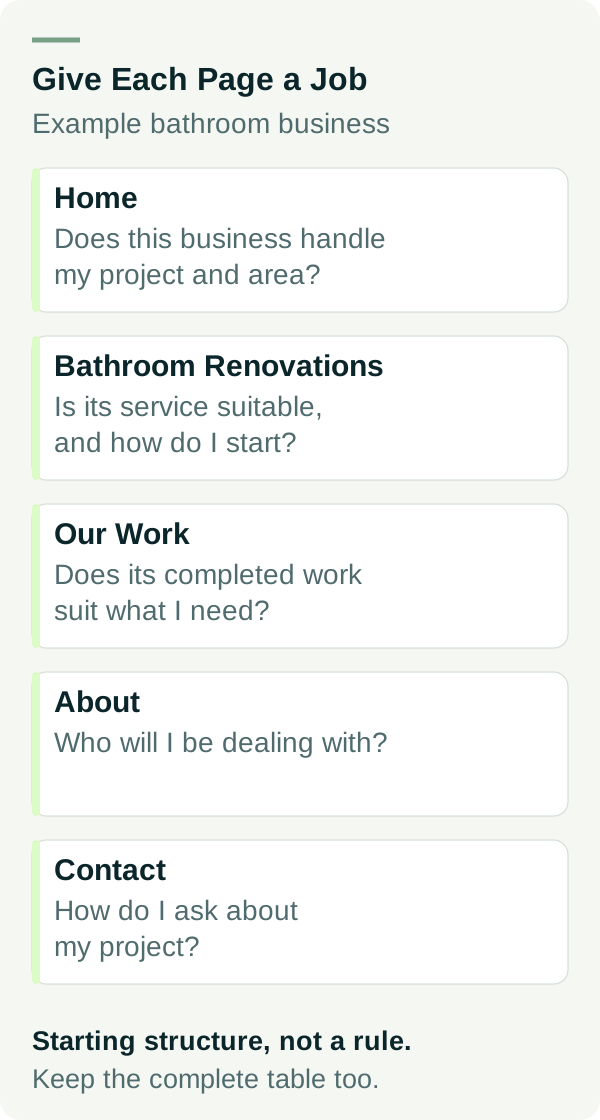
Proposed pages: Home, Bathroom Renovations, Our Work, About and Contact. This is a starting structure for this example, not a rule that every trade business needs five pages.
Content: The designer drafts from an interview and supplied material if that work is included in the quote. The owner checks services, service areas and claims.
Launch checks: Read the main pages on a phone, check the menu and contact links, complete an agreed form-delivery test and confirm account handover. Existing email must keep working.
The owner can send that brief to several designers and compare proposals against the same task.
Give Each Proposed Page a Job
A page list becomes more useful when you say what each page must help the visitor decide. Use this map with your designer:
| Page in the example | Customer decision | Material needed |
|---|---|---|
| Home | Does this business handle my project and area? | Main service, confirmed area, selected proof and contact route |
| Bathroom Renovations | Is its service suitable, and how do I start? | Scope, exclusions, process and quote information |
| Our Work | Does its completed work suit what I need? | Permission-cleared photos and factual captions |
| About | Who will I be dealing with? | Accurate business background and checked credentials |
| Contact | How do I ask about my project? | Contact options, enquiry fields and next-step explanation |
Add a separate service page when a different service needs its own explanation. Use your brief to discuss that choice. Creating pages for services you do not offer or areas you do not serve gives customers the wrong information.
List the Material You Can Supply
Make a folder for the logo, photos and text you are entitled to use. Add a simple list saying what each item shows, whether permission has been confirmed and who still needs to check it.
For customer quotes, prepare the source, approved wording and testimonial context before the designer builds the cards.
If material is missing, tell the designer early. They can explain whether the quote covers writing, photography or another suitable image source. Do not assume “content included” covers every one of those jobs.
If someone else will write the pages, check how the writer will learn your business and who will confirm the draft's claims.
For forms, ask for clear labels and instructions. W3C's form instructions guidance explains that placeholder text inside a field does not replace a label. In the brief, describe the information you need; let the designer explain how the form will be made usable and tested.
Flag the Existing Website and Email Before Anyone Changes Them
If you already have a site, list pages that bring useful enquiries, links you have shared and anything customers download or use. Include any booking service and email connected to the domain. Supply account names and the person who controls access, with credentials handed over securely later.
Ask the designer to review what should stay and what needs a planned change. A redesign can involve more than replacing the homepage. Important page addresses and connected services deserve attention in the scope.
If you are buying your first site, state how you want to update it and who should help after launch. Our website packages show the current AWE options to discuss against your brief.
Agree on the Review and Handover
Name one person who collects feedback and approves changes. Give the designer a realistic date for receiving your material. A deadline has more meaning when everyone knows what must be supplied to meet it.
Add an acceptance checklist to the brief:
- Services, areas, contact details and public claims are correct.
- Photos and testimonials have permission for the intended use.
- Main pages, navigation and contact options work on agreed devices.
- Form labels, errors and confirmation are checked, with delivery tested by agreement.
- Important existing pages and connected services have been accounted for.
- Domain, website and other agreed account access is handed over securely.
- Ongoing costs, editing arrangements and support responsibilities are clear.
Once the brief is ready, use our questions to ask a web designer to check the proposal you receive.
Have the business facts ready but need help turning them into a website scope? Talk to Matt about the jobs you want to win and how customers should enquire.