

Before adding a social media feed to your website, agree which account and posts it may display, how updates reach the page and what appears when the connection fails. A grid that looks good in a mock-up leaves those decisions open.
For an Australian service business, recent posts might help someone explore the work or find the business’s social profile. Keep the service explanation and enquiry route on the website itself. A visitor should not need a working feed or a social-media account to understand what you offer.
Approve the content rule as well as the layout. An automatically changing section needs an owner after the website launches.
Choose a Feed, Selected Posts or a Profile Link
Start with the customer’s task. Do you want to show a changing selection of recent work, discuss one particular project, or simply help people find your social account? Those requests can lead to different website features.
A profile link may be enough when the main purpose is to invite people to follow the business. Selected posts or a maintained project gallery can offer more control over what appears on a service page. A changing feed is worth discussing when the account’s continuing content suits that page.
WordPress.com’s Instagram integration guide distinguishes an individual embedded post, a latest-posts feed and a social icon linking to a profile. That is a platform example, not a promise that your website has the same options. Ask the provider to name the actual method in the proposal.
Separate website integration from producing social content. Designing posts, writing captions, publishing regularly and answering messages are additional responsibilities. A feed does not supply those services merely because it displays material from an account.
Set the Content Rule Before Connecting Anything
Name the account, the website pages and the types of material intended to appear. Then review representative posts, including ones that might be unsuitable: an expired promotion, an unrelated personal update, a collaboration or work with uncertain publication arrangements.
Ask whether the proposed system displays every eligible recent post, a manually chosen collection or a filtered selection. If approval, exclusions or particular post formats matter, have the provider demonstrate that behaviour. Do not assume a feature labelled “Instagram feed” includes moderation or supports every kind of post.
Decide how to handle captions, dates and destinations. A photograph can remain attractive after the offer described beneath it has ended. Check what will actually be visible and whether a customer could reasonably mistake historical material for a current service or promotion.
Our project-gallery guide covers factual captions and publication records. Apply that care to the material you plan to display through a feed. If the website use of a particular post is uncertain, hold it while the responsible person checks the arrangement.
Keep important facts outside the changing section. Service availability, coverage and enquiry instructions should have an approved place on the website. A later social post should not quietly become the only explanation of those arrangements.
Ask How Updates and Exclusions Work
Request a demonstration of what happens when an eligible post is added, changed or removed. Ask how long the website may take to reflect a change and whether it keeps an earlier copy while refreshing. Record the behaviour the chosen provider actually supports rather than promising instant updates.
Also ask what happens when you exclude a post. Does that change only the website selection, or is someone proposing to alter the original social content? Keep those actions separate in the brief. Removing material from one display should not be treated as authority to delete it elsewhere.
WordPress.com’s Latest Instagram Posts documentation describes an account connection and settings for its particular block. Other systems can have different account requirements, display controls and maintenance arrangements. Check the current documentation and demonstrate the exact proposed setup before committing to it.
Use this short acceptance record alongside the named integration:
| Situation | Decision to Agree | Demonstration to Request |
|---|---|---|
| A suitable new post is published | Whether it appears automatically or waits for selection | The supported update process and expected delay |
| A post should stay off the website | Who excludes it and what that action affects | The exclusion in the actual website display |
| A displayed offer becomes outdated | Who reviews the caption and removes or replaces it | The affected post, page and approved response |
| The feed cannot load or refresh | What the page retains and who investigates | The unavailable state and continuing enquiry route |
Keep the Page Useful When the Feed Is Unavailable
Ask to see the proposed page without a working feed. Does it leave a large empty section, show an unexplained error or retain a useful message and next step? Agree the intended result before the developer implements it.
A fallback might provide a labelled profile link when that destination remains useful. It might instead omit the feed section while retaining the project gallery, service information and contact route. The appropriate choice depends on the page; a link to the same unavailable material is not automatically a useful fallback.
Discuss what loads when the page opens and what can wait. MDN’s HTML performance guidance explains that embedded content can affect loading performance. Ask the provider to assess the actual integration and record the conditions of its checks. A small-looking grid does not establish a small loading cost.
Include any privacy or consent handling the responsible provider identifies for the actual setup. Have them explain the required scope rather than assuming every social embed behaves alike. This brief does not determine legal requirements or configure account permissions.
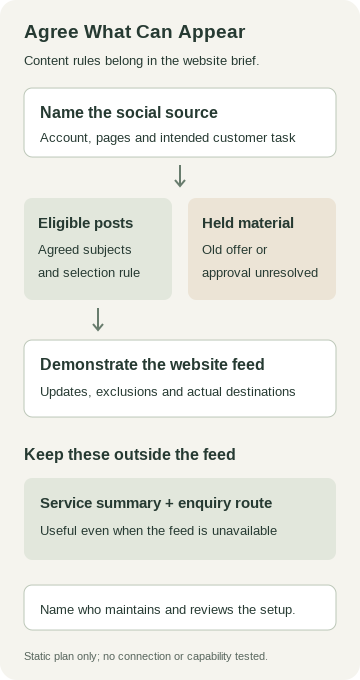
A Worked Example: A Signwriting Studio’s Project Posts
Illustrative example only: this is not an AWE client, a connected feed or a measured result.
A signwriting studio wants recent project posts beneath its service information. The account contains completed signs, occasional team updates and an old promotional offer. The owner wants project material on the website but has not approved that old offer for continued display.
The provider is asked to demonstrate whether the proposed integration can deliver the required selection. If it cannot reliably exclude the unsuitable material, the owner can consider selected embeds or a maintained gallery instead. They do not approve an unrestricted feed on the strength of four hand-picked mock-up images.
The proposal also needs to explain how an approved new project reaches the page and what happens when the connection is unavailable. The written service details and enquiry link remain outside the feed.
The old promotion stays unresolved until the owner decides its treatment. No account is connected, no post is removed and no supplier capability is established by this example. It gives the owner a concrete selection decision to take to the provider.
Review the Customer Route and Ongoing Work
Inspect the implemented page on a phone and computer. Check the visible captions, crops, controls and destinations. Ask what selecting a post opens, whether that handover is understandable and how someone returns to the website’s service information.
Include keyboard use and the relevant media alternatives in the agreed review. If the feed displays video, the separate website video brief covers playback, captions and information available without watching. A screenshot of the feed does not prove those interactions work.
Name who maintains the account connection, reviews unsuitable material and investigates failures. Ask what the agreement includes if a supplier or platform changes, whether any licence or ongoing fee applies, and what needs a separate quote. Use the website maintenance-plan guide to separate content work, monitoring, support and repairs.
When comparing AWE’s website packages, bring the intended page, content rule and four situations above. Contact Australian Web Experts to discuss the actual integration and review scope. Keep successful display checks separate from later evidence about social followers, suitable enquiries or accepted work.