
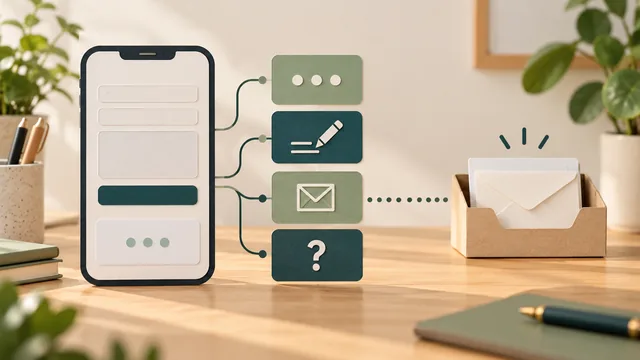
After someone sends an enquiry, show a clear message that explains what happened and what they should do next. Match the wording to the result your system can confirm. A request received by the website is not automatically a confirmed booking, an accepted job or proof that a notification reached the business inbox.
Plan this feedback alongside the form itself. Customers need useful guidance when details are missing, while a request is being sent, after it is accepted and when the result is uncertain. Writing those messages before the design is finished helps the owner and developer agree what each one means.
Confirm the outcome you know. Explain the next step without promising a response time, appointment or service the business has not agreed to provide.
Define What the Confirmation Can Truthfully Say
Ask the developer what event causes the confirmation to appear. Does the website show it after a successful response from the enquiry system, or merely because someone pressed the button? The customer-facing message needs to correspond to the actual outcome, rather than masking an unfinished request.
Separate the stages in your planning notes. The website may accept the request, store it in an agreed system, send a notification and trigger a customer acknowledgement. Those are different events. Ask which stages the implementation checks and how a failure at each stage will be handled.
Choose a statement that fits the verified behaviour. If the website has accepted a quote request, say that the request was received and explain the agreed review process. Do not say that a site visit is booked if someone still needs to assess the job and arrange a time.
Keep internal delivery details out of the public message unless they help the customer act. The customer usually needs to know whether to wait, correct something or use another route. The business and developer still need their own evidence that the request reached the agreed destination.
Give the Customer a Useful Next Step
Ask the person who handles enquiries what happens after a suitable request arrives. They might review the job details, check service coverage and contact the person using the details supplied. Describe the actual process in short, familiar language.
Include a response expectation only when the business has agreed it and can maintain it. Account for the real working arrangements rather than copying a website template's promise. If a different message is needed during a closure, assign someone to update it and restore the normal wording afterwards.
A useful next step may be to read a short explanation of the quoting process or keep relevant project information ready for a conversation. It should fit this enquiry. Do not require customers to join a mailing list, book an unrelated call or complete another long form to finish a request they have already sent.
If a confirmation email or reference number is part of the agreed system, explain it accurately. Do not tell customers that an email has been sent when the website cannot establish that event. A reference helps only if the business can recognise and use it when someone asks about their request.
Keep Errors and Uncertain Results Clear
W3C's form-notification guidance recommends concise feedback for both successful submissions and errors. Error messages should explain the problem and how to resolve it. A generic “Something went wrong” leaves the customer to guess which action is useful.
For a missing required detail, identify the relevant field and explain what is needed. A message such as “Enter an email address so we can reply” is useful only if email is the contact method required by that actual form. Align the message with the agreed field rules.
During submission, make it clear that the request is being processed. Ask the developer how repeated button presses are handled. A progress message and suitable button behaviour should support the real request process, without implying that every duplicate request has been prevented.
An interrupted connection can leave an uncertain outcome. Agree how the system handles that case before telling customers to submit repeatedly. The message should explain what is known and provide an appropriate recovery or contact route. The developer needs to consider whether the original request may already have been accepted.
Where correction is possible, avoid making people re-enter unrelated information unnecessarily. Have the developer decide how to preserve useful entries within the site's actual privacy and security requirements. The public message should help the person recover, not expose technical errors or private information.
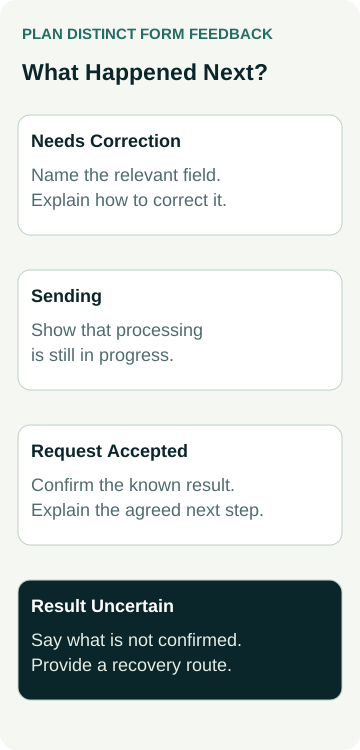
Write a Message for Each Submission State
Use a short state record when briefing the designer and developer. The wording below describes the job of each message; it is not a claim that these states already exist on your website.
| Submission State | Message Must Explain | Next Action |
|---|---|---|
| Details need correction | Which detail is missing or unsuitable and how to fix it | Return to the relevant field |
| Sending | The request is still being processed | Wait for the result shown by the system |
| Request accepted | What was received and the agreed follow-up process | Follow the relevant instruction or leave the page |
| Result uncertain | What cannot be confirmed and the available recovery route | Use the instructed check or contact option |
For every state, record the event that triggers it, the approved words and who maintains them. If two outcomes need different advice, avoid using one generic message for both simply because the design has room for one text box.
Decide whether feedback appears beside the form or on a separate confirmation page. Either approach needs a clear result and an accessible route onwards. A separate page should not suggest success merely because someone can open its address directly; agree the behaviour with the developer.
A Worked Example: A Fencing Quote Request
Illustrative example only: this is not an AWE client form, live submission or measured enquiry result.
A fencing business accepts requests for a site-specific quote. Its website does not book installation dates or provide an immediate final price. The owner wants the completion message to make that distinction clear.
After the system has accepted the request, the proposed on-screen wording is: “Your fencing quote request has been received. Our team will review the details and contact you using the information provided to discuss the next step. An installation date has not been booked.” The business must approve that process and the developer must connect the wording to the appropriate result.
The message does not promise a same-day call or imply that the business has accepted the work. If the owner later agrees a response window, they can add the verified wording with a maintenance owner. A template should not make that commitment on their behalf.
The designer also prepares a correction message for a missing required contact detail and a distinct message for an uncertain submission. The developer defines when each appears and how the customer recovers. The quote-request confirmation is not reused for an error.
Before launch, the owner and developer agree a controlled test and check the customer-facing result separately from receipt in the agreed business destination. This example describes a design and test plan; it does not prove that a real request was delivered or that any fence was sold.
Make the Feedback Noticeable and Accessible
Show the message where someone following the form can find it. Use readable wording and presentation that works at phone sizes and with larger text. Do not rely on a colour change or an unexplained icon to communicate whether the person should correct a field or wait for follow-up.
W3C's status-message guidance addresses updates that should be available to assistive technologies without moving focus. Ask the developer or accessibility reviewer to check the actual implementation, including relevant progress, result and error messages. A visible message alone does not demonstrate that a screen reader announces it.
If the form moves to another page or changes focus, include that behaviour in the review. Agree how keyboard users reach the feedback and any correction controls. The appropriate implementation depends on the form; an owner walkthrough is not a complete accessibility assessment.
Keep the overall journey understandable too. Our mobile enquiry-path check covers the broader route from service information to contact. The separate form-fields guide helps decide what to ask before the person submits.
Test Completion and Business Receipt Separately
Agree the test mode, inputs, destination, recipient and cleanup before submitting anything. A live form can create real messages, records and follow-up work. Use controlled test details and avoid booking, payment or other commitments unless that exact test is authorised.
Check the agreed correction, progress and completion behaviours on the relevant devices. Where an uncertain or failed result needs testing, ask the developer to reproduce it safely in a suitable test environment. Record what was observed and what remains untested.
Then verify receipt at the agreed business destination. If customer acknowledgement is included, verify that separately as well. An on-screen confirmation, a notification email and a customer reply are distinct evidence. Record a delivery gap as unresolved rather than treating the confirmation page as proof.
When discussing a small-business website package, bring the state record and approved follow-up process. Agree the design, message behaviour and delivery checks in the actual scope. Suitable enquiries, accepted jobs and revenue still require their own business records after the form works.