

A trade enquiry form should collect enough information to decide whether you can help and how to reply. Start with the job type, suburb, a short description and one usable contact method. Make extra details optional unless the person handling enquiries can explain why they are needed at this stage.
A repair request and a quoted renovation need different follow-up questions. Asking both customers to complete the same long questionnaire can create work without helping you assess the job.
Use the repair-versus-project field matrix to plan the form. The recommendations are a starting point to adapt to your services, rather than a universal form specification.
Work Back From the First Decision
Ask the person who answers enquiries what they need to do next. Usually they need to check the service, confirm coverage and contact the customer. A detailed quotation, site visit or booking can require more information later.
For each proposed field, complete this sentence: “We need this now to decide ___.” If nobody can name the decision, leave the field out or ask during follow-up.
If those inputs will produce an estimate, agree the calculator's units, rules and result meaning separately.
For a repair, the first decision might be whether the fault is within the work you handle. For a renovation, it might be whether the project fits your scope and needs an assessment. Neither customer necessarily knows the technical cause or exact specifications.
The W3C's forms tutorial recommends asking for information needed to complete the process. It does not prescribe a winning field count or promise more sales from a shorter form.
Compare Repair and Project Needs
The matrix below is an adaptable planning example for an example trade business offering scheduled repairs and quoted projects. It does not imply that your business offers emergency work, particular services or response times.
| Information | Scheduled repair enquiry | Quoted project enquiry | Why / when to ask |
|---|---|---|---|
| Job or service type | Required | Required | Route the request; include “not sure” if customers may not know |
| Suburb or postcode | Required | Required | Check genuine coverage before requesting an exact address |
| Short description | Required | Required | Understand the need in the customer's own words |
| Usable contact method | Required | Required | Obtain at least one method the business can use; do not automatically require both phone and email |
| Name | Optional initially | Optional initially | Useful for addressing the reply; decide if your actual workflow requires it |
| Exact street address | Follow-up unless needed to assess this request | Follow-up unless needed to assess this request | Collect when there is a clear reason, such as arranging an agreed visit |
| Photos | Optional | Optional | Can add context; retain a route for people who cannot upload |
| Preferred timing | Optional | Optional | Ask for a preference without implying availability or a confirmed booking |
| Product model / technical details | Optional if known | Optional if relevant | A customer may not know; do not force a guess |
| Plans or dimensions | Usually follow-up | Optional initially | Useful for some projects, but not everyone has plans ready |
| Budget range | Usually omit initially | Optional if it helps assess project fit | Explain why; include “not decided” rather than forcing an invented figure |
| “How did you hear about us?” | Optional | Optional | Supporting self-reported source information, separate from job assessment |
“Required” here means the example business has a reason to need that information before replying. Your business may make a different choice. Record the reason, not just the setting.
Offer One Workable Way to Reply
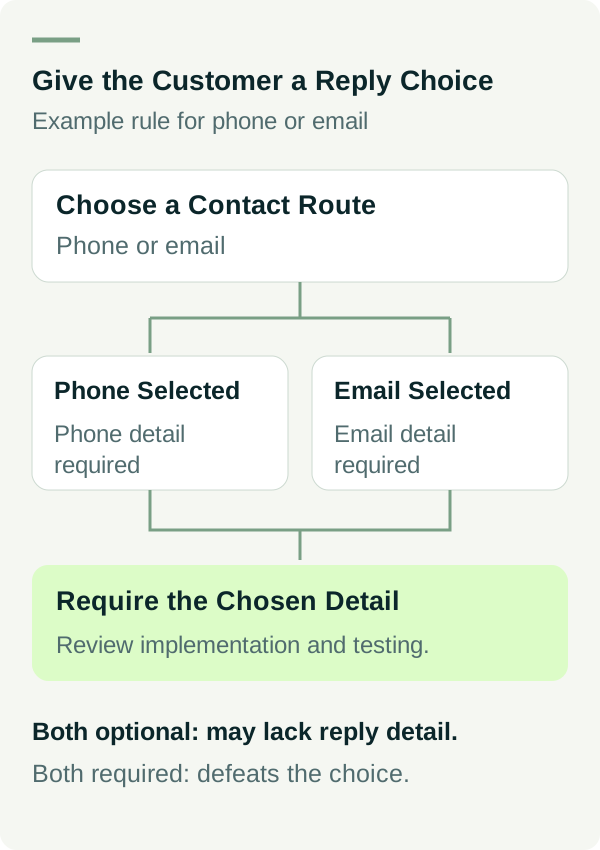
If customers can choose phone or email, the form should require the chosen contact detail. It should not reject a phone-only request because an unused email field is empty.
That needs careful implementation and testing. A pair of fields both marked optional can let an enquiry arrive with no way to reply. A pair both marked required defeats the choice.
If your team only uses one contact route, explain that and ask for the detail it needs. Add any calling-hours or reply-time wording only after the owner confirms it. A preference such as “afternoon” is a request, not an appointment.
Keep marketing choices separate from the enquiry details. Decide what information you need, explain its purpose and link the business's applicable privacy information. Avoid asking for identity documents, payment details or other sensitive records on a general first-contact form.
Let Customers Describe the Problem Plainly
Use a short service selector when it helps route work. Include a sensible “not sure” option and a message field. People should not need to diagnose a fault or learn your internal product names before asking for help.
For an example repair form, a useful prompt is “What needs attention? Tell us what you have noticed.” For an example project form, it could be “What would you like changed, and what stage is the project at?”
These prompts ask for context without inviting unsupported promises. Avoid wording that suggests the form produces an instant diagnosis, fixed price or guaranteed appointment if the business still needs to assess the job.
If the business has an approved route for time-critical work, make that route and its operating conditions clear. A general enquiry form should not imply constant monitoring merely because it accepts submissions at any hour.
Make Uploads Genuinely Optional
A photo can help explain visible damage or the space involved in a project. It cannot establish everything needed for a quote or technical assessment.
If you support uploads, show accepted file types and size limits before the customer chooses a file. Give a useful error when a file fails, and allow the enquiry to continue without it where your workflow permits.
Ask customers to avoid unnecessary personal details in images. Keep the files within the private enquiry process. Sending a photo to help assess work is a different purpose from publishing it in a project gallery.
If secure uploads are not supported, offer a reviewed follow-up process rather than displaying a button that does not work. The owner and developer need to agree how files will be stored, accessed and removed.
Label Fields and Explain Mistakes
Use visible labels and clear required/optional wording. Example text inside an empty box can help, but it disappears as someone types and should not replace the label. See W3C's form instructions.
Error messages should tell the customer which field needs attention and how to fix it. “Enter the phone number we can call” is more useful than “Invalid input”. Keep information already entered when a recoverable error occurs.
Validation should accept reasonable input formats. A phone number with spaces should not fail merely because the business stores numbers without them. W3C's validation guidance also explains why checking in the browser does not replace server-side validation.
These are implementation checks, not a claim that a particular plugin makes the whole form accessible or secure.
Check the Full Enquiry Path
Use the form review sheet to agree a controlled test with the person responsible for the website. Test the supported routes in an appropriate test environment before making a live change.
Check that required fields are enforced, optional ones can be skipped, upload errors are understandable and keyboard users can reach the controls. Review the form on a small phone screen as well as a desktop.
Then check where the request is accepted and where the team handles it. A visible success message alone does not independently confirm that the business received the request. Use the intended private record to verify acceptance and routing. Keep clearly labelled tests out of genuine enquiry counts.
Review what customers must do next. “Request sent” should not be mistaken for a booked visit or accepted quote. Publish a response expectation only when the business can support that wording.
Give Your Designer a Field Decision, Not a Wish List
Use the blank field decision sheet to record each field, its purpose, whether it is required and who uses it. Include the contact-choice rule, file handling and the expected acceptance check.
If the form is part of a new website, bring those decisions into the website scope. Review our website packages or talk to Matt about the work you want and the information needed to assess it.