
Before approving a font for your business website, ask the designer to identify the exact font, the arrangement for using it on the website and what you will receive at handover. Then review it with your real headings, service descriptions and enquiry buttons.
A brand guide or attractive mock-up is a starting point. The website proposal still needs to explain how the selected text will appear in a browser, whether an ongoing service is involved and who keeps that arrangement working after launch.
For an Australian business commissioning a website, these questions belong in the build scope. Resolve them while the designer can still adjust the selection, rather than discovering an unanswered subscription or handover question when you change provider.
Identify the Font and Its Job on the Page
Ask for the font family, the particular styles or weights and the source. Record where each will be used: headings, paragraphs, navigation, buttons or another defined role. “Use the brand font” can leave several of those decisions open.
If you already have branding files, tell the designer what was supplied and by whom. Ask them to establish the website arrangement for the selected font. A font installed on somebody’s computer or visible in an old PDF is not, by itself, an explanation of that arrangement.
Use representative content when judging the choice. Include a long service heading, a realistic business name, phone numbers, punctuation and any languages the site needs. Ask which characters and styles the proposed setup supplies. Do not assume that a sample containing a few English words establishes coverage for everything your business will publish.
Also clarify whether the font is part of the logo artwork, ordinary editable website text or both. Identify each intended use so the provider can explain what is covered. This record does not determine rights from the appearance of the lettering.
Ask How the Font Is Licensed and Delivered
Have the designer identify the supplier’s terms and explain how the proposed website use is covered. Record who arranges any licence, who pays and which business or account the arrangement belongs to. Ask about conditions relevant to the actual site and planned handover.
Keep the right to use a font and the method of loading it connected in the record. A service may supply fonts through an external embed, while another arrangement may supply permitted files for the website to serve. Have the provider confirm the method for this selection; neither approach should be inferred from a screenshot.
For a specific example, Adobe’s web-font documentation says its service uses Adobe-provided embed code and that a client website needs the client’s own Creative Cloud subscription. It does not permit self-hosting its web-font files under that service arrangement. Adobe also explains that cancelling the subscription removes those web fonts from the website, leaving the configured fallback fonts or browser defaults.
Those are Adobe Fonts service conditions, not a rule for every font supplier. If a different licence or delivery method is proposed, ask for the relevant terms and confirmation. Do not ask the designer to copy restricted files into the handover folder as a shortcut.
If a term or proposed use remains unclear, hold that selection while the supplier or an appropriately qualified adviser clarifies it. A website invoice, file extension or font name cannot settle an unclear permission on its own.
Review the Text When the Preferred Font Is Unavailable
Ask the designer which alternative fonts the website will use if the preferred font is unavailable, and how text is handled while it loads. This is a design and implementation question to demonstrate on the actual draft.
The MDN documentation for font-display explains that this setting controls display behaviour according to whether and when a downloaded font becomes ready. It is one part of the setup, rather than evidence that the finished page has been checked.
Agree a controlled preview check with the developer. Review the heading, paragraph, navigation and button text in the proposed fallback arrangement. Does a longer heading still fit? Is the enquiry button understandable? Does anything important disappear or overlap on a narrow screen?
Check ordinary reading too. A decorative heading treatment may suit a short title but be unsuitable for a long service description. Ask the designer to show the intended text sizes, emphasis and line spacing in context. Our website draft-feedback guide helps turn an observation into a specific revision request.
Keep accessibility review broader than a font choice. Our accessibility scope guide covers agreeing the checks for the website. An attractive font or a successful fallback preview does not establish that the whole site meets an accessibility standard.
Keep a Font Setup Record With the Website
Ask the provider to complete a short record before final approval. Keep purchase and account evidence privately; the public website needs only the implementation and attribution appropriate to the arrangement.
| Item | Ask the Designer | Keep With the Handover |
|---|---|---|
| Font and purpose | Which family, styles and character coverage are used in each page role? | Exact selection, source and intended heading, body or interface use |
| Website permission | How do the supplier’s terms cover this business and proposed use? | Applicable terms, licensing explanation and unresolved questions |
| Loading arrangement | Are fonts supplied by an external service or permitted website files? | Delivery method, responsible account and ongoing dependencies |
| Fallback and review | What appears when the preferred font is unavailable? | Fallback selection, agreed preview checks and findings |
| Future changes | What must happen when the provider, account or design changes? | Responsible person, available records and permitted handover material |
Record what the designer has actually confirmed. “Supplier confirmation requested” is useful when the answer is outstanding. Avoid marking the whole font arrangement complete because the first mock-up looks right.
A Worked Example: Keeping the Brand Without an Unclear Dependency
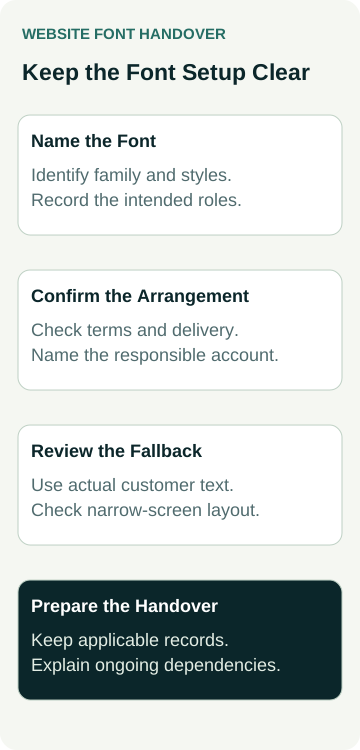
An example electrical business is commissioning a new website. Its brand guide names a heading font, and the designer has used it in a draft. The owner wants the finished site to retain the agreed appearance if another provider manages it later.
The owner asks for the exact family and weights, the source and the proposed website delivery method. They also ask who holds any required subscription and what must be maintained after launch. The existing brand guide is retained as a design reference, while the website-use explanation is recorded separately.
Suppose the proposal uses the Adobe Fonts service. The parties need to resolve the client subscription and web-project arrangement described by Adobe before relying on it for the finished site. A folder containing a desktop font file is not substituted for that service setup.
The designer then proposes a fallback and shows the business’s longest service heading, navigation and enquiry button in a controlled preview. If the heading wraps awkwardly, the feedback identifies the page, viewport and observed text. The designer can revise the treatment and show the result again.
The handover record identifies the font setup, responsible account, applicable records and any outstanding action. This example describes a planning and review process. No font licence has been purchased, account transferred, restricted file copied or customer website tested here.
Agree What Happens After Launch
Ask who retains the font record and who is responsible for reviewing changes. A new website domain, a replacement font, an account cancellation or a move to another provider may need the arrangement revisited. Have the provider identify the relevant checks rather than assuming every change has the same consequences.
Confirm what files and records can be supplied, what stays with an external service and how a future provider can understand the setup. Use appropriate account access or an agreed handover process; sharing somebody’s private account password should not be the plan.
If another provider will edit the site, include a review of the actual font treatment after the change. Keep permission evidence, the configured setup and visual checks as distinct parts of the handover. None of them establishes a search-ranking or enquiry improvement.
A useful handover lets the next provider identify the selected font, find the applicable arrangement and understand how the page should behave when that font is unavailable.
When discussing website packages with Australian Web Experts, bring your brand guide and available font-source records. Ask what the proposed design and handover scope includes, including any font costs or ongoing dependencies that need your approval.