

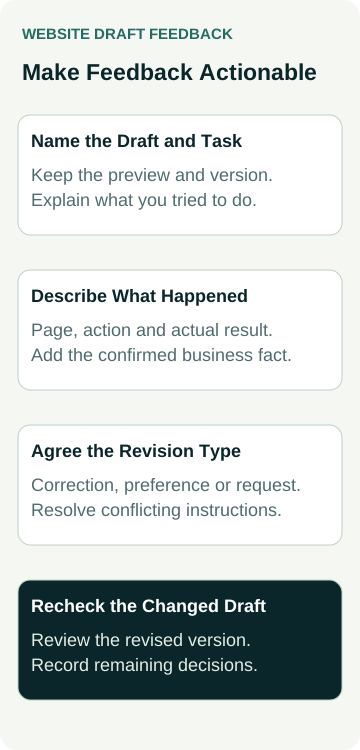
When a designer sends a website draft, give feedback that identifies the version, the page, what you tried to do and what needs to change. That gives both of you a useful starting point for the next revision.
“The homepage feels wrong” may express a real concern, but it leaves the designer guessing. “The homepage describes emergency repairs, which we do not offer” names a business fact that must be corrected. “I could not find the preparation instructions from the service page” describes a customer task to investigate.
Agree how feedback will be collected before the first review. The process should help you make decisions about the work being supplied, with a clear record of corrections, preferences and requests that need a separate scope discussion.
Confirm Which Draft You Are Reviewing
Ask the designer to identify the current preview and what is ready for review. A page layout, a set of proposed words and a working website are different things. A picture of a form does not establish that the form sends enquiries.
Keep the preview address and review date with your notes. If the designer supplies a version name, use it. Ask which pages or features are incomplete and mark those items so an unfinished section is not mistaken for the final proposal.
Have the agreed brief and page list beside you. They explain the customers, services and functions the project is meant to support. Our questions to ask before accepting a website quote cover those earlier scope decisions. During a draft review, use the actual agreement rather than assume everything you have since imagined is already included.
If several people are reviewing, send them the same version and the same questions. Ask one person to combine the notes and resolve conflicting business instructions. The designer should not have to decide whether the sales manager's service description or the owner's correction is authoritative.
Use Customer Tasks to Find the Important Problems
Choose a few tasks relevant to the business. A visitor might need to check whether a service covers their job, see suitable project evidence or find the right contact route. Start from a page a customer could reasonably reach and follow the choices presented there.
Record what you find before explaining what the designer should build. Perhaps the service exclusions are missing, a button suggests immediate booking when it opens a quote request, or a document is difficult to find. Those observations identify problems with meaning or use that can be discussed concretely.
Our mobile enquiry-path guide shows how to record a service-to-contact task on a phone. If you used a desktop's narrow preview instead, say so. Keep the device, browser and relevant conditions with the finding so the designer has a reasonable chance of reproducing it.
Ask someone less familiar with the business to try an appropriate task, with an agreed review scope. Avoid telling them every click in advance if the question is whether the choices make sense. Their difficulty is useful evidence to investigate, not a vote that automatically settles the design.
W3C's guidance on involving users in evaluation explains the value of observing people completing tasks. It also cautions against generalising from a limited evaluation and says user involvement alone cannot establish accessibility. Include appropriate users and specialist checks where needed; an informal draft review is not an accessibility certificate.
Describe the Observation Before Prescribing the Fix
A useful note names the location and the problem. Add the action attempted, the actual result and the expected result. If a fact is wrong, supply the approved replacement or identify who must confirm it.
For example, “The installation page says weekend appointments are available; we only arrange weekday visits” is actionable. “Make this section better” needs more discussion. Explain why the distinction matters to someone deciding whether to enquire.
A screenshot can help locate the issue. Include enough surrounding content to make the page and section recognisable, and remove private details that are unnecessary for the review. Keep the written observation alongside it: a circle on an image may show where something looks odd without explaining the problem.
You can suggest a solution while leaving room for the designer's judgement. If the customer cannot find preparation information, ask for a clearer route and explain where you looked. A new navigation item is one possible answer; a well-placed link on the service page may solve the task more simply.
Give the designer the customer problem and the approved business facts. Agree the design response before treating a suggested fix as the only acceptable solution.
Separate Corrections, Preferences and New Requests
Use a small feedback record to make the next discussion easier:
| Feedback Type | Useful Note to Supply | Decision to Agree |
|---|---|---|
| Incorrect business information | Page, current wording and confirmed replacement or fact owner | Correct the meaning and check related appearances |
| Obstacle in an agreed customer task | Starting point, action, observed result and relevant device | Investigate and propose a change within the agreed task |
| Visual or wording preference | Exact section and the reason for the preference | Choose a direction and identify what will be revised |
| Additional page or function | New customer need and the outcome wanted | Check scope, dependencies and any separate quote before work |
These are discussion categories, not a ruling about your contract. A designer may need to investigate before deciding whether an issue is a defect or an additional request. Keep the actual scope and the proposed action visible.
Set a practical priority for each note. Incorrect service information or a blocked agreed task may need attention before a decorative preference. That does not make the visual direction unimportant; it helps both sides decide what should be resolved first.
If a change affects several pages, ask the designer to identify that reach. Repeated contact details, shared sections and connected features may need a coordinated correction. Avoid assuming that a change visible in one screenshot has been applied everywhere.
A Worked Example: A Flooring Website Draft
An example flooring business receives a working website preview. The owner notices an inaccurate service statement, cannot find a preparation guide and would prefer a different project image. A colleague also asks for an online booking calendar that was not in the supplied page and feature list.
The combined feedback names the preview version and the relevant pages. The service note supplies owner-confirmed wording. The preparation note records the starting page and where the owner expected to find the guide, leaving the designer to propose a clearer route.
The image preference identifies the section and the purpose: show a completed residential job that better represents the offered work. The owner will supply an approved photo with the necessary permission. The calendar request is recorded separately for a scope discussion rather than presented as a broken feature.
The designer can now respond to each item with a proposed action or a question. No revision is assumed complete merely because it has been discussed. This example describes a review process only; no website has been changed or approved, and no enquiry or sales result has been measured.
Combine Feedback Into a Clear Revision Request
Agree one place for the feedback and one person who will send the consolidated decisions. That might be the provider's review tool or a simple document. Use a format both parties can maintain rather than introduce a complicated system for a small site.
Keep each item identifiable. Ask the designer to record whether it is awaiting facts, being investigated, changed for review or awaiting a decision about scope. A reply saying “done” is more useful when it points to the revised page and explains what changed.
Agree how further rounds will work and which revisions are included. If reviewers disagree, settle the business decision before requesting contradictory edits. If a new idea changes the purpose or size of the project, discuss its effect on the plan rather than let it enter the revision list unnoticed.
Avoid sending unnecessary customer records, account details or confidential material in screenshots and comments. If private information is essential to a particular check, arrange the appropriate review method with the responsible person separately.
Revisit the Changed Version Before Approving It
Open the revised preview and check the items that changed. Confirm the actual wording, customer route and relevant layout. Record anything still unresolved or not tested. A correction reported by the designer and a correction you have reviewed are different stages.
Keep the approval specific: identify the version, the pages or direction accepted, and any remaining conditions. A decision about the design does not by itself complete form-delivery, launch, accessibility or public-site checks. Our website launch checklist covers that wider acceptance and live-verification stage.
If you are planning a new build, explore AWE's website packages with your customer tasks and content responsibilities. Ask how draft reviews, revisions and approval will work in the proposed scope, so both sides know what the next review is meant to settle.