
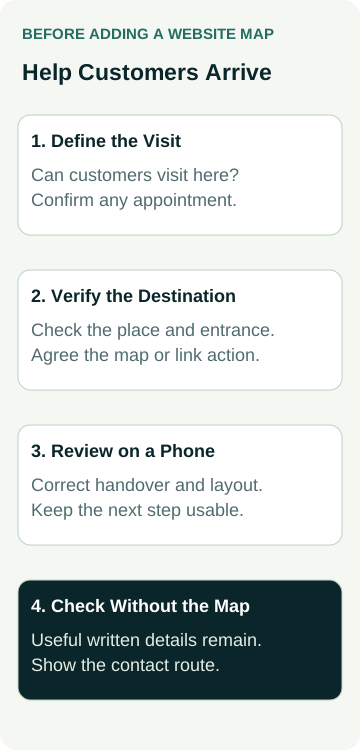
Before adding a map to your business website, decide what the customer needs to do. They may need to find a workshop, check whether you visit their area or arrange an appointment before travelling. Choose the map or link around that task, confirm the destination and keep essential instructions in ordinary page text.
A map is useful when it helps someone reach the right place under the right conditions. It can create confusion when it suggests walk-in visits to an appointment-only business, points to an old address or takes customers to the wrong entrance.
Give your website provider a short brief covering the approved public location, visiting arrangements, proposed map or directions link and the checks you expect on desktop and phone. You can approve that result without learning to build the map yourself.
A pin does not explain your visiting arrangements. State whether customers can visit, need an appointment or should contact you to arrange an on-site service.
Start With Whether Customers Should Visit
Write down the task before choosing an embedded map. “Find our workshop after we confirm a drop-off” needs different page wording from “check whether we repair appliances at your home”.
For a customer-facing location, confirm which address is approved for public use and what happens when someone arrives. Include relevant appointment requirements and accurate opening or collection information. A registered or administrative address should not casually become a customer destination.
For a business that travels to customers, a clear service-area explanation may answer the question better than a pin. State the actual coverage and how someone can check an uncertain location. Do not publish a private address merely to fill a map section in a template.
If a visit needs prior agreement, keep that requirement beside the location information and the relevant enquiry action. The booking or quote-request guide helps distinguish what the business can confirm at each stage. A map should support those arrangements rather than imply a booking has already been accepted.
Choose an Embedded Map or a Clear Link
Ask the designer to explain the proposed choice. An embedded map sits within the page; a link takes the customer to the map service. You may want a simple location reference, a directions action or a combination that serves a specific purpose.
Google's sharing and embedding guidance describes options for sharing a map or directions through a link or an embedded map. Those are delivery options, not a decision about which one your business needs.
Compare the proposed experience with the page's other information. Does an interactive panel help someone understand the location? Would a labelled directions link beside the written address be sufficient? Ask to see the page on a phone rather than approving only a large desktop mock-up.
Google's Maps URL guidance explains that links can request different actions, including searching for a place or getting directions, and may open the Maps app or a browser depending on the device setup. Have the provider confirm the intended action and check what the actual link does.
Avoid choosing a more elaborate integration before the task is clear. If a proposal involves a paid service, API account or extra maintenance, ask for that scope and responsibility to be explained separately. Do not assume every map option has the same requirements.
Verify the Place and the Arrival Instructions
Ask the owner who knows the premises to confirm the actual destination. Check the business identity, address and pin position against where customers should go. Similar names, multiple branches and an old location can all make a superficially plausible result misleading.
Consider the final part of the journey. Is the customer entrance on a different street? Is there a labelled unit, reception or collection point? Give the designer accurate, approved instructions rather than expecting the pin to explain those details.
Keep the wording specific to what you know. “Use the signed customer entrance on the side street” is useful only if it accurately describes the premises. Avoid promises about parking availability, step-free access or travel time that the business has not checked and cannot support.
Confirm the directions link separately from the map picture. Ask whether it opens a place, a route with a fixed starting point or another action. A route prepared from the designer's office may be a poor fit for customers arriving from different places.
Check the destination as well as the appearance. A correctly sized map with the wrong location still fails the task. Record the destination and instructions approved by the business before the website person implements them.
A Worked Example: Workshop Drop-Offs by Appointment
This example is illustrative. It does not describe an AWE client, a real address or a tested map integration.
An upholstery workshop accepts customer drop-offs after discussing the item and agreeing a time. Its owner wants the website to help confirmed visitors find the entrance without encouraging unarranged deliveries.
The page explains the appointment requirement, supplies the approved public address and gives a short arrival instruction. The designer proposes a clearly labelled directions link near that text. A map preview is considered as supporting context rather than a substitute for the written details.
During review, the owner checks the place and entrance information. The website person checks the link's intended action on the agreed desktop and phone environments. They also review the page without relying on the embedded panel, so the booking requirement and contact route remain clear.
The review plan records these situations:
| Situation | What to Check | Evidence to Keep |
|---|---|---|
| Before opening the map | Address and visit conditions are clear | Approved wording and page version |
| After opening the link | Correct place and intended map action | Destination, device and observed result |
| Using the page on a phone | Map fits and the next step stays usable | Browser, screen and findings |
| Map unavailable | Written instructions and contact route remain | Fallback state and unresolved issues |
If the link opens an old location, the team records the defect and corrects the affected link before approval. If the embedded panel cannot load, they check what the page still provides. Neither result should be inferred from a static design image.
The example sets out evidence to request. It does not establish that a particular map is accessible, improves enquiries or works for every visitor.
Check the Surrounding Page on a Phone
Have the provider demonstrate how the map fits within the page and how customers move past it. Check that it does not obscure the address, visiting conditions or enquiry action. Review portrait and any other agreed view that matters for the page.
Ask what happens when someone uses the page with a keyboard, enlarges its text or cannot operate the map itself. Keep the meaningful location and arrival information available as text, with clearly labelled links. Agree any wider accessibility evaluation and its limits with the responsible reviewer.
An external map can open a separate app or browser view. Check whether the handover is understandable and whether customers can return to your website information. A button labelled “Get Directions” should perform the agreed directions task, rather than unexpectedly opening an unrelated search or another business.
Use the mobile enquiry-path guide for the wider service-to-contact journey. Here, the specific review is the location task and its map handover. A passing check in one browser is a record of that environment, not proof about every phone or map application.
Keep Useful Information Available Without the Map
Ask what the page shows if the external map is slow, blocked or unavailable. The customer should still be able to read the approved location details, understand any visiting requirement and find the appropriate contact option.
Have the provider explain the proposed loading behaviour and whether the external service needs privacy or consent handling within the project. Those questions depend on the actual integration. Include any required specialist review in the scope rather than assuming a copied embed settles them.
Avoid publishing an unapproved screenshot of a map as a quick substitute. Ask the provider to confirm the permitted use of whatever map service or imagery they propose. A custom arrival diagram also needs an accurate source and a clear distinction from official road directions.
If the business has several locations, label each one so the customer can identify the right place before opening a map. Do not send every location button to a generic search and leave the customer to work out the branch. Ask for the destination attached to each link to be included in the review record.
Agree Who Maintains the Destination
Name the person who approves business facts and the person who updates the website map or link. Record where the destination is controlled, including any shared contact section that appears on several pages. A move can require more than changing one visible address.
Agree when another check is needed: a changed entrance, new branch, different visiting arrangements or replacement map integration. Keep the earlier destination and decision record so a later supplier understands what the page was intended to do.
When discussing small business website packages, bring the location task and approved details to the conversation. Ask which map or link work, testing and ongoing maintenance can be included or separately scoped. Approve a clear customer journey with a verified destination; measure any effect on enquiries or visits separately.