

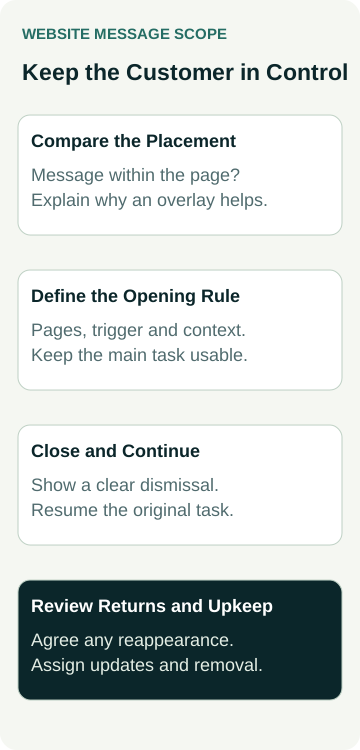
Before paying for a website pop-up, compare the same message within the page. A service note, link to a guide or invitation to enquire may work without covering what someone came to read. If an overlay still has a useful purpose, agree when it opens, how it closes and what happens when the visitor continues browsing.
For an Australian small business, the useful buying decision concerns the whole customer path. Keep the main task usable, including for someone who declines the message. This guide covers optional announcement and marketing pop-ups; consent systems and legally required notices need their own requirements and review.
Choose the Message Before the Overlay
Write down who needs the information and what it helps them do. “Read how to prepare for a quote request” describes a customer task. “Increase engagement” does not explain why the message should interrupt the page.
Ask the designer to show the wording as an ordinary section, a modest notice and an overlay. Compare whether the intended customer can find it at the right stage. Information needed to understand a service should remain available in the relevant page content rather than relying on someone accepting an extra layer.
Google's guidance on intrusive interstitials and dialogs recommends keeping content accessible without interruption and using small banners instead of full-page interstitials. It explains that obstructive overlays can also make content harder for search engines to understand. That supports reviewing the presentation; it is not a prediction of a ranking change for your site.
Keep the message factual. A popup does not make an unsupported offer, response promise or invented urgency acceptable. Agree the wording, destination and person responsible for maintaining it before choosing colours or animation.
Describe When It Opens and Where It Applies
If the proposal includes a pop-up, request its display rules in writing. Does a visitor deliberately open it, or does it appear automatically? Which pages and devices are included? What happens if someone is already reading, using the menu or completing an enquiry?
An automatically displayed message needs a reason for its timing. Ask the supplier to explain the proposed trigger in relation to the customer's task. Do not assume a particular delay, scroll percentage or exit behaviour is suitable because a template or marketing tool recommends it.
Agree where the message should stay out of the way. A service page, contact form, booking route and customer login can have different needs. A sitewide setting should be reviewed against those paths rather than accepted from a homepage demonstration alone.
Plan what happens after dismissal. Decide whether the visitor will see the message again during the visit, on another page or on a later return. Ask how the actual setup recognises that state and what its limits are. Do not promise that a preference follows a person across browsers or devices unless the implementation supports it.
Make Closing and Continuing Part of the Scope
Ask the designer to demonstrate a clear way to dismiss the optional message and continue the original task. A small close icon hidden against an image can be difficult to find. The wording of a decline option should be plain and should not pressure someone into taking the promotional route.
Clarify what type of overlay is being built. A modal dialog temporarily makes the content behind it unavailable for interaction. A small non-modal notice behaves differently. The developer needs to choose and implement the appropriate pattern, rather than using the word “popup” for several different behaviours.
The W3C's modal dialog pattern describes focus moving into an opened modal, keyboard navigation within it, Escape to close and a visible closing control. It also describes returning focus to the initiating element or an appropriate place in the workflow. Ask how the proposed dialog will handle those tasks, including where an automatic opening has no customer-operated trigger.
Those requirements need an implementation check. Our guide to agreeing an accessibility review scope explains how to define the pages, tasks, checks and repair evidence. Following a pattern or installing a plugin does not establish whole-site accessibility conformance.
Review the experience after closing the message, not just its appearance while open. The customer should be able to resume the task they were doing.
Record the Open, Closed and Return States
Use a short state record when comparing the proposal with a demonstration. The table describes decisions to agree; it does not claim those behaviours are already implemented on your site.
| State | Customer Experience to Agree | Evidence to Request |
|---|---|---|
| Before opening | Main content and normal next step remain available | Relevant page shown without the message |
| Message open | Wording, destination, controls and intended background behaviour are clear | Phone, keyboard and relevant task demonstration |
| Message dismissed | Customer can continue without taking the promotional action | Closing and resuming the original page task |
| Another page or return visit | Reappearance follows the agreed rule within known limits | Demonstration of stored state and any exceptions |
Include the message's maintenance rules too. Name the person who can change it, remove it or stop it appearing. If it concerns a temporary arrangement, agree when it should end and who verifies that the normal page remains correct afterwards.
Ask what the quote covers beyond inserting a box. Display rules, state handling, mobile layout, keyboard behaviour, content updates and continued support may involve different work. An attractive screenshot does not settle those responsibilities.
A Worked Example: Helping Customers Prepare a Repair Enquiry
An example furniture-repair business wants visitors to read a preparation guide before requesting an assessment. Its owner considers a pop-up that would appear while someone is viewing the repair service page.
The designer is asked to compare an inline guide link near the enquiry route with the proposed overlay. The owner first checks whether customers can understand what information would help without interrupting the service explanation. The guide remains available through the normal page content in either design.
For the overlay option, the owner requests a demonstration of opening, declining and continuing to the enquiry. They also ask what happens on another page, when someone returns and when the message appears beside the site's other controls. The trigger and repeat rule remain decisions to approve, rather than settings copied from a template.
The owner may choose the inline version if it serves the task adequately. This is an example design decision, with no actual business test, pop-up installation or measured enquiry improvement implied.
Check the Whole Phone and Keyboard Experience
Have the website owner arrange checks in an appropriate test environment. Use the actual proposed message, destinations and display rules. Keep test enquiries identifiable and out of genuine customer reporting if the approved checks reach a form.
Inspect the combinations that exist in the site. An open menu, chat launcher, cookie notice and a pop-up can compete for space. If there is a fixed mobile contact strip, check what the contact bar covers as a related part of the layout review.
Ask for evidence that a customer can:
- Read the message and find the closing control on a small phone screen.
- Operate the relevant controls with a keyboard and resume the intended page task.
- Continue without accepting the optional promotional action.
- Reach the stated destination and understand what happens next.
Review enlarged text, long wording and the supported device layouts as well as a tidy desktop preview. Have the developer record failures and repairs against the agreed scope. This checklist identifies useful demonstrations; it is not a complete accessibility or search-performance assessment.
Keep the Feature Only While It Serves the Task
After launch, review the message against the reason it was added. Dismissals and link clicks describe different actions. A click is not proof that someone completed an enquiry, became a suitable customer or accepted a quote. Record the evidence and its period before making a claim about results.
Keep content and removal ownership clear. A stale message or broken destination needs a practical correction route. If the overlay adds friction without a demonstrated reason to keep it, review the inline or notice option again rather than adding more triggers and layers.
If the pop-up is part of a website proposal, bring the message, alternative placement and state record into the scope discussion. Our website packages provide a starting point for discussing the build; the chosen behaviour, testing and ongoing support should be confirmed for the actual project.