
Before sending customer feedback to your web designer, put the original message, the approved wording and the agreed attribution together. Then check the finished website card against that record. A real customer’s words can become misleading when a sentence is shortened, a heading changes its meaning or a photo suggests a different job.
For an Australian service business, this is a content approval task as well as a design task. Approve the complete testimonial as it will appear, including the name, image, surrounding claim and any link to its source. A polished card is useful only when you can explain what it represents.
Start With Feedback You Can Trace
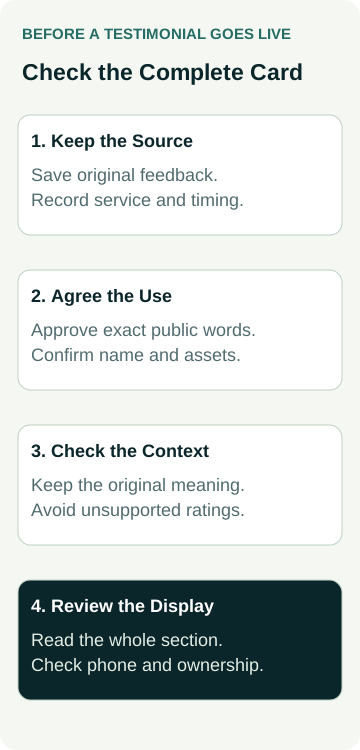
Keep the original email, feedback form or review link in a private working folder. Record which service the customer experienced and when. Your designer needs the approved public material; the original correspondence can stay with the person responsible for checking it. Avoid forwarding unrelated personal details with the quote.
The ACCC’s guidance on online reviews covers reviews on a business’s own website as well as platforms and social media. It says reviews should reflect the genuine opinion of someone who experienced the product or service. Fake or misleading reviews are prohibited, including arranging for someone else to create them.
That is the starting point, rather than a request for someone to write a flattering sentence under a customer’s name. Ask for feedback in the customer’s own words. If the feedback is missing, leave the space out of the design while you collect suitable material. A blank placeholder in a private draft must never become a published endorsement.
Treat a testimonial supplied by a previous designer as an item to verify. A name and a quotation mark do not establish where the text came from. If you cannot recover the source or confirm its use, choose another piece of evidence.
Agree What the Customer Is Approving
As a practical approval process, show the customer the exact excerpt and attribution you intend to use. Ask whether it may appear on your business website and record their answer. Include a proposed photograph, business logo or job image in that request when applicable; permission for a sentence does not settle every other asset.
Specify the name format rather than assuming it. A person might agree to a first name and suburb while declining their surname, employer or photo. Do not turn their employer’s name into a company endorsement without confirming that representation. If the material came from a review platform, check its reuse requirements before copying text, screenshots or branding.
Keep the approval with the source record and give the designer the agreed version. This workflow is an editorial recommendation, not a statement that one email clears every privacy, copyright, platform or industry requirement. Regulated services and sensitive customer stories may need a separate qualified review before publication.
Make channel boundaries explicit. Approval for a website testimonial does not automatically answer whether you can put the same person’s image in a paid advertisement or a social post. Ask about the use you are actually planning, rather than collecting a broad release you do not need.
Keep the Meaning When You Shorten a Quote
A short card still needs the original meaning. Check what the customer was describing: an enquiry, the quoting process, a completed job or ongoing support. Do not move praise about a helpful phone call under a heading that presents it as proof of completed workmanship.
If an excerpt needs shortening, show the proposed version for approval. Do not quietly remove a qualification that changes the overall impression. The ACCC identifies editing by others and relevant context as issues that can make reviews misleading. Its guidance also addresses suppressed negative reviews, undisclosed relationships and incentives. A website owner should consider the overall impression, not just whether each surviving word appeared in the source.
Label selected customer testimonials honestly. Do not make a few chosen quotes look like a complete review feed, an independently verified collection or a rating calculated from all customers.
Avoid adding stars simply because the design has room for them. A written compliment is not evidence of a five-star rating. Where a real aggregate rating is displayed, confirm its source, review count, currency and presentation. The ACCC gives the total number of reviews behind a star rating as an example of context that needs to be clear.
Give Your Designer One Approval Record
Use a small record for each proposed card. This avoids a folder of screenshots, an old spreadsheet and a later email all containing different versions. The record can be a document you already use; it does not require new software.
| Check | What to Supply | What to Hold Back |
|---|---|---|
| Source | Original reference and service or job context | Untraceable text copied from an old mock-up |
| Approved wording | Exact excerpt confirmed for the planned website use | A designer-written replacement presented as customer words |
| Attribution and assets | Agreed name format and separately checked images or logos | Private details or an employer endorsement you have not confirmed |
| Display and maintenance | Placement, context, source-link decision and review owner | Unsupported stars, verification badges or automatic rating claims |
Give each record a simple internal identifier so it can be matched to the design without publishing private correspondence. Note who checked it and the date of approval. If the customer asks for a change later, that identifier helps you find the affected card and its other approved uses.
For the wider project, include the testimonial requirement in your website brief. State whether you are supplying static approved cards or asking for a connected review feed. Collection, moderation, platform connections and ongoing updates are separate pieces of work to agree; do not assume a quote includes them.
A Worked Example: Praise for the Quoting Process
Illustrative example: a painting business receives an email thanking its estimator for explaining the preparation work and answering questions. The customer has accepted the quote, but painting has not started. The owner wants to use an approved excerpt on the new website.
In the first mock-up, the card sits beneath a heading about completed transformations and beside a finished-project photograph. The words themselves are unchanged, yet the arrangement suggests the customer is reviewing the completed painting job.
The owner asks for the card to identify the experience as the quoting process and confirms the excerpt and attribution with the customer. The unrelated project photo is removed from that card. A separate gallery can show documented finished work with accurate captions and permissions.
The final review checks the whole section on a phone: heading, quote, attribution and neighbouring images. Nobody adds a star rating or rewrites the email as praise for the finished job. The record explains what was approved, making a later design change easier to assess.
This is also why a trade project gallery and a testimonial need their own evidence. A photograph can show work you completed; a quote describes one person’s experience. Putting them together should not invent a connection.
Check the Finished Cards on a Phone
Read the preview as a visitor would, rather than checking only that the words were pasted in. Confirm that the attribution remains attached to its quote, longer text is not cut off and the customer’s approved name format survives the mobile layout. Avoid placing essential wording inside an image that becomes tiny on a narrow screen.
A simple set of readable cards may be enough. If the design uses a moving testimonial carousel, ask how a visitor pauses movement and operates it with a keyboard. The W3C carousel tutorial explains these controls and the need to communicate changes and manage focus. A screenshot of the first slide cannot show whether those behaviours work.
Check any source link and make sure its label explains where it goes. If a connected feed is proposed, ask what happens when the connection fails or a source review changes. Agree who maintains it and whether a fallback could leave stale or misleading information visible.
If your designer proposes search markup alongside the cards, agree that work separately. The schema buying guide explains why visible content, technical checks and search-feature eligibility need separate evidence. A testimonial card does not establish a particular search display or a ranking improvement.
Approve the Section, Then Keep a Named Owner
Before release, compare the finished section with the approved record. Confirm the quote, attribution, context, assets and any rating information. Ask for a live check after publication as well; approving a private preview does not prove the public page contains the same material.
Name the person who will handle corrections, customer requests and future replacements. Recheck testimonials when the associated service changes or a redesign moves them into a new context. If the original basis is uncertain, pause that item while it is clarified rather than passing the uncertainty to the next designer.
If you are discussing website packages, bring the approved material and explain the display you need. Contact Australian Web Experts to agree the design and implementation scope, including any feed or maintenance requirements. Permission checking, legal review and ongoing platform management should have clear owners and agreed scope before work begins.