

Before paying for website uptime monitoring, agree what will be checked, who receives a failure alert and what that person will do next. Ask the provider to describe those responsibilities for your actual website. An alert subscription may leave the investigation and repair with somebody else.
Start with the arrangements you already have. Your host, website provider or maintenance service may supply some monitoring. Find out what it covers before buying a second service or assuming a new subscription replaces existing support.
This guide helps an Australian business owner compare an availability-monitoring proposal. The useful output is a short response record that the business and its providers can follow when a check fails.
Name the Page and the Condition Being Checked
Ask for the exact website addresses included in the proposal and a plain explanation of what counts as success. Does the check look for an acceptable response from a page, particular content, or completion of a customer task? Record the answer for each important route.
For example, UptimeRobot’s troubleshooting documentation describes how accepted response codes, keyword conditions, request settings and checking regions affect its results. Those are details of that product and configuration. Ask your proposed provider to explain its own rules rather than assuming every monitoring tool behaves the same way.
A successful check of the homepage supports a statement about that check. It does not establish that a booking was accepted or an enquiry reached the right inbox. List those business functions separately, including any approved testing they need. Our mobile enquiry-path guide helps identify the customer route worth checking.
Keep the first scope proportionate. A service business may need a different arrangement from an online shop. Have the provider explain why each proposed check matters and which important functions remain outside it.
Separate Detection From the Human Response
Ask how often checks run, how a failure is confirmed and when an alert is sent. Then ask a separate question: when is a person expected to act? An automated service operating overnight does not, by itself, establish an overnight support commitment.
Have the agreement distinguish these stages:
- Detection: the configured check records a failure.
- Notification: an alert is sent through the agreed channel.
- Acknowledgement: a responsible person confirms they have taken the issue.
- Investigation and repair: the appropriate provider assesses the problem and carries out authorised work.
Any quoted response time should identify the stage it covers, the support hours, timezone and conditions. Ask what happens on weekends, public holidays or when the usual contact is unavailable. Keep the actual commitment in the proposal; avoid filling gaps with an assumed repair deadline.
Better Stack’s escalation-policy documentation describes rules for notifying people in sequence until an incident is acknowledged. That illustrates an alert-routing capability. It does not establish that the recipient has accepted repair responsibility or has the access needed for your website.
Complete an Alert Response Record
Use the same questions when comparing proposals. Have each provider fill the gaps with named responsibilities and agreed limits.
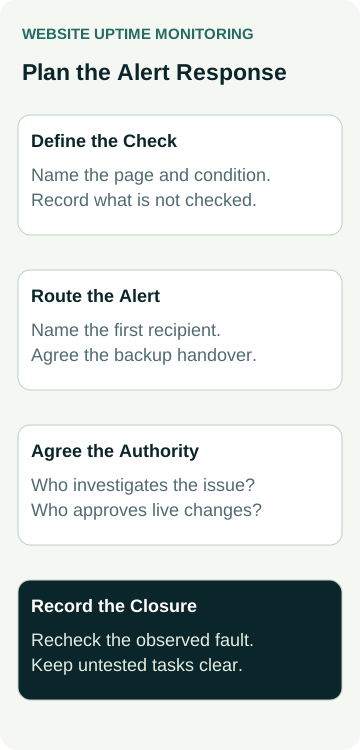
| Part of the Arrangement | Ask the Provider | Record Before Buying |
|---|---|---|
| Check and coverage | Which address and condition are observed, and what is outside the check? | Included routes, success conditions, checking schedule and exclusions |
| First recipient | Who receives the alert during the agreed support hours? | Responsible role, contact channel and acknowledgement commitment |
| Unanswered alert | Who is contacted next, and when does that handover happen? | Backup role, handover rule and coverage outside ordinary hours |
| Investigation and changes | Who can investigate, approve costs and authorise live changes? | Responsible provider, available access, approval boundary and extra-work process |
| Closure | What evidence will show what recovered and what remains unverified? | Recheck result, customer-route checks, unresolved items and next owner |
Keep contact details and access instructions in an appropriate private business record. A public status page or monitoring report should not become a place to expose account credentials, private customer information or internal recovery instructions.
Check whether the host and website developer are different providers. Who contacts which organisation? Who holds the relevant account, and can the nominated person raise a support request? A list of company names is less useful than an agreed handover route.
Agree What an Alert Allows Someone to Do
An alert can justify investigation without authorising every possible repair. Ask the provider to describe routine actions it may take under the agreement and changes that need your approval. Include how additional costs are approved and how the business receives an update.
Avoid leaving broad instructions such as “restore the site if anything looks wrong”. A recovery could affect recent website changes or business records. An appropriate decision depends on the problem and the actual recovery arrangement. If backup recovery forms part of the proposal, use our WordPress restore-check guide to discuss that separate evidence.
Also agree how planned maintenance is treated. Who tells the monitoring provider about an approved change, how are notifications handled during the work, and who checks that normal monitoring resumes afterwards? Keep the maintenance record alongside the incident history so later reports can be interpreted.
For the broader division between updates, faults and new requests, see our website maintenance-plan guide. Here, the decision is narrower: what happens from the first availability alert through to an agreed closure.
A Worked Example: An After-Hours Contact-Page Alert
An example air-conditioning business is comparing two monitoring proposals. One sends alerts to the owner. The other includes an agreed support contact and a backup recipient. The owner wants to understand the work behind each arrangement before choosing.
They list the homepage and contact-page address, then ask what each check observes. Neither proposal is treated as evidence that an enquiry reaches the office unless that delivery check is separately included and approved.
Suppose the contact-page check reports a failure on a Saturday evening. The response record identifies who reviews the alert, the coverage available at that time and the route to the relevant hosting or website provider. If the first recipient cannot take the issue, the agreed backup route applies.
The person investigating compares the reported address, time and condition with what they can observe. They report the affected scope and proposed next action. A monitoring failure alone does not establish the cause or justify disabling protective controls, changing DNS or restoring a backup.
If a repair is proposed, the agreement determines who can approve it and any additional charge. The closure record would then distinguish the monitoring check returning to its expected state from any separate customer-route or delivery checks completed afterwards.
This is a planning example. No monitor has been configured, alert delivered, live failure created or repair completed here. The owner can compare the proposals by their responsibilities without assuming either prevents every outage.
Ask for a Controlled Handover and Useful Reports
Before accepting the setup, ask how the provider will demonstrate the agreed alert and acknowledgement route. Have it propose a controlled test with the recipients’ agreement and a clear boundary around live services. Taking the public website offline should not be the default way to demonstrate an alert.
Record which check or test event was used, who was meant to receive it, who actually acknowledged it and what remains untested. If repair capability was not demonstrated, keep it separate from a successful notification test. Repeat the relevant handover review when responsible people, support coverage or important website functions change.
Ask what the ongoing report will show. Useful entries identify the check, observation period, incident times and timezone, action taken and unresolved work. If a percentage is supplied, ask how gaps, paused checks and planned maintenance are treated. A headline figure needs its measurement context.
Compare the cost of the whole arrangement: monitoring, notification channels, response coverage and any separately charged investigation or repair. Keep availability evidence separate from search rankings, enquiries and revenue; a monitoring report does not measure those outcomes.
Before accepting the proposal, be able to finish this sentence: “If this check fails, this person receives the alert, follows this handover route and works within these agreed permissions.”
If you are reviewing the support around your business website, bring the current arrangements and any known problems to Australian Web Experts. Ask us about your website’s needs and the scope we can offer. Confirm any monitoring, response coverage or repair work in the actual proposal.