
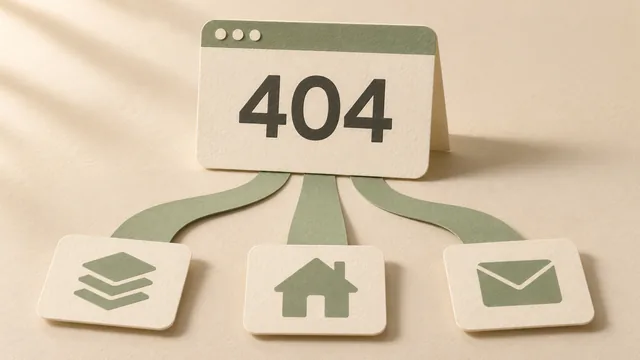
A custom 404 page should explain that the requested page could not be found and offer useful ways to continue. Before approving its design, agree the exact message, link labels and destinations, then ask the developer to demonstrate them at a genuinely missing address.
For an Australian service business, those choices should reflect the work and information currently available. A large illustration or a familiar logo can make the page recognisable, but customers still need to understand what happened and where they can go.
Review the message and the routes together. A friendly error screen is useful only when its suggested next steps lead somewhere appropriate.
First Confirm That a Not-Found Page Belongs Here
A 404 page is what someone sees when a requested resource cannot be found. MDN’s 404 reference explains that the response alone does not establish whether the absence is temporary or permanent.
If an important service page has unexpectedly disappeared, ask the website owner to investigate it. Designing a better error screen does not restore that information. If content moved, the responsible specialist may need to assess a relevant redirect instead.
Our reported-404 decision guide covers correcting links, restoring content, assessing redirects and retaining appropriate not-found responses. Start there when the right response is unresolved. This article concerns the message and recovery choices on a page that should remain not found.
Keep that distinction in the brief. The error-page design and the treatment of particular missing addresses may be separate pieces of work.
Write a Message That Explains the Situation
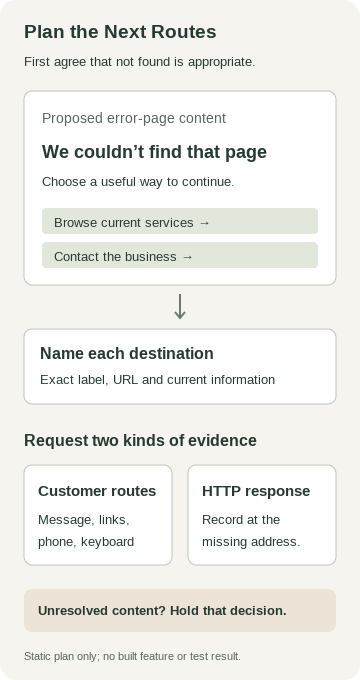
Use a heading someone can understand without knowing what HTTP means. “We couldn’t find that page” is a possible starting point. The number 404 can remain as supporting information, but it should not carry the explanation by itself.
Follow with a short instruction that matches the choices below it. For example: “Browse our current services, or contact us if you need help finding information.” Use that wording only when those routes exist and suit the business.
Avoid claiming the page was moved or deleted when the website cannot establish that. An unknown address might never have existed. Similarly, do not tell people they made a typing mistake simply because the address failed.
Keep humour secondary to the explanation. Read the message as someone arriving from an old email, a saved link or another website. Would they understand that their requested information is unavailable, rather than think the whole business website has closed?
Choose Routes With Specific Destinations
Start with the information customers can actually use. A current services overview may help someone find the right offer. A homepage link can provide another starting point. A contact route may suit someone who needs help, provided its wording describes the actual process.
Do not make a general enquiry link sound like an immediate booking or a promise of support within a particular time. Confirm those arrangements with the business owner before writing them into the page.
Record the complete destination for each proposed choice. “Browse services” should lead to the agreed service overview, rather than whichever page happens to be available during the build. Check that the destination still explains the business’s current work.
W3C’s link-purpose guidance addresses identifying a link’s purpose from its text or its context. Apply that principle when reviewing labels. The separate website menu guide helps connect customer questions with labels and destinations; an error page needs the same care.
Keep the choices focused without imposing an arbitrary link count. A useful route plan might look like this:
| Page Element | Owner Decision | Evidence to Request |
|---|---|---|
| Explanation | The exact heading and instruction | The built message at an agreed missing address |
| Services route | A label and current overview destination | Follow the link and review its actual content |
| Search option | Include only if its coverage and behaviour are suitable | Demonstrate a useful query and a no-result state |
| Help route | The contact destination and accurate expectation | Follow the route; record any submission test separately |
A Back control can be an extra option, but it should not be the only way forward. Someone may have opened the missing address directly or arrived from outside your website. Offer choices that make sense without relying on a previous page within the site.
Include Search Only When It Is Useful
A search box is optional. If the website has no suitable search feature, drawing a field on the error page creates another unfinished requirement. Clear links may be enough for the information the business publishes.
Where search already exists, ask whether it is available and usable on the actual error page. Check what it covers, a representative phrase and a query with no suitable match. The no-result message should distinguish helpful suggestions from genuine search matches.
Use the website search-box guide for the wider feature decision. Include setup, ongoing maintenance or additional costs in the proposal if search needs new work. Do not assume an error-page layout includes a working search system.
A Worked Example: A Garden Maintenance Business
Illustrative example only: this is not an AWE client, a working error page or a measured customer result.
A garden maintenance business is planning a custom error page. Its current services overview and contact page are available. The proposed message offers those two routes, with labels that describe browsing services and making an enquiry.
The owner also finds an old seasonal-offer address. Whether that offer should have continuing information is unresolved. They hold the decision for that address while confirming the business facts; they do not use the new error-page artwork as permission to remove it or send everyone automatically to the homepage.
For the error-page review, the developer is asked to use an agreed address that genuinely should not exist. The owner will check the message, follow both suggested routes and review the narrow layout. The technical owner will record its response separately.
That plan does not establish that the feature has been built, that the old offer was handled correctly or that an enquiry was received. Each needs its own evidence.
Check the Built Page From the Missing Address
Ask to see the error page by requesting an agreed missing URL, including a deeper path where relevant. Opening a design file or the error template’s own preview address does not show how the website handles that request.
Review a direct arrival and, where an affected internal link is being corrected, the original link journey. Check that the logo, navigation and recovery links reach the intended destinations from that deeper address. Record the starting URL so the developer can reproduce a failure.
Include a narrow phone view and keyboard use in the agreed implementation checks. Can someone reach and identify each choice, see the focus indicator and follow it? Ask about larger text and any interactive search states. These checks belong within the broader website accessibility review scope; a readable label or screenshot does not establish whole-site accessibility.
Keep the visible message and HTTP response as separate acceptance items. Google’s HTTP status documentation explains that error-like content returned with a success status can be treated as a soft 404. A friendly design does not prove the server returns the intended status, and a recorded status does not prove its links are useful.
Keep the Decision With the Website Brief
Retain the approved wording, destination list, optional features and unresolved addresses. Name who confirms the business facts, who implements the page and who records the customer-route and technical checks. Revisit its links when services or contact arrangements change.
When discussing AWE’s website packages, ask how the actual error-page design and implementation would be scoped. Contact Australian Web Experts with the proposed routes and any missing addresses that need investigation. Agree the work before treating a polished mock-up as a completed feature.