
A search box is worth considering when customers need to find particular information that clear navigation does not help them reach comfortably. Before adding one, identify the finding problem, the content it should cover and what a useful result would look like. A visible search field and a working search experience are different deliverables.
For an Australian small service business, customers may mainly need the services, area covered and contact details. Clear page names and links may handle those tasks. A business with a growing collection of guides, project information or product documents may have different needs.
There is no useful universal page count that settles the decision. A small site can be confusing, while a larger collection can be organised well. Test how people find the information they need before buying another feature.
Identify the Information Customers Struggle to Find
Choose actual customer tasks. Someone may want a named guide, information about a particular service or instructions for a product the business supports. Use the questions you receive and the material you actually publish, rather than inventing a large content library to justify search.
Ask someone unfamiliar with the website to find that information using the current menu and links. Observe where they hesitate. Are the labels unclear? Is the answer missing? Is a useful document buried among many similar items? Those problems need different responses.
For repeated customer questions, decide where the answer belongs before adding an FAQ section rather than treating another component as a fix for missing content.
Search cannot return an explanation that has never been written. If the information is missing, agree the content first. If the menu uses internal business terms customers do not recognise, improve the wording and route. If customers know what they want but cannot locate it within a useful collection, site search becomes a reasonable option to assess.
Use a customer-task menu plan to connect labels with useful destinations before adding another finding tool.
Our one-page or multi-page website guide covers the broader structure choice. This guide concerns an additional finding tool within that structure. Customers should still have clear navigation to the main business information.
Define What the Search Will Cover
Write down the content people should be able to search. Will it include service pages, articles, project pages, product records or uploaded documents? Ask the provider to demonstrate the proposed coverage rather than assuming that every file on the website is included.
Confirm what should stay outside the results. Draft pages, outdated material and information intended for a different audience can make results confusing. The website owner should review the actual content and access arrangements; a search setting should not be treated as a way to make private information secure.
MDN's search-input documentation describes a text field designed for entering a search query. The field is the input. The proposal also needs to explain how the system searches the chosen content and returns results. A search icon in a design preview does not establish that work.
Use a small set of representative phrases to discuss the scope. Include a phrase using the business's own terminology and another using the customer's likely wording. If matching alternative terms, spelling variations or document text matters, ask whether those capabilities are included and how they will be checked.
Avoid assuming that a particular plugin or a feature called “smart search” will handle every phrase. Request a demonstration with your representative content. The useful question is whether the proposed system can find the required information accurately.
Agree the Results and the No-Result Route
Ask what someone will see after submitting a query. A useful result needs a recognisable title, enough context to choose it and a working destination. If several items have similar titles, ask how a customer will distinguish them.
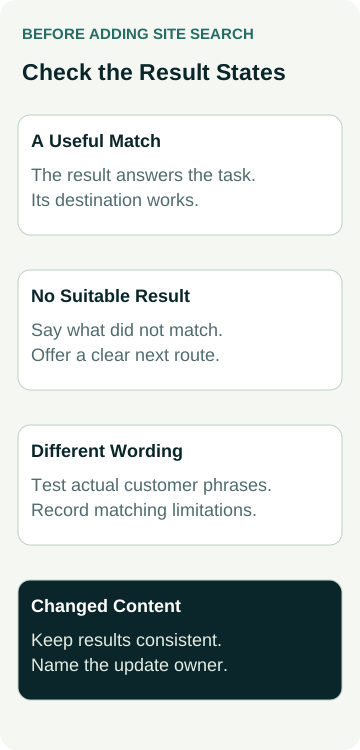
These checks make the feature more concrete in a quote.
| Search State | What to Check | Evidence to Request |
|---|---|---|
| A useful match exists | The relevant information appears and the destination answers the task. | A demonstration using an agreed phrase and current content. |
| Nothing suitable matches | The message is honest and offers a sensible way to continue. | The actual no-result screen and available navigation or contact route. |
| The customer uses different wording | The system's matching behaviour is understood. | Results for representative alternative terms, with unsupported behaviour recorded. |
| Content is updated or removed | Results remain consistent with the current public material. | The update process and a check of the affected result and destination. |
A no-result message should not be disguised by presenting unrelated items as though they answered the query. You can offer relevant categories, a way to revise the phrase or a contact option, but the wording should distinguish those suggestions from actual matches.
If results include documents, identify the destination clearly so people know they are opening a file. If the search covers only part of the site, explain that limitation where it helps the customer choose a route. Keep promises such as “search everything” within the actual coverage.
Agree the content, representative phrases and result states. Then check those against the implemented feature.
Check the Search on a Phone and With a Keyboard
Ask how someone discovers the search, enters a phrase, submits it and reaches a result on a phone. Check whether the field and result wording remain readable and whether the search overlay or menu can be closed without losing the rest of the page.
W3C's form-label guidance explains that controls need labels that describe their purpose and are associated with the controls. A magnifying-glass image or disappearing placeholder should not be assumed to provide the complete labelling the implementation needs. Ask the developer to show how the field and action are identified.
W3C's landmark-region guidance explains how page regions can communicate structure to assistive technology. That provides implementation guidance; it does not prove that a particular search feature or the whole website is accessible.
Include keyboard use in the agreed checks: reaching the control, entering a query, submitting, choosing a result and returning to the page. If the feature includes suggestions or filters, those states need consideration too. Test the actual feature rather than judging it from an empty field in a screenshot.
Our website accessibility scope guide covers the wider evaluation discussion. Search checks should fit that agreed scope, with the reviewed states and remaining issues made clear.
A Worked Example: A Repair Business With Customer Guides
This is an illustrative business and feature decision, not an AWE client or a measured result.
Example Repairs has straightforward service and contact pages, plus a growing collection of public care guides for equipment it supports. Customers sometimes ask for a particular guide using a model name or a plain-language problem description.
The owner first reviews the guide titles and categories. If clearer labels let customers find the right material comfortably, that may be enough for the current collection. The business does not need a search box solely because other websites have one.
If the finding problem remains, the owner asks for a search demonstration limited to the public guide collection. The agreed phrases include an actual guide title, an alternative customer term and a phrase for which no matching guide exists. The demonstration should show a relevant match, explain any unsupported wording and provide an honest no-result route.
The owner also asks how a corrected guide reaches the search results and who reviews obsolete material. A feature that works on launch day still needs a way to stay useful. None of these observations establishes a conversion increase or guarantees that every future query will succeed.
Name the Ongoing Work and Costs
Ask what the build includes and what continues afterwards. Is search part of the chosen platform, a separately maintained feature or a service with ongoing fees? Confirm the actual proposal, any required plan and responsibility for support and updates.
Name who will maintain content titles, categories and current documents. Ask who can investigate an important phrase returning poor results and which changes require the provider. If the system takes time to reflect an edit, agree how that behaviour will be explained and checked.
Decide whether search-use reporting is needed for the business task. If it is, ask what is collected, what the report means and who will review it. Do not assume that installing a box automatically supplies a useful reporting dashboard. Handle any customer-entered information through the business's agreed data practices.
For a new website, include these responsibilities in the website brief. The provider can then explain the required work before the design and price are settled.
Decide From the Finding Task
Keep clear navigation when it handles the important tasks well. Consider search when a useful collection and actual customer finding problem justify the setup and continuing work. Hold the feature if its coverage, result quality or maintenance is unresolved.
After launch, review whether people can complete the intended finding tasks. Keep that functional evidence separate from search-use counts, suitable enquiries or sales. A successful demonstration shows that an agreed phrase works with the tested content; it does not establish every-query performance or a business return.
Compare AWE's current website packages with your requirements, or talk to Matt with the information customers need to find and the content you have. Agree whether search belongs in the scope and how the proposed results will be checked.