
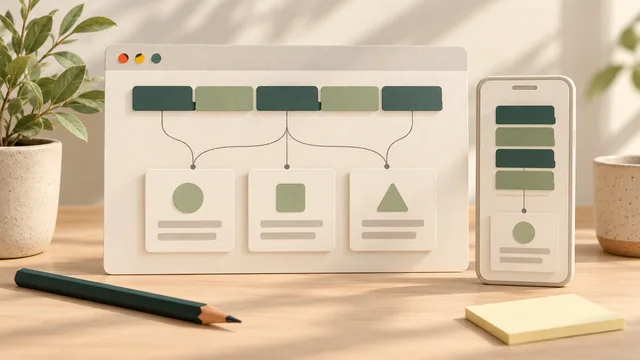
Start your website menu with the things customers need to find: the right service, evidence of your work and a suitable way to get in touch. Give each choice a clear label and a real destination. Then ask someone unfamiliar with the business to follow a few useful routes before settling the wording.
For a small Australian service business, a menu can be planned on paper before the designer builds it. You do not need a large dropdown or a fixed number of links to begin. You need a short, understandable set of choices that fits the information you have and the work you offer.
Write the customer's question first. Use the menu to help them reach an answer, then check that the destination delivers what the label suggests.
Start With the Questions Customers Bring
List the reasons someone would visit your website. A new customer might need to know whether you repair their type of equipment. Another might want to see completed work. An existing customer could be looking for contact details or service instructions.
Use questions you receive in calls, emails and enquiries. Remove personal details when turning them into planning notes. Keep the business's current services and coverage clear; a service you hope to introduce later should not appear as something customers can order today.
For each question, identify where the answer belongs. It might already have a service page, need a section on an existing page or require new content. A menu label cannot supply an answer that has not been written. Mark missing content so the owner and designer can agree who will prepare it.
Choose a few representative tasks to carry through the design. Write them as actions, such as “Find out whether this business repairs split-system air conditioners.” That is easier to test than a general instruction to make the website intuitive.
Group Related Choices Around the Business
Lay out the proposed pages or sections and group those that serve related needs. Installation and repair pages might sit under a Services heading. Project examples might have a separate Our Work route. Contact details should have a recognisable place of their own.
These are possible groups, rather than a compulsory menu for every business. A specialist with one main offer may need a different arrangement from a business serving several distinct customer groups. Choose the grouping that helps someone decide where their task belongs.
Keep the main menu focused on useful starting points. Supporting material can be reached from the relevant service page, a resources area or another appropriate location. That does not mean burying important conditions: information customers need to judge a service should remain easy to reach alongside that service.
If the page structure itself is undecided, use the separate one-page or multi-page guide. A menu item may lead to another page or to a section on the same page. Record which destination you mean before handing the plan to the designer.
There is no universal link count that proves a menu is good. If your proposed choices feel crowded, revisit the grouping and customer tasks. Cutting an essential choice merely to reach a number can leave the same problem in a different place.
Write Labels That Set a Clear Expectation
Use words your customers recognise. A label should help someone predict what they will find after choosing it. “Services”, a specific service name or “Contact” may be suitable; internal department names or an unexplained slogan may need more interpretation.
Read the label without the rest of the design. What would a person expect behind it? Then read the destination heading and content. If a button says Book Online but opens a general enquiry page, change the label or provide the promised booking route. Do not imply an immediate booking when someone must first request a quote.
Be specific where the distinction matters. A business offering both installation and repairs needs to make those routes understandable. That might mean separate service choices beneath a clear group, rather than one vague label that leaves the customer to search the entire website.
Keep wording consistent when the same choice appears in different places. Repeated labels should not lead to unrelated destinations without a clear reason. Likewise, several different labels for one destination can make a small site seem more complicated than it is.
Try the wording with someone outside the business. Ask where they would go to complete a task, and let them choose before explaining your intention. If they hesitate between two labels, record what they expected each one to contain. Use that observation to revise the wording or grouping.
Map Each Menu Choice to Its Destination
Give the designer a simple route plan. The table below uses example tasks; replace them with your actual services and information. It is a content plan, not evidence that these routes exist on your website.
| Customer Task | Possible Menu Route | Destination Must Explain |
|---|---|---|
| Find out about a repair | Services, then Air Conditioning Repairs | Repair work offered, relevant limits and how to enquire |
| Look at completed work | Our Work | Relevant project examples with useful context |
| Check whether the business can visit | Service Area, or coverage information beside the service | Actual coverage and any visiting arrangements |
| Ask about suitable work | Contact, or a clearly labelled quote request | The appropriate enquiry route and what happens next |
Review every proposed destination, including external links and same-page sections. Give each route an owner and note whether the destination is ready, needs copy or needs a decision. A label in a mock-up does not establish that the destination is complete.
This plan also keeps content decisions separate from behaviour. If choosing Services should open a list rather than take someone to a page, explain that to the designer. Agree how people reach any overview page as well as the individual services. Customers should not have to discover the intended behaviour by accident.
A Worked Example: An Air-Conditioning Repair Route
Illustrative example only: this is not an AWE client website or a measured customer result.
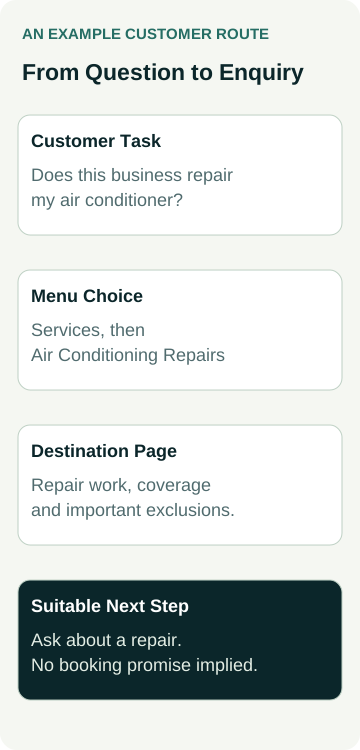
An air-conditioning business offers installation and selected repair work. Its owner wants a new visitor to find repair information before making an enquiry. The draft menu groups both offers beneath Services, with Air Conditioning Repairs as one of the choices.
The repair page explains the equipment and work the business handles, its actual service area and important exclusions. A labelled enquiry link takes the reader to the appropriate contact route. The wording does not promise emergency attendance or online appointment confirmation unless the business provides those services.
The owner asks someone unfamiliar with the business to find out whether a repair is suitable. They start at the homepage, choose the menu route and read the destination. The owner observes without coaching. If the person chooses installation by mistake, they discuss what the labels suggested and revise the plan.
They repeat the route in the mobile design and from a project page, rather than checking the homepage alone. Any contact submission remains a separately agreed test. Finding the right page is one observation; receiving a suitable enquiry and winning a repair job require separate evidence.
Keep the Menu Understandable on Different Screens
W3C's menu structure guidance explains the importance of meaningful structure and identifiable navigation. It also advises keeping displayed items consistent in order, wording and destination across screen sizes. A compact mobile layout should still offer an understandable route through the same information.
Ask the designer to show the menu closed and open on a phone-sized view. Can you find the control, read the complete labels and reach the intended pages? If a submenu is used, follow it through and check how to return or close it. Do not approve a desktop layout as proof of the mobile behaviour.
W3C's menu styling guidance covers readable sizing, spacing, consistent presentation and cues that do not rely on colour alone. Include larger-text and keyboard checks in the implementation review with the person responsible for accessibility. A quick owner walkthrough is not a full accessibility assessment.
For a broader journey after someone reaches the service, use the mobile enquiry-path check. If customers need to find material within a larger collection, consider the separate website search-box guide after the main navigation and content are clear.
Hand Over the Plan and Keep It Useful
Send the designer the customer tasks, proposed groups, exact labels and destinations, plus the content still required. Agree who approves the wording and who checks the built routes. Request the same checks after relevant changes, especially when adding a service or changing a shared header.
Keep observations concrete: which starting page was used, what the person tried and where the route became unclear. That gives the designer something to improve without inventing a conversion problem or treating one person's choice as a result for every customer.
When discussing a small-business website package, bring the menu plan and ask how the actual design, content and navigation work will be scoped. Confirm what is included in your agreement. A clear menu is one part of a useful website; enquiries, accepted jobs and revenue still need their own records.