

Start with a static opening unless you can explain what a visitor gains by changing slides. A rotating banner, also called a slider or carousel, displays different panels in the same space. It adds decisions about timing, controls, content and maintenance. Those decisions belong in the website brief before the feature is approved.
For a small service business, a clear opening can explain the service and offer a relevant next step without moving. Several services do not automatically require several slides. They might be easier to compare in a visible group farther down the page.
A carousel can still have a useful purpose. A visitor might deliberately browse related project images or choose between current collections. The question is whether changing panels helps that task, and whether the proposed implementation gives the visitor control.
Ask the designer to show the same content as a static opening and as a carousel. Compare what customers can understand and reach, then agree the behaviour you want built.
Decide What Must Stay Visible
Write down what a new visitor needs to understand before doing anything else. For a service business, that could be the type of work, the relevant service area and a route to read more or enquire. Keep those facts available without waiting for another panel.
Do not divide one essential explanation across a sequence. A first slide saying “Renovations”, a second naming the service area and a third showing the contact route asks someone to assemble a message over time. A complete opening can carry the essentials together, with more detail in the page below.
Treat the first panel as a complete experience. Someone may leave, scroll past or choose a link before any later panel appears. That is a design consideration, not a claim about how many of your visitors see a particular slide. If the provider claims a measured problem, ask for the page, period and evidence.
The wording still needs to describe the real business. A slider will not resolve an unclear service offer, and a static image will not make an unsupported promise acceptable. Agree the message before comparing transition effects.
Compare Static, Manual and Automatic Options
Ask for more than a choice between “slider included” and “no slider”. A manually operated carousel behaves differently from one that advances on a timer. A static opening followed by visible service links is another option.
| Option | Useful Question | Work to Agree |
|---|---|---|
| Static opening | Can one complete message introduce the business? | Image crop, readable wording and the next link |
| Visible group | Do customers need to compare several services? | Clear labels, order and useful destinations |
| Manual carousel | Is browsing related items a real customer task? | Discoverable controls, keyboard use and item context |
| Automatic carousel | Why should the content change without a request? | Movement controls, updates, focus and alternative access |
Use the comparison to discuss the actual content, rather than selecting a feature because it appears in a template. A manual gallery can suit a set of related project views without making the homepage introduction rotate. The project gallery guide covers selecting useful images and factual captions.
Also distinguish a slideshow from a video. A video may explain a process with sound or continuous action and needs its own playback and alternative-content plan. The website video brief deals with that separate decision.
Specify Controls Before Approving Movement
W3C’s carousel tutorial describes the need for user control, keyboard operation, communication of item changes and understandable focus management. It also notes that carousel content can be hard to discover. Use those points to ask what the designer will demonstrate in your particular component.
If slides move automatically, ask how someone pauses them and resumes them deliberately. Can a person read the content at their own pace? Are the controls visible and understandable on a phone? What happens when someone moves keyboard focus into the component or interacts with a link?
There is more to consider than the duration of a transition. W3C’s explanation of Pause, Stop, Hide distinguishes moving content from automatically updating content. Its moving-content condition includes automatic movement lasting more than five seconds alongside other content, with an essential-activity exception. The auto-updating requirement has no five-second exception. A short slide interval is therefore not a general workaround for giving users control.
Have a knowledgeable reviewer assess the actual behaviour against the agreed requirement. This article does not establish conformance for a component or a whole website. Put the carousel in the accessibility review scope, including its controls, changing states and responsive versions.
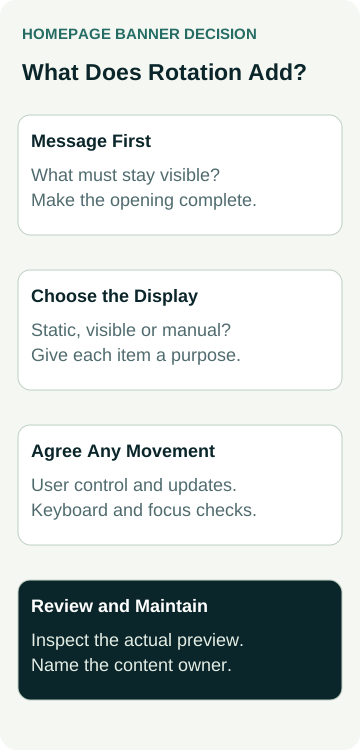
A Worked Example: Introducing a Cabinetmaking Service
This is an illustrative design decision, not a client result. An example cabinetmaking business proposes three homepage slides: kitchens, wardrobes and laundry cabinetry. Each has a different photograph and a link to its service information.
The owner’s main question is whether a visitor can quickly understand the kinds of cabinetry offered and find the relevant service. The designer prepares a static introduction with a representative image, followed by three visible service links. The owner can review that against a manual carousel using the same approved material.
The comparison does not assume one version will produce more sales. It checks whether each service is discoverable, the introduction remains complete, the labels are meaningful and the visitor can reach the right information on a phone.
If the owner chooses a carousel for project images farther down the page, that is a separate decision. Its images still need permission, honest descriptions and sensible controls. It does not require the main introduction to rotate as well.
Review the Actual Page on a Phone
A desktop screenshot can show the proposed appearance. It cannot demonstrate changing slides, keyboard behaviour or what happens when the content is longer than expected. Ask to inspect the built preview with the real approved wording and images.
Check these parts of the agreed scope:
- Content: the first panel makes sense alone, and important service information is available elsewhere on the page or through clear links.
- Images and text: phone crops retain useful subjects; wording remains readable without relying on text baked into a photograph.
- Controls: previous, next and any movement control have understandable names and can be used through the agreed input methods.
- Changes: a slide change does not unexpectedly take focus or make the current action disappear while someone is using it.
- Destinations: each link reaches the intended current service or collection, with an honest label.
Ask the provider to record the preview version, screen sizes, methods and findings. Keyboard and assistive-technology checks need their own evidence; a visual phone inspection cannot stand in for them.
Loading also depends on what the component actually requests and runs. Ask how the proposed page was assessed, including the images and scripts involved. Do not accept a guaranteed speed or ranking improvement merely because a slider was removed. If loading is a concern, agree a measured comparison under recorded conditions.
Give the Content an Owner
Each extra panel creates material someone must keep accurate. Record the message, image rights, destination, content owner and review trigger for every item. A panel for a discontinued offer should not keep returning because nobody remembers it is in the sequence.
Keep any time-sensitive information in a place that does not depend on catching one slide. If a temporary message is proposed, agree its removal or review with the responsible owner. Do not invent availability, deadlines or offer terms to fill spare panels.
Ask who can edit the carousel after handover and what that person needs to check. Replacing a short heading with a long paragraph can change the mobile layout. Adding an image may introduce a different crop or rights question. Include a practical preview-and-review step in the handover.
Agree the Choice in the Website Quote
Before approving the feature, record its customer purpose, content, starting state, manual or automatic behaviour, controls and review coverage. Include what remains accessible outside the sequence and who maintains the material. Ask which changes are included in the proposed work and which need a separate scope.
If the only reason for rotation is that several people want their message at the top, first agree the homepage priority. Giving every message a turn does not resolve that business decision. A static opening and clearly labelled sections may be enough.
Australian Web Experts’ website packages are a starting point for discussing the site you need. Bring the proposed banner content and ask how the designer would present it, what the interaction adds and how the result will be checked. Agree the feature from that evidence before paying for complexity your customers may not need.