

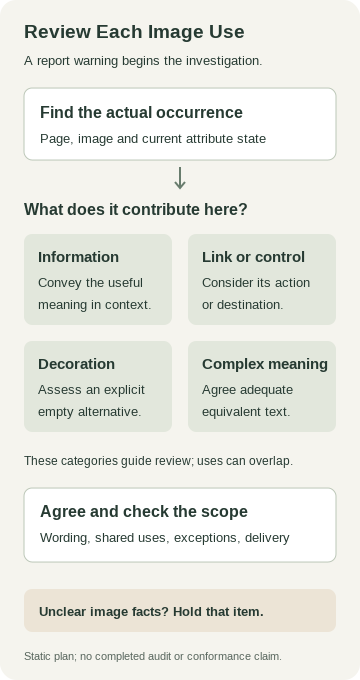
Before approving a bulk alt-text update, ask for the page, image and exact finding, then review what that image does in context. A missing attribute, a deliberately empty alternative and an unhelpful description need different decisions. Filling every blank field with a service keyword does not settle them.
For an Australian business owner, a useful proposal should identify the affected uses, the wording or implementation change needed and how the delivered pages will be checked. Keep uncertain image facts and shared-template effects visible before approving the work.
Treat the audit list as a starting point. Agree what each image contributes before deciding what its text alternative should say.
Ask What the Report Actually Found
Request the report date, affected page address, image reference and the condition the tool checked. Does “missing alt text” mean there is no alt attribute, that its value is empty, or that the existing words failed a particular tool rule? Ask the reviewer to explain the finding rather than infer it from the warning label.
Have the website person show the current page and delivered image markup. A media-library field, an old crawl and the image actually used on a public page may describe different states. Keep the report observation separate from the fresh check.
Also ask what the count represents. One shared image might appear on several pages. A report might group by file or list individual occurrences. The number alone does not establish how many distinct descriptions need writing or how many locations an edit will change.
The existing project-photo image-search guide covers preparing filenames, alternatives, captions and page context. This article starts with an audit warning and helps define which existing uses need a change, an explained exception or further investigation.
Review the Image’s Purpose on That Page
Read the surrounding heading, copy and any link or control containing the image. Ask what information or action would be lost if someone could not see it. The same file can contribute useful detail in one location and serve a different purpose elsewhere.
W3C’s alt decision tree distinguishes informative, functional, decorative and more complex uses. It also explains that the tree does not cover every case. Use it to guide a contextual review with the person responsible for accessibility.
A project photograph may need a brief description of the detail that matters. A purely decorative flourish may need an empty alt attribute. If an image supplies the purpose of a link or button, its alternative needs to communicate the destination or action rather than merely name the object pictured.
Do not classify every hero photo as decorative, or every logo as informative, based on its appearance. Consider its actual role. W3C’s functional-image guidance shows how the surrounding link text can affect what alternative an image needs.
Use a review record such as this one. These are decisions to assess, not automatic rules for every matching image.
| Finding in Context | Decision to Discuss | Evidence to Keep |
|---|---|---|
| A photo contributes service or project information | Supply an accurate alternative for that use | The page, image and approved meaning |
| A decorative image has no alt attribute | Assess an explicit empty alternative | Its decorative purpose and delivered markup |
| An image is the only explanation of a link or control | Describe the destination or action appropriately | The complete control and its checked purpose |
| A diagram contains information not explained elsewhere | Agree an adequate text explanation and implementation | The information, equivalent text and review scope |
Keep Deliberate Empty Alternatives Explained
W3C’s decorative-image tutorial describes an empty alternative, written as alt="", for images that do not add information in that context. That is different from omitting the attribute without a decision.
An audit record can therefore retain an explained empty alternative. Ask the reviewer to show why the image is decorative or redundant in that particular use. “It is stock photography” or “there is already some text nearby” does not establish that by itself.
If a tool continues to flag the deliberate choice, retain the rationale alongside the finding and clarify how the tool reports it. Do not add irrelevant wording solely to reduce a warning count. Equally, an empty field should not become an excuse to leave meaningful information unavailable.
If the purpose is unclear, hold that item and ask the content owner. A documented unresolved decision is more useful than a guessed description marked complete.
Confirm the Facts Before Writing Descriptions
Describe what the image contributes accurately and in proportion to that purpose. Check project records before naming a material, location, product or work stage. Avoid presenting stock imagery as the business’s own work or inferring qualifications from someone’s appearance.
Google’s image SEO guidance explains that it uses alt text together with page content and other methods to understand images. It advises useful descriptions and warns against keyword stuffing. That supports writing for the image’s meaning, without turning every alternative into a list of services and suburbs.
Keep filenames, captions, nearby copy and text alternatives distinct in the brief. A filename change is a separate task with potential address dependencies. A caption may supply useful visible project context; it does not automatically settle the appropriate alternative for every use.
If descriptions are generated or proposed in bulk, have a person check each affected use against the actual image and confirmed facts. A plausible sentence can still identify the wrong material, invent a location or describe a scene when the image’s job is to operate a control.
A Worked Example: A Cabinetmaker’s Audit List
Illustrative example only: no actual client, completed audit or public image edit is claimed.
A cabinetmaking business receives an image warning list. It includes a close-up of a completed cabinet, a decorative divider and an image used alone as a link to a project page.
The owner can confirm what the close-up shows but cannot yet confirm its material. The proposed alternative is held until the relevant project information is checked. The writer does not guess a timber species from the photograph.
The decorative divider is reviewed separately for an explicit empty alternative. The linked project image needs its function considered in the complete link, rather than receiving the same descriptive sentence as an unlinked photograph elsewhere.
The provider is asked to list those locations and explain where their alternatives are controlled. The owner can then approve the wording and exceptions within a defined scope. The example supplies decisions to resolve, not finished alternatives, a passing accessibility report or improved search visibility.
Agree Where the Edit Will Take Effect
Ask whether the change belongs to a page instance, a shared component, a media record or another source. Have the provider demonstrate the actual arrangement. Updating a library field does not establish that every existing public use has changed.
The shared-content editing guide helps define the locations and exceptions an edit can affect. For an image audit, retain each relevant page use and its purpose, even when several uses share one file.
After implementation, request checks of the agreed public pages, delivered alternatives and affected image controls. Review the displayed image and surrounding content together, including relevant mobile crops. Confirm that page-specific exceptions remain appropriate.
A clean automated report is one observation. It does not establish that every description conveys the right meaning or that the website meets an accessibility standard. Use the website accessibility scope guide to agree any broader manual evaluation and retesting.
Approve a Defined Cleanup
Keep the original finding, current observation, proposed action, confirmed facts, exceptions and completion evidence together. Name the person who resolves uncertain descriptions and who checks the delivered pages. Record unreviewed uses as unreviewed.
When discussing AWE’s SEO services, bring representative audit entries and the affected pages. Contact Australian Web Experts to agree the actual investigation and edit scope. Verified alternatives are a concrete deliverable; image-search appearance, enquiries and accepted work need their own later evidence.