
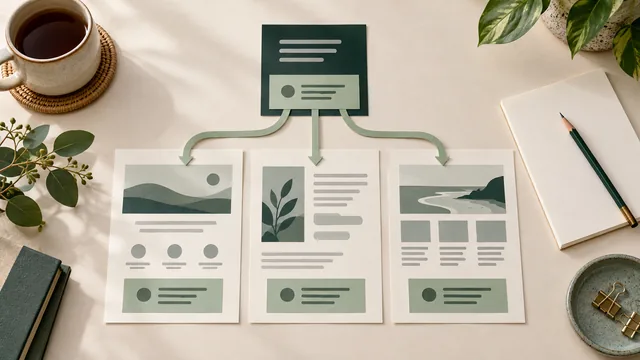
Before changing a section that appears on several website pages, ask where its information is controlled and which other pages the edit will affect. An edit made while viewing one page may change a shared section elsewhere. Confirm that reach before approving the new wording, image or link.
A shared contact panel can make a phone-number update easier to manage. Separate copies can also look identical while needing separate edits. The appearance of a section does not tell you how it is maintained. Ask your website person to demonstrate the actual arrangement.
This guide helps an Australian service-business owner agree the reach, approval and checks for a shared-content change. It also gives you a specific handover question when buying a website: what will happen elsewhere when I edit this section?
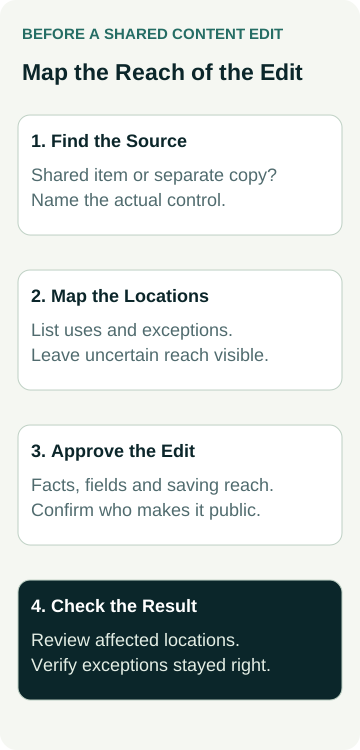
Identify the source, list where it is used, distinguish shared and page-specific information, then check the affected pages and the pages that should stay unchanged.
Identify the Source of the Section
Point to the section you want to change and describe the business reason. For example, a contact panel has an old phone number, or a call-to-action mentions an offer that needs correction. Give the website person the page address and the exact information needing review.
Ask whether the section is controlled on that page, in a shared content item, through a template or in another setting. Use a name your team can recognise, such as “main service contact panel”. You do not need to know the underlying code to ask where the approved information lives.
WordPress provides one example of shared content. Its block-pattern documentation explains that a synced pattern updates wherever it is used when the pattern is edited and saved. It also distinguishes a detached instance that can be edited independently.
That is a platform example, not a finding about your website. Other systems and custom builds can organise repeated sections differently. Even a WordPress site may use a different arrangement. Ask the provider to show the actual source rather than infer it from the platform name.
Separate Shared Design From Page-Specific Facts
A consistent layout does not require every page to say the same thing. Two service pages might use matching contact panels while needing different introductory wording or enquiry destinations. Ask which parts are shared and which can vary.
Learn WordPress's synced-pattern overrides lesson demonstrates this distinction: configured content can differ between instances while the original pattern controls shared design. A central design change can therefore have a different reach from a change to an overridden piece of content.
For your site, request a demonstration of the particular field you intend to edit. Does changing the heading affect every instance? Does replacing the image affect only this page? What happens if a button destination is changed? The answers depend on the delivered setup.
Check the business meaning as well. A general contact number may be suitable across services. A statement about availability, eligibility or a particular offer may need to remain specific. Approving the layout is not approval to repeat an unsupported promise throughout the website.
List the Locations Before Approving the Change
Ask for the pages and other relevant locations that use the shared section. Include places outside the main menu if they are part of the intended scope, such as an older campaign page still receiving visitors. Mark any uncertain locations for investigation.
The list should distinguish a linked shared item from a separate copy that merely looks similar. It should also record exceptions. A page may use the shared layout but keep its own wording or link. Those differences matter when deciding what to change and what to check afterwards.
Use a short record alongside the proposed edit:
| Record Item | Question to Resolve | Useful Evidence |
|---|---|---|
| Content source | Where is this section or field controlled? | Named item, template or setting demonstrated in the actual setup. |
| Shared reach | Which pages use it, and which are independent copies? | A reviewed location list with uncertainty and exceptions visible. |
| Approved change | Which facts, layout details or links should change? | Agreed wording and purpose, with a person checking the business claims. |
| Acceptance check | Where must the change appear, and what must remain unchanged? | Affected pages and nominated exceptions checked after the agreed update. |
Avoid treating a list from one tool as proof of complete coverage. Ask how the provider identified the locations and what it could not confirm. If the site has inconsistent copies, agree whether this task is a narrow correction or a separately scoped restructuring of the content.
Demonstrate the Saving and Approval Behaviour
Before an owner starts making shared edits, have the provider demonstrate the process in an agreed non-public environment or through a controlled walkthrough. Confirm who prepares the change, who checks it and who is authorised to make it public.
Ask what the relevant save or publish action affects. A demonstration of a new draft page does not establish how changes to an existing shared section behave. Have the provider explain how the proposed shared edit can be reviewed without unintentionally changing live pages.
For a purchased site, include this in the handover: name the shared sections an owner may maintain, the page-specific fields they may edit and the changes that should go through the provider. Agree the support arrangement and any separately required work before relying on self-editing.
Our DIY builder or web designer guide covers the broader choice of who builds the website. Here, the demonstration has a narrower job: establishing the reach of a particular shared edit. Our website quote questions help put the resulting responsibilities into the proposed agreement.
A Worked Example: A Shared Contact Panel
Illustrative example: a roof-maintenance business needs to correct the contact panel shown beneath several service descriptions.
The owner brings the current and approved phone details to the website person. The provider identifies a centrally controlled contact panel used on the main service pages. An older campaign page has an independent copy. One service page also uses its own introductory line while sharing the panel's layout.
The owner approves the phone correction for the shared panel and the independent campaign copy. The service-specific introduction stays unchanged. The location record makes those decisions visible rather than assuming that editing the panel will fix every similar-looking section.
The provider demonstrates the intended change and its saving behaviour in the agreed review environment. The owner checks the approved number and the service-specific wording. After the authorised update, the provider checks the listed locations, their contact links and the page that should retain its individual introduction.
The record confirms the correction at those locations and notes any remaining uncertainty. It does not claim a faster editing process for every future task or an increase in enquiries. The value of the example is a defined reach and a checkable result; no actual client site or shared section was changed to produce it.
Check the Pages, Links and Recovery Scope
After the agreed update, inspect the public locations in the record. Check the changed information, its surrounding context and any links. Read the section on a phone as well as a computer. A correct number or sentence can still sit beside an inappropriate service promise.
Check the nominated exceptions too. If a page was supposed to keep its own introduction or destination, confirm that it did. Record unexpected changes with the page address and the observed issue. Stop expanding the edit until the responsible person has reviewed what happened.
Ask how a mistaken shared update can be recovered. WordPress's revisions documentation describes saved revisions and restoration, but it also documents configurable retention. The existence of a revision feature does not establish what your particular shared item retains or restores.
Have the provider demonstrate recovery for the actual type of item and explain its limits. Restoring a page, recovering a shared item and restoring a whole website are different scopes. This guide does not replace a backup or recovery plan.
Use the small-business launch checklist for the wider website acceptance tasks. Keep this change record focused on the listed shared-content locations and any effects you can actually verify.
Include Shared Editing in the Website Brief
Tell the designer which repeated information your team expects to maintain. Contact details, general notices and recurring calls to action are useful items to discuss. Identify where service-specific content must remain independent instead of asking for every section to be shared.
Add the source, reach, approval process, demonstration and recovery responsibilities to your website brief. Ask for a handover that lets the responsible person find the right item and understand the effect of an edit. Confirm which ongoing changes need provider assistance.
If you are planning a build, review AWE's website packages or contact Australian Web Experts with the sections your team expects to update. Discuss the actual editing setup, training and support scope before assuming they are included. One clear demonstration is more useful than an undefined promise that the whole website will be easy to edit.