

Ask which important content is missing, from which page and in which test. A JavaScript warning should lead to a specific investigation before you approve a new platform or a whole-site rebuild. Compare the evidence for the current page and agree what a proposed change must fix.
JavaScript can add content and features after a browser receives a page. That creates useful possibilities, along with dependencies the technical team needs to understand. The presence of JavaScript does not by itself establish that Google cannot read your service information.
For an Australian business owner, the buying decision is practical: are you commissioning an assessment, a targeted correction or a broader rebuild? Ask the SEO person and developer to connect that recommendation to the actual customer information affected.
Name the Content That Matters
Choose an important public page and a small set of things it must communicate. For a service page, that might be the service explanation, coverage limits and a link to related information. Record the actual words or link destination so everyone checks the same items.
“The page uses JavaScript” describes part of its implementation. “The service explanation is absent from the saved rendering result” identifies something the provider can investigate. Keep those statements separate when reading an audit summary.
Also identify the tested address, date, page version and tool. A preview, old URL or redirected address may describe a different page from the one customers use. Ask why the selected page is representative before applying its result to every service page.
Our SEO audit or ongoing campaign guide helps define the assessment you are buying. A list of warnings needs interpretation and priorities before it becomes an implementation scope.
Understand the Different Page Views
The initial HTML is the page response supplied by the server. A browser can then run scripts and build the displayed page. Some sites deliver much of their content initially; others depend more heavily on that later processing.
Google's JavaScript SEO guidance explains that Google runs JavaScript and processes pages through crawling, rendering and indexing. It can use rendered HTML when indexing. Missing words in the initial response therefore need investigation; their absence alone does not prove Google cannot obtain them.
Ask the provider to label each view it has inspected. A normal browser view, a crawler configured without rendering and a Google diagnostic rendering result answer different questions. Record whether the chosen passage and link are present in each, and leave an unavailable view unknown.
A browser screenshot is useful context for the owner, but it is not a substitute for examining the relevant HTML and search evidence. Nor should the developer assume that a successful session on their own computer reproduces every crawler's experience.
Request a Content Comparison You Can Read
Have the provider show the selected content alongside the evidence for each view. You should be able to follow what was checked without interpreting an entire technical export.
| Page View | Evidence to Request | What to Keep Separate |
|---|---|---|
| Initial response | Exact URL, date and relevant content or link in the returned HTML | Absence here alone is not a failed Google rendering test |
| Browser after scripts run | Same public page, conditions and presence of the selected items | A working browser is not proof of Google's recorded version |
| Google diagnostic rendering | Named test, date, rendered HTML and relevant resource or error evidence | A diagnostic result is not a new index result |
| Indexed information | Available URL Inspection record and its crawl date | Older information may concern a version before the correction |
Google's JavaScript troubleshooting guide recommends inspecting rendered content and provides tools for examining resources, console output and errors. Ask the specialist to explain the evidence relevant to the missing item, rather than treating every script error as equally important.
An absent heading might need a different investigation from a missing link, an unavailable data source or a page that cannot be fetched. Have the provider state the established finding and the remaining hypothesis. A cause should not be presented as confirmed solely because it is plausible.
Agree the missing item, the evidence and the proposed correction before accepting a platform-wide diagnosis.
A Worked Example: A Service Description That Appears Later
Imagine an equipment-servicing business whose page loads its main service explanation through a script. The owner receives an audit warning and a recommendation to rebuild the site. This is an illustrative decision exercise, not an AWE client or a tested implementation.
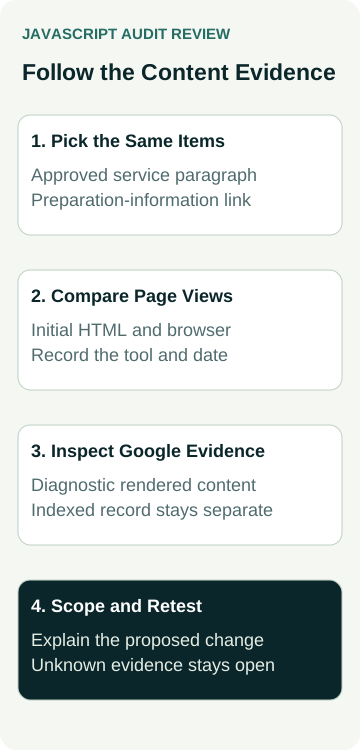
The owner asks the provider to follow two items: the approved servicing paragraph and a link to preparation information. The initial response lacks both, while a browser session shows them. That comparison establishes a dependency to examine; it does not settle whether Google renders them successfully.
The provider is then asked for the relevant Google rendering evidence. If that evidence is unavailable, the record stays open. If a saved result lacks the paragraph, the developer investigates the content-loading path and relevant errors before proposing a correction. The example does not assume which script or system is at fault.
The owner requests a scoped proposal explaining what would change, which pages share the affected component and how the same two items will be retested. A larger rebuild remains an option to justify through the business's wider needs, rather than a conclusion already established by the first warning.
These are planning decisions. No script has been repaired, Google test run, index change observed or enquiry improvement measured in this example.
Compare the Fix With the Rebuild Proposal
Ask what the proposed work changes about content delivery and why that addresses the observed problem. The developer should identify affected templates, dependencies, editing work and customer functions. A targeted correction and a platform replacement can have very different scopes.
Google's guidance notes benefits of server-side or pre-rendering and that not all bots run JavaScript. That supports considering delivery options; it does not establish one compulsory solution for every business site. Ask for the trade-offs for your actual setup.
Use our platform-setup comparison when a new system is proposed. Compare the editor, features, dependencies and handover, rather than assuming a platform label proves search suitability. A broader change also needs the SEO migration work scoped separately.
If the finding concerns loading performance, the PageSpeed report guide covers test conditions and lab versus real-user evidence. A speed score and the presence of a service paragraph in rendered HTML are different observations.
Retest the Same Items and Retain the Unknowns
Agree the URLs, selected passages and links before implementation. After the correction, request a comparable check of those items and the affected customer route. Keep the original finding, change description and retest date together.
Google's URL Inspection documentation distinguishes indexed information from a live test. A successful current test does not prove that Google has indexed the revised page or selected it for a search. Keep later indexed observations separate from the correction's technical acceptance.
Our blocked, uncrawled or unindexed guide covers those wider status questions. If a particular observation is missing, mark it unknown and name the person responsible for the follow-up. Avoid filling the gap with a ranking or business-result claim.
To discuss a finding, review AWE's SEO services or contact Australian Web Experts with the public URL, audit finding and content that should be available. Agree the assessment, proposed implementation and checks included in the actual scope.