

Before approving a website redesign, ask for a record of which existing pages will stay, move, merge or be removed, and who will check each decision before and after launch. Agree the SEO work while the new structure is being planned, so the designer, developer and search provider can price and carry out the same plan.
A new layout can leave page addresses unchanged. A rebuild can change them, remove useful content or replace the way pages are linked. Describe those changes separately. “SEO included” needs an explanation of the existing pages being reviewed, the changes being implemented and the checks you will receive.
This guide is for Australian small businesses replacing or substantially changing an existing website. If you are still deciding how much work the site needs, start with our repair, refresh or rebuild guide.
Bring the current website into the build discussion. Ask the people doing the work to explain what customers will find when they use an existing page address after launch.
Identify What Is Changing
Ask the designer to describe the proposed changes in plain language. Will the domain stay? Will the page addresses stay? Are services being combined or removed? Is the platform changing? Who will supply and approve the new wording?
These decisions affect the work needed. Replacing colours and layouts while keeping useful content and addresses is different from moving to a new domain, changing the platform and reorganising every service page together.
Google's site-move guidance recommends making changes one at a time where possible. Ask whether the proposed changes can be staged and what would make that impractical for your site. The provider should explain the dependencies rather than promising that a new platform will improve rankings.
Make the boundaries visible in the quote. For example, the design scope may cover layouts and navigation, while redirect implementation needs the developer and page priorities need the SEO person. One supplier can hold several roles, but every task still needs an owner.
List the Existing Pages Before Drawing the New Menu
Request a list of the site's current page addresses. Ask which pages receive relevant search visits, have links pointing to them, explain important services or support customers after an enquiry. Record the evidence period and gaps. A page with few recorded visits may still contain a useful service explanation or a download customers use.
The list should include pages beyond the current menu. Old campaign pages, project examples, PDFs and images may have their own addresses. Search Console, analytics, the website's page list and existing sitemaps can help the people reviewing the site find them. Each source has limits; an export from one tool is not proof that the list is complete.
Separate business relevance from recorded search activity. A page can attract searches for work you no longer offer. Keeping it unchanged to preserve clicks may continue attracting the wrong enquiries. Equally, removing a useful service page because its layout looks dated can discard information the new site still needs.
For each important page, ask what customer question it answers and whether the business still wants that work. Our query-to-service-page worksheet helps connect observed searches to the page and service being discussed.
Agree a Destination for Each Changed Page
Ask for an old-to-new URL map: a record of each existing address, its proposed destination or retirement decision, and the reason. The developer uses the agreed map to implement the changes. You use it to check that the new site still describes the right work.
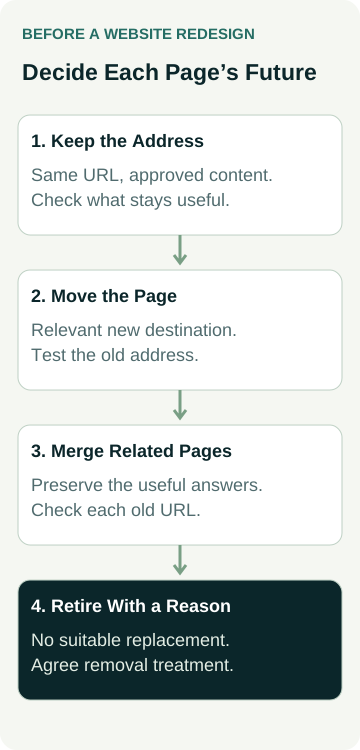
Use these four decisions when reviewing the map:
| Page Decision | What to Agree | Evidence to Request |
|---|---|---|
| Keep the address | The useful page stays at its existing URL, with approved changes to content or layout. | The live address opens the intended page and the important service information remains accurate. |
| Move the page | The same customer task continues at a different address. | The old URL redirects to the agreed new page, which works and answers that task. |
| Merge related pages | A combined page will adequately answer the customer questions covered by the old pages. | Each old address has a relevant destination and the combined content preserves the necessary explanation. |
| Retire the page | The service or content has ended and there is no suitable replacement. | The reason is recorded and the developer confirms the appropriate removal response and updated links. |
Google recommends permanent server-side redirects where possible for permanently moved pages. Its redirect guidance identifies 301 and 308 as permanent redirects. You do not need to write the server rules yourself; ask the developer to show the result for the agreed addresses.
Avoid treating the homepage as a catch-all destination for unrelated retired pages. Google's move guidance warns against irrelevant redirects and allows a 404 or 410 response when content has been removed without a replacement. Have the provider explain the appropriate treatment for each case.
A redirect moves a visitor to another address. It does not recreate missing service details, make an unrelated page relevant or guarantee unchanged search results. Read the destination as a customer would before approving the mapping.
A Worked Example: A Plumber Reorganises Three Services
An example plumbing business is rebuilding its website on the same domain. The owner still offers hot-water repairs and blocked-drain work, but has stopped installing rainwater tanks. The proposed menu has fewer items and the new draft initially combines all services on one short page.
The owner asks the team to review three entries in the migration map:
- Hot-water repairs: the existing
/hot-water/address remains. The new layout keeps the repair explanation, supported systems and enquiry route. The team has no business reason to change this address. - Blocked drains:
/drains/will move to/blocked-drains/. The new page explains that service, and the developer is responsible for the permanent redirect and updated internal links. - Rainwater tanks:
/rainwater-tanks/will be retired because the business no longer offers the work. There is no equivalent replacement. The owner approves removing the obsolete offer, and the developer records the removal treatment instead of sending everyone to the homepage.
The SEO person and owner also review the proposed combined page. If it cannot adequately explain the services and their different customer questions, they discuss retaining separate pages. The decision is based on the information customers need, rather than keeping or deleting pages to reach a preferred menu size.
Before launch, the owner reads the approved destinations. After launch, the developer checks the old and new addresses, and the owner repeats the customer journey. No traffic or enquiry improvement is assumed in this example. The completed map gives the team specific decisions to implement and inspect.
Ask for Checks You Can Review
Agree what will be demonstrated on the preview and what must be repeated on the public website. A preview can confirm the planned content and navigation. It cannot prove that the old public addresses redirect correctly after launch.
Ask the website and SEO people to cover these tasks in the written scope:
- Review the existing pages and approve their keep, move, merge or retire decisions.
- Check that new destinations contain the agreed content and a working customer path.
- Implement and test the redirect map, including relevant old addresses outside the main menu.
- Check internal links, intended canonical addresses and the sitemap against the new structure.
- Check that development restrictions have been removed where public search access is intended.
- Repeat the important checks live and record unresolved faults, the person responsible and the next action.
Keep development access restrictions under the developer's control. Ask how the preview will be protected and how the public site's intended search settings will be verified. Do not remove restrictions yourself to make a test pass. Our website launch checklist covers the wider business information, device and enquiry checks alongside this search-specific work.
Also ask who can restore the previous working site if a serious launch fault occurs. Agree which problems would trigger that decision and who can authorise it. A rollback plan needs to account for content or enquiries created after launch, rather than assuming an old backup can be restored without consequences.
Plan the Review After Launch
Google says rankings can fluctuate while it recrawls and reindexes significant site changes. There is no reliable promise that every website will retain the same positions or settle within a fixed number of days.
Separate an implementation fault from an outcome observation. A redirect leading to the wrong service, a missing page or an accidental search restriction needs investigation. A change in recorded clicks needs its date range, affected pages and context before anyone attributes it to the redesign.
Ask for a saved pre-launch comparison period and agreed review points. Note changes to measurement, seasonality, service offers or advertising that could affect the comparison. Review relevant landing pages and actual useful enquiries alongside overall traffic. Tracking a contact-button click is different from confirming that a customer request arrived.
The review should name who checks search data, who fixes website faults and who confirms enquiry quality. If the build quote ends at launch, ask whether post-launch checks and corrections are included or separately scoped. An ongoing campaign is a further decision; our audit or ongoing SEO guide helps compare that arrangement.
Bring the Migration Plan Into the Quote
Before accepting the redesign, ask for the page decisions, implementation responsibilities, live checks and post-launch support in writing. Resolve disagreement between suppliers while the structure can still be changed. Keep unfinished decisions visible rather than marking the whole site ready because the new design looks good.
For help planning the search work, review AWE's SEO services and contact Australian Web Experts with the current website, proposed changes and the service pages that matter to your business. Ask how the existing site will be assessed and what migration work would need to be agreed before the build starts.