

Compare the working setup you will receive, including the editor, customer features, ongoing services and exit path. A platform name or attractive demonstration does not explain all of those. Ask each provider to show how its proposed setup handles the same business tasks before choosing.
Your comparison might involve a WordPress installation with separate hosting, a hosted WordPress service or another website-building product. Record the actual product and arrangement. Two proposals using the same platform name can still involve different editors, extensions, permissions and support work.
Ask what you can edit, what the website depends on and what you would receive if you changed provider. Check those answers against the proposed product and configuration.
Name the Exact Product and Build Arrangement
Ask the provider to identify the platform, editor, relevant plan and important additions in the written proposal. Include who arranges hosting and who holds the relevant accounts. A description such as “WordPress website” or “built with Wix” leaves those practical details open.
Also ask what the provider intends to build within that setup. Will your service information use ordinary pages, repeatable entries or a custom editing interface? Which layouts will be designed for your business, and which parts use an existing theme or template?
Those are separate questions from who does the initial work. A designer can use a hosted builder, and an owner may maintain content in a professionally built site. Our DIY builder or web designer guide covers that division of work. Here, compare the platforms and configurations being proposed for the same job.
Keep the comparison grounded in your current needs and a few credible future requirements. “It can do anything” is difficult to assess. Ask the provider to explain the actual route for an important feature, including the limits and extra work it may involve.
Compare the Same Customer Task
Give each provider the same description of what a visitor needs to achieve. For a service business, that might be finding the relevant service, understanding the coverage area, viewing approved project information and sending a useful enquiry from a phone.
Ask how the proposed site will support that route. Where will the content live? What handles the enquiry? If a booking tool, payment service or customer account is needed, identify the proposed product and its connection to the website. A feature on a general platform sales page is not a description of your finished setup.
Have the provider distinguish included configuration from additional development. Record any extension, subscription or integration the route depends on, along with the person responsible for it. Include the information your business must supply for the feature to work as intended.
Compare demonstrated capability and stated limits. A platform label alone does not establish mobile usability, accessibility, search visibility or a business result. Those need checks appropriate to the actual delivered website and the work you have agreed.
Try the Editing Work You Expect to Do
Choose a routine task such as correcting a service paragraph or replacing a project image. Ask to see it performed in a representative version of the proposed editing setup, with the kind of access you expect to receive. Look at the resulting page as well as the editor.
Find out which changes are intended for everyday editing. Changing text in an existing section may be a different task from adding a new layout, changing a shared component or altering a connected form. Have the provider explain where its help would still be needed.
Our website editing and handover guide develops the practice tasks, permissions and training record. Use that process to compare the proposed setups; the platform choice should reflect how your business will maintain the content.
Ask about ongoing operation too. Who handles the agreed software work, paid additions, faults and support requests? Record those responsibilities and recurring charges. A simple-looking editor does not describe the work involved in keeping every connected part running.
Check What an Export Actually Contains
Ask the provider to explain what can be supplied if you move and what you could do with it. A content export, source-code package, account transfer and complete running website are different deliverables. Identify the material, usage permissions, dependencies and assistance involved in your proposed exit path.
For example, WordPress.org’s Tools Export documentation describes a WXR/XML export containing content such as posts, pages and related data for import into another WordPress site. That description should not be treated as proof that one export reproduces your entire configured website. Ask what else your actual setup requires.
Wix’s Studio Two code-export documentation describes a beta export that can be hosted elsewhere. It also says the running site still uses Wix fonts, media and business-feature APIs, and lists current limitations. This is specific to Studio Two’s documented feature; it is not a promise about every Wix product, plan or website.
These examples show why the exact product and export type matter. Ask the proposed provider to demonstrate or document the applicable path. If an important feature depends on a service that would remain elsewhere, include that dependency in the comparison rather than describing the result as wholly independent.
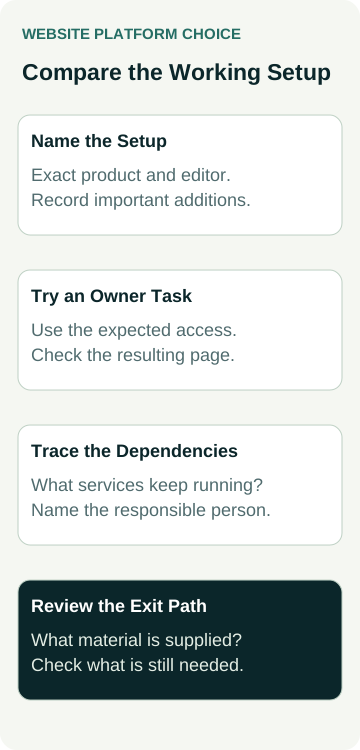
A Worked Example: A Painting Business Comparing Proposals
Illustrative planning example only: no actual business, platform trial, export, migration or performance result is being claimed.
An example painting business compares two website proposals. Both promise an editable service page, a project section and an enquiry form. The owner expects to correct service wording and add approved job photos, while the provider handles layout changes and technical work.
The owner asks each provider to name the editor and additions, show the routine content change and trace where an enquiry goes. The owner then asks what would be supplied during a provider change and which hosting, media, form or other services would still be required.
The answers are recorded against the same four questions below. An unknown answer stays open for clarification; the example does not assume that one platform wins.
| Comparison Area | Ask Each Provider | Record the Practical Answer |
|---|---|---|
| Everyday editing | Can the intended editor complete the agreed content change? | Demonstrated task, access and remaining help |
| Customer features | How does the proposed setup complete the customer’s task? | Actual products, configuration and limits |
| Ongoing operation | Who maintains the connected parts and recurring services? | Responsibilities, dependencies and charges |
| Changing provider | What is supplied, and what would still be needed? | Available material, permissions and transfer or rebuild work |
The business can now compare what it would operate and what help it would need. That is more useful than choosing from a broad claim that one platform is always easier, cheaper, more portable or better for search.
Put the Comparison Into the Written Proposal
Keep the platform and editor details beside the agreed page and feature list. Include the required content, important services, account arrangements, recurring charges, routine editing work and handover deliverables. Ask the provider to resolve any mismatch between its demonstration and its written scope.
Separate what is included now from a possible later addition. A future customer portal or store may need another plan, integration or build phase. Ask what the provider can substantiate about that path rather than treating a general growth claim as an included feature.
Keep the proposed exit arrangement specific. Who supplies the agreed material, what assistance is included and what limits apply? If a licence or agreement is unclear, get the relevant explanation or advice before relying on it. An export capability by itself does not settle every ownership or usage question.
If an important question remains unresolved, identify the person who will answer it and the evidence needed. You can compare proposals while keeping the uncertainty visible; filling a blank with an assumption makes the comparison less useful.
Keep the Decision Tied to the Delivered Site
At handover, review whether the delivered editor, content structure and customer features match the agreed setup. Check the routine task and relevant customer route in the delivered version. Record any remaining work with the provider rather than assuming the initial demonstration proves completion.
Keep the configuration and responsibility record available for future updates. Revisit it when changing an important extension, moving services or commissioning a feature that affects the original arrangement. A later change may need its own assessment and review.
When discussing website packages with Australian Web Experts, bring the customer tasks and content updates your business needs. Ask what platform setup, ongoing help and handover the actual proposal provides, then compare those answers with the other arrangements you are considering.