

Before adding a language selector, agree which customer journey will work in the new language, who checks the wording and what happens when someone gets in touch. A translated introduction can be useful, but customers need to know where that assistance ends.
Start with a specific need from your actual customers. They might want to understand a service, prepare for a visit or send a suitable enquiry. List the pages, controls and messages involved in that task before asking for a multilingual website quote.
The work can include translation, content review, layout changes, website development and ongoing updates. Ask the provider to identify those responsibilities separately. A plugin or a language button does not establish that the complete journey has been translated, checked or connected to a team that can respond.
Start With the Customer Task and Available Support
Ask the people who handle customer questions where language assistance would help. Use patterns from genuine conversations without copying personal details into the brief. Check which language or language variety the intended audience needs rather than choosing from a generic list of popular languages.
Write the proposed task in plain terms: “Understand our equipment servicing process and request an assessment.” Then confirm which services and areas the business can actually cover. Translating a page should preserve those limits unless the owner has approved a real change to the offer.
Keep language preference separate from location. Google distinguishes a multilingual site, which offers more than one language, from a multi-regional site targeting different countries. An Australian business can provide information in another language for customers within its existing service area. That does not establish a new overseas service or office.
Confirm how an enquiry will be handled. Can the team read and answer it in the selected language? Is language assistance available only for particular stages? Agree a clear, accurate explanation where that affects the next step, without promising an interpreter, response time or ongoing bilingual support that the business has not arranged.
Map the Whole Journey Before Counting Pages
Follow the intended route from arrival to the customer's next action. Include the service explanation, navigation, buttons, form labels, correction messages, acknowledgement and any document needed to understand the service. A page count can miss small messages that determine whether someone can finish.
Use a coverage record when discussing the quote:
| Journey Stage | Material to Include or Identify | Decision to Agree |
|---|---|---|
| Arriving and choosing | Entry page, language choice and relevant navigation | Where the person starts and how they reach the equivalent information |
| Understanding the service | Scope, exclusions, preparation and necessary documents | What is translated and who confirms its meaning |
| Making the enquiry | Field labels, instructions, errors and action wording | Which parts work in the chosen language and what assistance is available |
| Continuing afterwards | Confirmation, acknowledgement and response arrangements | What the customer is told and what the business can actually provide |
Mark every item as included, excluded or unresolved. For an excluded item, explain the customer effect and the proposed alternative. A download remaining in English may matter more than an untranslated optional blog post if customers need it before their appointment.
Ask whether third-party booking, payment or enquiry tools are part of the scope. They may have their own language capabilities and limits. Have the provider demonstrate the actual proposed arrangement rather than assume a translated page controls every connected system.
Agree How Wording Is Reviewed and Approved
Name a person responsible for checking each language version. They need enough language and subject knowledge to confirm service meaning, exclusions and customer instructions. Where specialist review is needed, agree who supplies it and what the quote includes.
If software produces an initial translation, record the review and approval process before publication. Compare the actual displayed wording with the business's approved meaning. Keep an agreed terminology list for service names, important conditions and repeated action labels so different parts of the journey remain consistent.
Review more than the large paragraphs. Check page titles, image descriptions where needed, text embedded in images, captions, downloads and automated messages within the agreed scope. The reviewer should know which source version they approved. Later edits should not silently retain an old translation as though it still describes the current service.
Ask for a readable preview with the real wording fitted into the layout. Translation can change the space a heading, menu choice or form instruction needs. Some languages also need different text-direction handling. Agree relevant design and technical checks with the provider rather than accepting a screenshot filled with short placeholder labels.
Plan Language Switching and Technical Checks
Ask what happens when someone switches language halfway through a task. Ideally, the destination should make sense in relation to the page they were reading. If there is no equivalent version, agree a clear alternative that explains the gap. Do not let the selector imply every page is translated when the agreed scope is smaller.
Google's multilingual-site guidance recommends different URLs for language versions and links that let users choose between them. It advises against automatic redirects based on an assumed language because they can prevent access to other versions. Ask the developer how the proposed setup follows the relevant guidance.
Have the technical owner explain the page relationships and any search annotations needed for the actual versions. This is separate from translating the copy. Neither a language label nor an annotation guarantees indexing, rankings or enquiries.
W3C's HTML language guidance explains declaring the page's default language and identifying passages in another language. Those declarations describe language to software; they do not translate the content. Google separately says it determines page language from visible content rather than the HTML language attribute. Ask for both the content review and the appropriate technical checks.
Approve a complete, understandable route for the chosen scope. Record any language gap before it becomes a surprise for the customer.
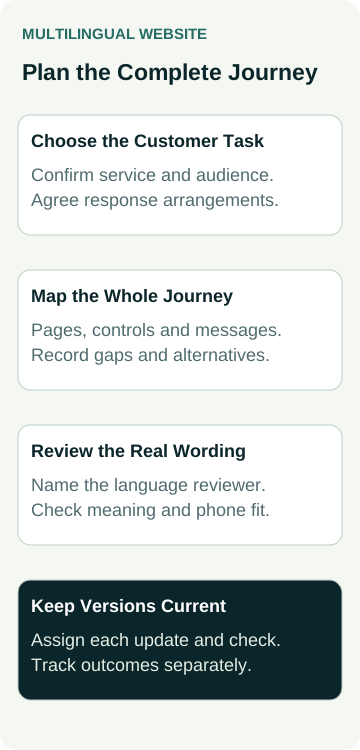
A Worked Example: An Equipment-Servicing Enquiry
An example equipment-servicing business receives requests for clearer service information in another language. It considers translating an introduction and adding a language selector to the website.
The owner instead briefs one defined task: understand the servicing offer, check preparation requirements and request an assessment. The coverage record includes the service page, a preparation document, the enquiry fields and the confirmation. An unrelated news archive remains outside the proposed translation scope.
The language reviewer finds that one repeated service term needs clarification from the technician. The business resolves that meaning before approving the wording. The designer then checks the real labels on a phone, while the developer explains what happens when the customer switches from an untranslated news page.
The owner also confirms the response arrangements with the person handling requests. The public explanation will reflect that actual process. The business does not claim round-the-clock support in another language simply because it has translated a form.
These are proposed planning decisions. No translation has been certified, no enquiry has been sent and no increase in customers or search visibility has been measured in this example.
Check the Preview From Arrival to Response
Ask a language reviewer and the website person to follow the agreed journey using the actual preview. Check direct entry to the translated page as well as arrival through the selector. Review navigation, layout, documents and the route back to the other version on desktop and phones.
Include these points in the acceptance discussion:
- The displayed service facts and important conditions match the approved meaning.
- Labels, instructions and necessary documents are available as agreed.
- Language changes and missing equivalents lead to understandable destinations.
- Form feedback and response expectations describe the actual process.
Our enquiry-confirmation guide explains why a success message and business receipt need separate checks. Where a test submission is appropriate, have the owner and developer arrange a controlled test with approved data. Keep its result separate from a visual review. This article does not perform a test or establish accessibility conformance.
Budget for Keeping Both Versions Current
Agree what happens when a service, contact detail or preparation instruction changes. Name who updates the source, who reviews the other language and who decides whether old information can remain visible while an update is pending. Include the linked documents and messages that depend on the changed fact.
Ask which work is included in continuing support and which needs a separate quote. If staff will make routine edits, use our website-editing handover guide to agree the tasks they will practise and the limits of their access. Managing a page does not automatically include translating and approving every later change.
To discuss the build, review AWE's website packages with your proposed language, customer task and coverage record. Confirm translation, review, connected tools and ongoing updates explicitly in the scope; do not assume they are included in a standard package.