

Ask to practise the edits you expect to make, using the account and website setup you will actually receive. A promise that the site is “easy to update” is more useful when the provider can show you completing a routine task, checking the result and knowing when to ask for help.
A content management system, usually shortened to CMS, provides tools for managing website content. What you can change depends on the platform, the way the site is built and the access you are given. Having a login does not establish that every page or feature can be edited in the same way.
For an Australian small-business owner, the buying decision is how much everyday content work you want to handle and what support remains with the provider. Put those responsibilities in the quote and handover plan before assuming you can take over all future changes.
Agree a small set of real editing tasks and ask the provider to demonstrate them with you. Record what you can complete, what still needs help and which changes remain outside the agreed scope.
List the Updates You Expect to Make
Start with the work your business will actually do. You might replace a project image, correct a service paragraph or add a new job example. Describe each task with a specific piece of content and an expected public result.
“Update the website” is too broad for comparing proposals. “Replace one gallery image while preserving its caption and checking the phone crop” gives the designer something concrete to demonstrate. It also tells you whether the training matches the work you plan to do.
Estimate who will perform the updates and whether that person has time for them. You can choose to manage a few routine tasks while paying the provider for others. Self-editing need not mean rebuilding layouts, maintaining software or fixing connected systems yourself.
Add the expected tasks to your website brief. If you are still deciding who should build the site, the DIY-or-designer guide covers that wider comparison. This handover discussion concerns operating the completed site, whichever build route you choose.
Ask to See the Editing Setup You Will Receive
Request a demonstration using the proposed site structure and your likely content. A provider working quickly in its own familiar environment does not show how the eventual editor will experience the task.
Ask where the information lives. Is a project description a field in a repeatable entry, a section on one page or part of a shared layout? Which parts are intended for everyday editing, and which should go back to the provider? Keep that distinction visible in the handover notes.
WordPress is one example of why access matters. Its documentation on roles and capabilities describes controlling which tasks users can perform. If WordPress is proposed, ask the provider to explain the actual permissions configured for your account. A role name alone should not replace a demonstration of the agreed tasks.
For another platform, ask the same practical questions about its editing and publishing setup. Do not assume a tutorial for a different product, version or website applies to yours. Account administration and technical ownership also need clear arrangements, separate from the permissions required for routine content work.
Use a Task Record During the Handover
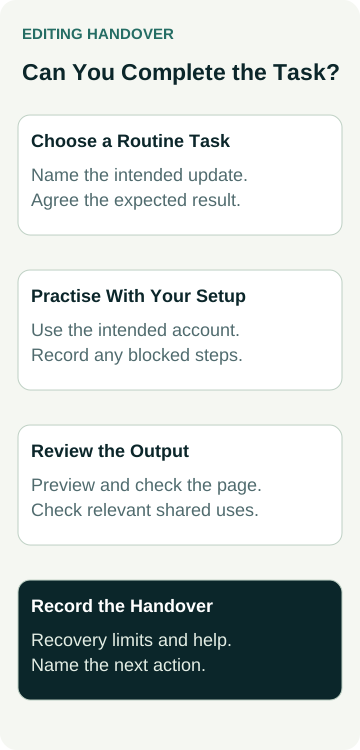
Choose a few representative updates before the session. Agree a suitable practice environment and approved sample content, so learning does not accidentally publish a new offer or replace important live information.
Record the intended result and the evidence you need. This example can be adapted to the website being supplied.
| Practice Task | Result to Demonstrate | Limit to Clarify |
|---|---|---|
| Correct a paragraph | Intended wording appears on the relevant page | Who approves changes to service facts |
| Replace an image | Image, nearby description and phone crop work together | File preparation and publication rights |
| Add a project entry | Approved template produces a complete useful page | Required fields and any extra layout work |
| Revisit a saved edit | Editor can identify the saved state and review the output | What history or recovery the setup supports |
Let the person who will maintain the content perform the task, with guidance. Note the steps that were unclear, permissions that blocked progress and any part the provider had to finish. A watched demonstration and a completed practice task are different handover results.
You do not need a universal time limit or a score for the session. You need enough evidence to decide whether this setup and training fit your team. An unresolved task can lead to more training, a simpler editing setup or an agreed provider-managed update.
Check the Page Beyond the Editing Screen
Ask how to preview a change and how to tell whether it is a draft, a saved update or publicly visible. The labels and workflow depend on the supplied system. Have the provider demonstrate the actual sequence rather than assuming every Save button publishes or every preview matches the public page.
Review ordinary text, headings, images and links on the page. Include a phone-sized view and the relevant desktop layout. Longer wording or a different image shape may fit the editor while changing the appearance customers see.
Check whether the content appears in more than one place. A title or shared panel might feed a card, menu or another page. The shared-content guide covers finding that reach before making an edit. Include the relevant dependency in training if your team will manage it.
Keep the business approval separate from the mechanical edit. Being able to change service eligibility, an offer or opening information does not make the new wording correct. Name who supplies and approves those facts before the editor publishes them.
A Worked Example: Adding a Landscaping Project
This is an illustrative handover task, not a client project or measured result. An example landscaping business wants its office coordinator to add completed-job entries using an agreed project template.
Before the session, the owner approves a practice description and suitable images. The provider confirms where the task can be rehearsed and which account represents the coordinator’s intended access. The practice should not send messages, change account permissions or publish unapproved customer information.
The coordinator creates the entry, fills the required fields and previews the result. The review checks the title, description, image treatment and relevant links. It also checks where the project appears in the gallery, rather than looking only at the new entry’s editing screen.
If the coordinator cannot finish a step, the handover record says which step and why. The provider can explain whether the answer is training, a configuration change or additional work. The owner then agrees the appropriate response instead of treating a generic “CMS included” line as proof that everything is ready.
The task is complete when the agreed result and checks are demonstrated, with any remaining limits recorded. It does not establish that the coordinator can redesign the whole site or that adding projects will produce more enquiries.
Agree What to Do When an Edit Goes Wrong
Ask the provider to demonstrate the available review or recovery options in the agreed practice environment. Find out what those options cover and who handles a problem beyond them. Do not assume every change can be reversed in the same way.
For example, WordPress documents a revisions system that records saved drafts and published updates and allows earlier revisions to be reviewed and restored. If that is part of your supplied setup, ask which content it covers and how the provider has configured it. The editing interface can also differ by version.
A page’s content history is not a complete explanation of how the website would be recovered after a wider problem. Ask separately about images, shared settings, layouts and anything the routine history does not cover. A whole-site backup or technical repair belongs with its responsible provider and an agreed process.
Record when the editor should stop and ask for help. Examples might include an unexpected change across several pages, a missing control or a problem with an enquiry integration. Keep customer calls, form submissions and notification tests outside a training exercise unless they have been specifically arranged.
Put Training and Continuing Support in the Quote
Clarify who attends the handover, which tasks are covered and what notes or recordings will be supplied. Ask whether the session uses the completed editing setup, whether practice is included and how unresolved tasks are handled. Do not assume training is unlimited or that an old generic tutorial covers every customised feature.
Agree the continuing responsibilities too. Routine content editing, software maintenance, design changes and fixing an integration are different kinds of work. Ask what is included, how additional requests are priced and how someone reports a problem. Keep any response-time commitment tied to the actual agreement.
- Business owner: approves facts, material and who may publish.
- Everyday editor: completes the agreed tasks and checks the output.
- Website provider: explains the setup, supplies the agreed training and handles its defined support work.
- Handover record: names completed tasks, remaining limits and the next action.
Australian Web Experts’ website packages are a starting point for discussing the site you need. Bring the updates you expect to handle and ask what editing setup, training and support the proposal provides. Agree that practical result before relying on a promise that you can edit everything yourself.