

Ask which filter URLs need a search purpose before approving a rule that covers them all. A shopper may need to narrow products by material or size without every combination becoming a separate page you want people to find through Google.
For an Australian retailer reviewing an SEO audit, the decision starts with the actual storefront. Which choices help customers, what addresses do those choices create, and which views have a useful role as search landing pages? A large URL count does not answer those questions.
Keep the Customer Filter and Search Page Separate
Filters let people narrow a collection. Sorting changes how a collection is ordered. The site may represent those choices in different ways, so ask the provider to demonstrate your implementation rather than infer it from the platform name.
Google's faceted-navigation guidance explains how parameter-based filters can create large numbers of URLs and consume crawling resources. It distinguishes URLs that do not need to appear in search from ones intended to be crawled and potentially indexed.
That distinction does not require removing useful customer controls. A filter can remain part of the shopping experience while its search treatment is reviewed. Equally, a useful filtered collection may deserve assessment as a deliberate landing page rather than being swept into a blanket exclusion.
Keep the broader buying route clear too. Our catalogue or online-store guide covers whether customers order, buy or request a quote. This article concerns the URLs produced while narrowing that catalogue, not choosing the checkout model.
Inspect What the Report Has Counted
Ask for representative addresses and the report's observation date. Does the total mean URLs the tool discovered, URLs it fetched or pages recorded as indexed? Keep those states separate. An audit finding thousands of combinations is not proof that Google has indexed them all or that a particular business has lost enquiries.
Open a few agreed examples with the website owner. Record the starting category, selected filters, sort order and resulting address. Then check what that exact address shows when opened directly. Does it preserve the intended selection, show the same products, reset to the base category or return an unexpected result?
Also ask where the addresses are linked. A visible control and a crawlable link are not necessarily the same thing. The technical reviewer should explain how the site exposes its filter states and where the audit obtained them.
If the concern is specifically a sitemap list, use the sitemap-inclusion review for that decision. Removing a sitemap entry alone does not change the page or its filter behaviour.
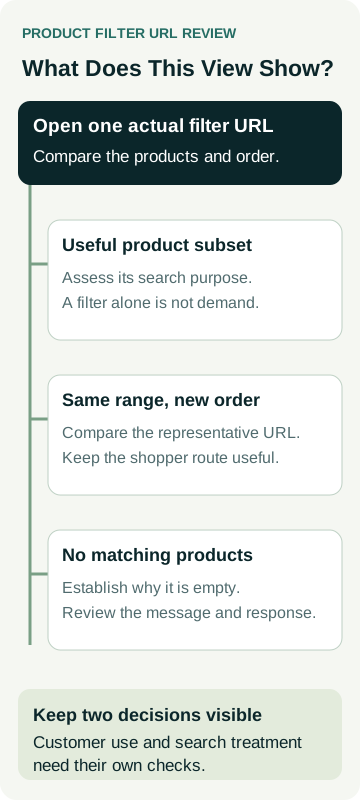
A Worked Example: Four Planter Views
An example garden retailer sells planters. The addresses below are teaching examples, not a live shop, a crawl export or evidence of search demand. The owner and reviewer compare what each view actually does.
| Example View | What the Example Shows | Decision Before Changing Rules |
|---|---|---|
Base collection: /planters/ |
The ordinary planter range and its product routes | Identify the intended main collection and preserve the customer path |
Material filter: ?material=terracotta |
A relevant subset of the offered range | Assess whether this deserves a deliberate search entry; demand and useful content are not established by the filter alone |
Price sort: ?sort=price-asc |
The same products in another order | Review its relationship to the ordinary collection rather than assume a new customer subject |
Empty combination: ?colour=blue&material=stone |
No matching products in this example | Investigate why it is empty and agree the customer message and technical response |
The material view is a candidate for assessment, not an automatic instruction to publish another page. Ask what someone arriving from search would gain, whether the range supports the purpose and what actual query evidence is available. If that evidence has not been collected, record it as unknown.
An empty combination needs another distinction. Does the business never offer that combination, or has a normally useful range temporarily become unavailable? Have the provider explain the actual state before applying a rule intended for a different situation.
Google recommends a 404 response for faceted combinations with no results. Ask the developer how its guidance applies to your platform and the particular empty states being reviewed. This example does not prescribe deleting a category, redirecting customers or changing stock handling on an unseen store.
Decide what each view is for before approving its technical treatment. A working customer filter, a chosen public address and a Google index result are separate things to check.
Ask Which Control Addresses Which Problem
A proposal saying “block duplicates” needs more detail. Ask the reviewer to name the objective: reduce unnecessary crawling, keep a page out of search or nominate a representative for equivalent content. Those are different jobs.
Google's robots.txt introduction explains that controlling crawling does not necessarily keep a URL out of search. Its noindex guidance says Google must be able to access a page to read that instruction. Combining controls without considering that relationship can leave the intended result unresolved.
For equivalent versions, Google's canonical guidance addresses choosing a representative URL. A canonical preference does not redirect a shopper or guarantee Google's selection. Our canonical-URL guide covers that wider comparison; it should not become a reason to treat every product subset as identical.
Have the specialist explain the proposed rules and exceptions for the actual site. Avoid copying a generic parameter block or a fixed “two filters means noindex” rule from a tutorial into a live store. A recommendation needs to account for the pages you intend to retain, the platform's behaviour and existing search evidence.
Test the Exceptions Before Approving a Wider Change
Ask for a limited preview that includes the ordinary collection, one proposed search-worthy subset, a sort view and an empty combination. Include a direct product address too, so the review does not overlook the route to the item itself.
Review these customer actions with the responsible person:
- Select and clear a filter, confirming the product list and visible selection agree.
- Open a selected view directly and check whether it preserves the expected state.
- Follow a product link and return to the collection using the supported route.
- Read the empty-result message and find a useful way to change the selection.
- Check that intended collection and product pages remain reachable after the proposed rules.
These are a starting set for a controlled review, not a claim that every platform supports the same behaviour. Any configuration or code change still needs a defined implementation, approval and appropriate checks.
Keep the specialist's crawl and index checks separate from the customer walkthrough. The crawl and indexing evidence guide explains why a page opening successfully does not establish Google's recorded index state.
Review the Result Against the Agreed Purpose
At handover, ask which rules changed, which views were checked and what remains unresolved. A smaller audit export is not sufficient evidence that the storefront or search setup is better. Confirm the intended customer routes and record later Google observations with their dates.
For any retained search landing pages, review relevant queries and suitable enquiries over comparable completed periods. Keep inventory changes, promotions and other website work in view. A change after the implementation does not establish that filter handling caused it.
Bring the report, representative URLs and your intended product groups when discussing AWE's SEO agency services. Talk to Matt about the assessment your site needs, including who can investigate the platform and carry out any agreed changes. A specific set of filter states is a better starting point than an instruction to make every parameter disappear.