

A separate service page is useful when customers need a different explanation to decide whether the work suits them. Start with the customer decision, the actual service and the information you can supply. A different keyword or a longer page list is not enough on its own.
For a small trade business, several related jobs may fit comfortably on one page. Another service may need its own scope, exclusions, quoting inputs and proof. The worksheet below helps you make that choice before asking a designer to add pages.
List the Services You Actually Offer
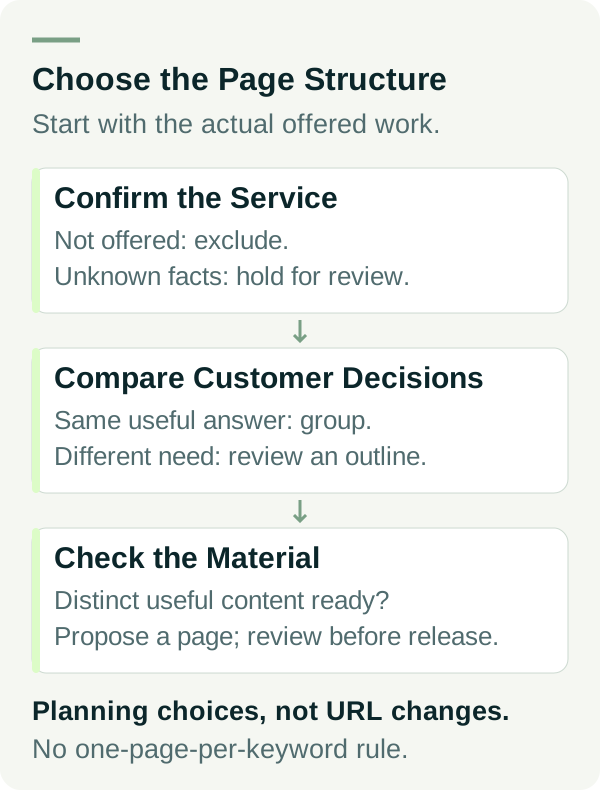
Write the offered work in plain language. Include who it is for, the coverage you can fulfil and the work you exclude. Ask the person who assesses enquiries to check the list.
If an existing service is ending, agree the old page, links and customer message rather than leaving its current offer unchanged.
Keep a future service separate from one customers can buy today. If the business is still deciding whether to offer it, mark it hold. A proposed page should not quietly turn a plan into a public promise.
Then record the existing page that explains each service. Read its content rather than relying on its title. A general services page might already answer a simple task well; another page may mention an important service without explaining it.
Our local business information guide explains why a reader needs enough detail to assess suitability. This exercise goes further into choosing the page structure for that information.
Compare the Questions, Scope and Next Step
For each proposed service page, ask:
- Does this customer need a materially different explanation?
- Are the scope, exclusions or quoting inputs different?
- Can we show relevant, permission-cleared evidence for this work?
- Does an existing page already answer the task clearly?
- Who will supply, check and maintain the additional information?
If the answers are substantially the same, group the related work on the existing page. Use clear sections so customers can find the variation that matters to them.
If the answers differ, write a short proposed outline. A separate page becomes a sensible candidate when that outline has useful distinct information, rather than the same text with a new service name.
Google's SEO starter guide encourages useful, organised content and descriptive links. It does not prescribe one page per keyword or guarantee a ranking for a new page.
Use the Service-Page Decision Sheet
Download the service-page scoping worksheet and the worked example. The full decision fields are also below.
| Field | What to record |
|---|---|
| Offered service | Owner-confirmed work and exclusions |
| Customer decision | What someone needs to decide before enquiring |
| Different information | Scope, process, quote inputs and useful proof that differ |
| Existing page | Actual URL and what it already answers |
| Content readiness | Material available, missing facts and approval owner |
| Proposed decision | Keep, group, plan a separate page, hold or exclude |
| Reason and next check | Evidence for the decision, responsible person and review date |
This is a planning record. No URL is deleted, redirected or published by completing it. Review the actual links and dependencies with the website owner before an implementation decision.
A Worked Bathroom-Business Example
These services and decisions are examples. They illustrate the worksheet; they are not a client case study or a recommended offer.
Example Bathrooms offers complete residential bathroom renovations. Its current bathroom page explains project scope, exclusions and how the initial discussion starts.
| Candidate | Relevant difference | Planning decision |
|---|---|---|
| Complete bathroom renovations | Main offered service with a useful existing explanation | Keep and review the existing page |
| Ensuite renovations | Same project process and enquiry inputs in this example | Group as a clear section on the bathroom page |
| Laundry renovations | Different room requirements, scope and project material | Plan a separate page only after the owner confirms the service and supplies the outline |
| Emergency tap repairs | Not offered by this example business | Exclude and check that existing copy does not imply otherwise |
The laundry decision remains a proposal until its facts and material are ready. It is not an instruction to publish an empty page. Another business might have different processes and reach a different decision.
Give the Proposed Page a Clear Job
A short page brief should identify the customer, the real work and the question the page answers. Add the important exclusions, quoting preparation and the next contact step. Include evidence only where you have the facts and permission to publish it.
Before buying an additional address for that service, define what the extra domain will open and what SEO work it needs.
Use an accurate link from the existing services overview or a related page. The link should help a reader choose the right explanation. Avoid forcing every page into the main menu when a clear services section would work better.
Related questions can stay within the page. A longer research question may need a guide if it takes the reader through a genuinely different decision. That guide should have its own purpose and a natural route back to the relevant service.
Do not create a batch of near-identical pages simply to cover wording variants. Google's spam policies describe doorway abuse involving similar pages created to rank for similar queries. That policy is not a finding that your site has been penalised; assess the actual purpose and content.
Review the Plan Before Expanding the Site
Take the worksheet, the existing page and a draft outline to the person responsible for the website. Agree which facts need checking and how the page will fit the enquiry journey. Record an owner and a review date for unresolved items.
After an agreed page goes live, verify its content, navigation and contact route. Search visibility and suitable enquiries need their own observations over a defined period. Adding a page does not establish either outcome.
Need help deciding how to explain your services? Review our website packages or talk to Matt with your current pages and the work you actually want to promote.