

Before a short closure, agree the affected dates, what customers can still do and when normal arrangements resume. Use that record to prepare the website notice and any appropriate Google Business Profile hours update. Check what customers can actually see after the changes, rather than assuming one update changed every place.
This is a practical task for an Australian business planning a brief break or exceptional change to its usual customer-facing hours. A business can pause visits or routine work while its website remains available. Explain those differences so a customer can decide whether to visit, call, send a request or wait.
A form being available does not mean the team is answering it. Make the closure message describe the real service and follow-up arrangements.
Agree the Actual Closure Before Writing the Notice
Ask the person responsible for the business schedule to confirm the first affected date, the last affected date and the reopening arrangement. Include the year in the working record. Write out any partial-day hours rather than using an ambiguous phrase such as “closed over the weekend”.
Identify what is changing. Are customers unable to visit the premises, are phone enquiries paused, or is the team stopping site work? These arrangements may overlap, but they are not interchangeable. A showroom could be shut while an agreed contact route remains available.
Also record what continues. Existing appointments, work already scheduled or a particular support arrangement may need a separate explanation. Confirm those facts with the people delivering the service. Do not invent emergency cover or a response promise merely to make the notice sound helpful.
If the return date is not known, keep that uncertainty visible in the plan and assign a review owner. Do not fill a template with a guessed reopening date. A longer or uncertain shutdown needs a different review from a short, dated change.
Check the business's own calendar instead of relying on a generic list of Australian holidays. The notice should describe the arrangements for the actual location and team. There is no assumption here that every business closes on the same public holiday or follows the same working week.
Check Which Google Hours Setting Fits
Google's special-hours guidance describes temporary changes without altering the normal schedule. It allows special hours for brief adjustments or a closure of up to six consecutive days. The same guidance directs businesses closed for seven or more consecutive days, or for an unknown period, to its temporarily-closed option.
Have the authorised profile owner check that the setting fits the actual circumstances before making a change. Do not use a permanent-closure status for a planned short break. Equally, do not treat every extended shutdown as a few isolated holiday dates to avoid considering the correct status.
Special hours also depend on the profile having its business hours set to “Open with main hours”. That is not a reason to add arbitrary hours to a profile that should not display them. Google's business representation guidelines say to use regular customer-facing hours and identify exceptions, including businesses operating only by appointment.
If your business falls into an exception or has several different service schedules, ask the profile owner to review the current guidance for that case. Website enquiry hours, appointment availability and public visiting hours should not be forced into one generic timetable.
Google also recommends confirming official-holiday hours even when they match the usual schedule. Use the business's confirmed arrangements as the input. The public holiday label is not a substitute for checking whether you are open.
Write a Website Message That Answers the Customer's Question
Give the notice a clear subject and describe the affected dates. Explain what resumes afterwards and what customers should do in the meantime. Keep the wording close to the relevant contact or visiting information so people can find it while making that decision.
For a business that accepts online enquiries during the break, explain whether someone will review them after reopening. If an existing message promises a response that the team cannot provide during the closure, agree a temporary correction. Do not leave a normal turnaround promise beside a notice saying nobody is available.
Only include an alternative contact route when it is real, appropriate and approved. A phone number helps only if someone will handle calls as described. A booking link should not imply that an appointment has been accepted when the business still needs to assess availability.
Keep the service pages available where they still explain current work. A short closure does not automatically mean that the service has ended. Our service-retirement guide addresses the different decision to stop offering work permanently.
Use One Closure Record Across the Updates
Give the website and profile owners the same approved facts, with an owner for each public surface. The table below is a planning record, not a claim that your current website or profile needs a particular change.
| Part of the Plan | Facts to Confirm | Owner's Check |
|---|---|---|
| Affected period | Exact dates, partial-day times and location | The record matches the real business schedule |
| Customer availability | Visits, calls, work and online requests that continue or pause | The wording describes each relevant activity accurately |
| Public information | Website notice, contact information and appropriate profile setting | Each surface shows the intended dates and meaning |
| Return to normal | Reopening arrangement, review time and notice-removal owner | Normal information is correct after the exception |
Keep the update scope narrow. If another detail is wrong, record it separately and agree who will address it. A closure notice does not require unrelated changes to the business name, address, services or website structure.
For more than one location, confirm the arrangements for each location rather than copying one timetable everywhere. A shared website header may be visible on pages for several branches, so check where the notice will appear before publication.
A Worked Example: A Three-Day Showroom Break
Illustrative example only: this is not an AWE client schedule, live notice or completed profile update.
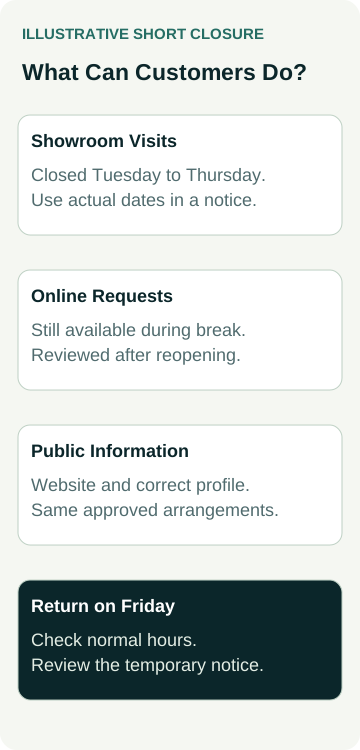
A flooring business plans to close its showroom from Tuesday through Thursday and resume normal customer-facing hours on Friday. Its owner confirms the actual calendar dates and year in the closure record. The website will continue accepting enquiries, but the team will review those requests after reopening.
The proposed website notice explains those facts in plain language. It does not say that the website is unavailable or promise an immediate callback. The contact page's usual follow-up wording is checked so it does not contradict the temporary arrangement.
The profile owner confirms that this business normally displays appropriate main hours and that the three-day closure fits the special-hours guidance. They prepare the affected dates without replacing the regular weekly timetable. The website owner separately prepares the notice using the same approved schedule.
After the authorised updates, the owners check the public website and profile. They compare the displayed dates, the closure meaning and the stated next step. The working record keeps any pending or incorrect display unresolved until it has been checked again.
An owner is also assigned to check normal information on reopening and remove the temporary website notice when appropriate. The example describes a coordination process; it does not demonstrate a search ranking improvement, an avoided wasted visit or an additional flooring sale.
Verify the Public Information Before the Break
Read the website as a customer. Check the contact page, visible hours and the route where a visitor would normally make an enquiry. Follow the relevant links without placing calls or submitting forms unless that test has been agreed. Check the notice on a phone as well as the desktop layout.
Have the profile owner verify the correct business and the information customers see on Google. A saved setting and a public display are separate observations. Record the profile, affected dates, what was observed and anything still pending; do not assume that a confirmation inside the editor proves the public result.
Read the website and profile together for meaning, not just matching characters. A website can explain that requests remain available while the premises are shut. That explanation should complement the correct profile hours rather than suggest that staff are available for visits.
Keep existing customer arrangements clear too. If people already have an appointment or active job, the person responsible for those commitments should decide how they are handled. Do not rely on a general public notice as proof that an individual customer received an important change.
Check the Return to Normal and Keep a Useful Record
Schedule a review around the actual reopening arrangement. Confirm the public profile hours for the relevant dates, the website's normal contact information and any temporary wording about responses. Remove or revise the notice only when it accurately reflects what is happening.
If the closure changes, update the shared record first and have each owner review the affected information. Keep a short history of the approved facts and checks so the next person can understand why a notice or exception exists. Do not leave an expired banner to be rediscovered by a customer.
This task sits within broader seasonal website planning, but it has a specific outcome: accurate availability information for a defined exception. Search visibility, enquiries and sales are separate measures and should not be inferred from completing the hours update.
When discussing local SEO support, bring the confirmed closure record and identify which website and profile work you need. Agree the actual updates, public checks and return-to-normal responsibility before the break.