
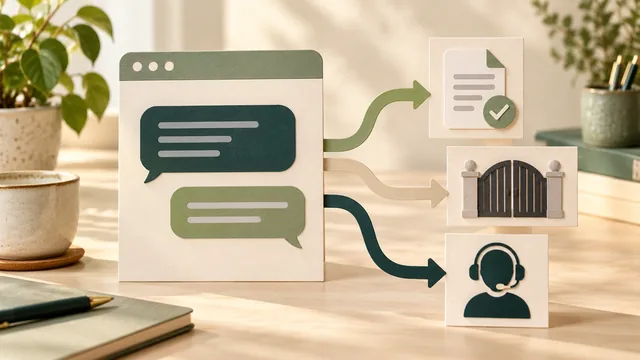
Before adding a chatbot to your business website, agree what it may answer, what it must leave for your team and how a customer reaches a person. Check those routes using your actual business information. A chat bubble in a design preview does not show that the answers are accurate or that a message reaches anyone.
Start with a specific customer task, such as finding the right service or understanding how to request a quote. Approve the answers and the handover together. An automated reply is useful only when its limits and the next step are clear.
Give the Chatbot a Small, Defined Job
Describe the proposed role in ordinary language. Will it point visitors to service information, answer approved questions, collect a request or connect someone to staff? These are different pieces of work. A product described as “AI chat” may combine several of them, but the proposal still needs to say which are included.
Distinguish automated chat from live chat with a person. Ask what the visitor will see when the conversation starts and how they can tell who is responding. Avoid a human-looking name and availability message that make an automated answer appear to come from a staff member who is currently online.
For a small service business, a useful starting scope might be to explain offered work and direct a visitor to the relevant enquiry route. Keep advice about a particular fault, a firm quotation or a confirmed appointment outside that scope unless the business has deliberately commissioned and checked those capabilities.
Also consider whether clearer page content would solve the immediate problem. If customers cannot find your coverage or preparation instructions, fix that information where it belongs. The service-page decision guide helps you assess the information a service needs. A chatbot should not become the only way to discover essential service information.
Agree the Information It Can Use
Give the provider an approved set of current public information and identify who maintains it. Include the actual services, exclusions, coverage and enquiry process. Mark unsettled facts as unresolved rather than asking the system to fill the gaps with plausible wording.
Ask which material the system can access. Does it use selected pages, uploaded documents or a wider collection? How are old files removed? If a service changes, who updates the source and checks that the chatbot stops giving the previous answer? “Connected to the website” is not a complete explanation of that process.
Test questions whose answers are missing or depend on an assessment. The system should have an agreed way to acknowledge the limit and offer a suitable route. It should not turn a general description into a promised price, diagnosis, service area or appointment.
Keep content access separate from permission to act. Finding a booking page is different from creating a booking. Explaining a payment process is different from taking payment or changing an account. If the proposal includes actions, have the responsible person agree the exact authority, confirmation and recovery process before enabling them.
Define the Handover States
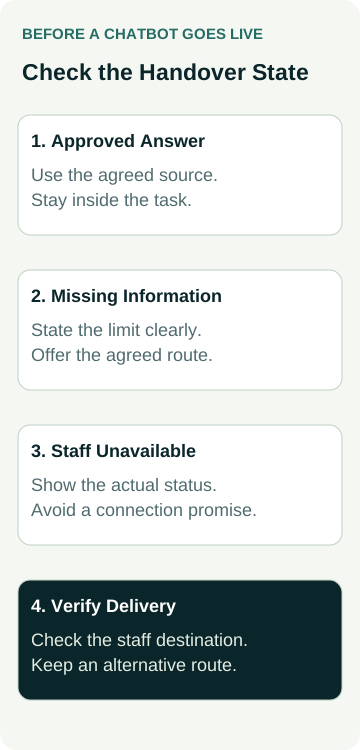
Ask what “human handover” means in the proposed system. It could mean opening a live conversation, creating a request for later review or linking to a contact page. The visitor needs accurate wording for the route that is actually available.
Use a few agreed scenarios to make the scope concrete. These are planning cases to adapt, not a claim that every product supports the same behaviour.
| Customer Situation | Behaviour to Agree | Evidence to Request |
|---|---|---|
| The answer is in approved information | Give a suitable answer or link within the agreed scope | A demonstration checked against the current source. |
| The answer is uncertain or missing | Acknowledge the limit and offer the agreed next step | The actual fallback, without an invented answer or promise. |
| The visitor asks for a person | Explain the available staff or follow-up route | The visitor view and evidence that the request reaches the intended destination. |
| Staff are unavailable or delivery fails | State the situation and provide a workable alternative | After-hours and failure demonstrations, including what was and was not received. |
Confirm the operating hours, time zone and person responsible for the destination. Opening hours alone do not prove that someone is watching the chat inbox. A request can arrive while staff are busy, away or unable to take another conversation.
If the system sends a transcript or contact details to another service, agree what is transferred and who can access it. Do not assume that every handover includes the full conversation. The customer should not be told that a person has joined when the system has only queued a request.
Keep “request received”, “waiting for staff” and “connected to a person” as separate states. The wording should match the evidence the system actually has.
Check Data Handling Before Supplying Customer Material
Ask what the provider stores from a conversation, who can access it, how long it is retained and whether it can be used to improve or train a service. Establish which settings and contractual arrangements support the intended use. Avoid uploading private enquiry histories simply to give a demonstration more realistic examples.
The OAIC’s guidance on commercially available AI products recommends checking suitability, human oversight, privacy risks and access to information. It also addresses transparency about public-facing AI tools. Use it with the person responsible for your business’s privacy arrangements to assess the proposed product and the obligations that apply to you.
For a general first-contact task, agree what information is needed and offer an appropriate private route for anything more sensitive. The enquiry-form guide provides a related way to question unnecessary collection. A chat interface should not quietly demand more information than the next business decision requires.
Use made-up test details during development. Decide how test conversations are identified, who receives them and how they are cleaned up. Any test that creates a real booking, payment, account change or external message needs a separately agreed scope.
A Worked Example: A Repair Request After Hours
Illustrative example: a garage-door repair business offers selected scheduled work. Its proposed chatbot can explain those services and link to the quote-request page. It is not authorised to diagnose a fault, promise an emergency visit or confirm a repair price.
In the preview, the owner asks about a problem that is not covered by the approved material. The agreed response acknowledges that the team needs to assess it and offers the normal enquiry route. The bot does not invent a repair method or turn a general service description into a diagnosis.
The owner then asks to speak to someone while the team is unavailable. The approved wording explains that a live response is unavailable and provides the actual follow-up option. It makes no promise about when someone will reply unless the business has confirmed that commitment.
During an agreed delivery test, the reviewer checks the request in the intended staff destination as well as the confirmation shown to the visitor. If the request fails, the preview must not continue to claim a successful handover. The alternative contact route remains available.
These are example requirements, not evidence of a working bot or a client result. If the business later wants appointment creation, that is additional scope to assess using the booking-versus-quote guide. An enquiry remains different from a confirmed job.
Test the Conversation and the Website Around It
Ask for a preview demonstration with typical wording, an unfamiliar phrase, a missing answer and a request for staff. Include a request for an unsupported promise, such as a discount absent from the approved information. Check that the system keeps the agreed limits rather than treating a visitor’s instruction as permission to change them.
On a phone, check that the chat panel opens and closes, the keyboard does not hide essential controls and the visitor can still reach the normal contact options. Test whether the widget covers important page content or repeatedly interrupts someone trying to read.
Include keyboard and assistive-technology checks. W3C’s status-message guidance explains how relevant waiting, success or error messages can be conveyed without moving focus. Ask the developer to assess the actual conversation and status behaviour; neither announcing every update nor checking one message establishes complete accessibility.
Retain a route outside the chatbot. Use the mobile enquiry-path check to review that route and record what was actually tested. A successful demonstration of the chat alone does not establish that the rest of the customer journey works.
Name the Owner and Agree the Ongoing Work
Before release, record who approves source changes, reviews incorrect answers and monitors handover failures. Agree how the system can be disabled or replaced with a simpler contact route if it gives unsuitable answers or stops delivering requests.
Compare the quote’s setup work with the ongoing responsibilities. Software charges, usage limits, monitoring, source updates, staff training and integration maintenance need clear scope. Do not assume they are included because the preview shows a working chat window.
When discussing website packages, bring the proposed tasks, answer limits and handover cases. Contact Australian Web Experts to establish the website requirements and whether separate chatbot work is appropriate. Confirm the actual implementation and support scope before relying on any chatbot capability or availability promise.