
Your website needs clear answers to customer questions. Whether those answers belong in an FAQ section depends on what someone is trying to do. If a detail determines whether they can use your service, put it where they assess that service. If it explains how to complete a form, put it beside the form.
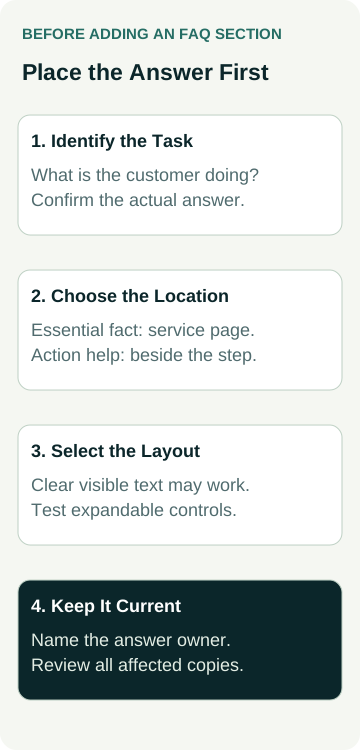
A separate FAQ can help when several related questions need a clear home. Before asking your designer to add one, list the actual questions, confirm the answers and decide where each answer will be useful. Choose the location before choosing the layout. An expandable list cannot repair missing or uncertain business information.
Start With Questions Your Team Actually Receives
Ask whoever answers enquiries which questions customers repeatedly raise. Look at the wording in recent calls or messages without sharing private customer details in the website brief. Record the underlying task: deciding whether the service fits, preparing an enquiry or understanding the next step.
Separate a repeated question from a business fact that has not been decided. If customers ask about weekend appointments and the owner has not confirmed availability, the designer needs a checked answer. A generic statement about flexibility can become a promise the business cannot meet.
Also ask why the question keeps coming up. The information might be absent, buried under an unclear label or contradicted elsewhere. Adding another answer can leave the original problem in place. Read the current page before creating a second version of the same explanation.
Keep a short source note for each answer. It might name the person responsible for bookings, the approved service description or the current preparation instructions. This is a working record for checking facts, rather than public evidence of customer behaviour or a claim that the questions represent every visitor.
Put Essential Information at the Decision Point
If a visitor needs a fact to decide whether to enquire, make that fact easy to find on the relevant page. Genuine service coverage, important exclusions and the way a quote starts should not require a separate hunt through a catch-all FAQ.
The Australian Government Style Manual’s discussion of FAQ pages argues for fixing information problems where they occur and providing help in context. It discusses government content; the useful principle for a small-business website is to check whether the main page should already answer the question.
For example, if people routinely ask whether you repair a particular type of equipment, review the service explanation first. If people ask which photos to attach to a form, place the instructions at the upload step. A visitor should not have to leave a half-completed enquiry to discover the requirement.
An FAQ section remains an option for supporting questions. It should add useful detail rather than carry the entire service explanation. Our service-page decision guide covers when different work needs its own page; this exercise decides where an answer belongs within that customer journey.
Use a Small Answer-Placement Record
Give the designer a checked answer and a proposed location. Keep the reason alongside it so the decision survives later design changes. Use this example as a starting point, adapting it to the work your business actually offers.
| Customer Question | First Place to Check | Proposed Action |
|---|---|---|
| Do you handle this type of job? | Relevant service page | Clarify the offered work and exclusions in the main explanation. |
| What should I send with my enquiry? | Form introduction and relevant field | Put preparation or upload help beside the action. |
| What happens after I contact you? | Enquiry route and confirmation wording | Explain the actual next step without inventing a response time. |
| Can I read more about a supporting detail? | Relevant page section or grouped help area | Add a short answer and a descriptive link to the fuller explanation. |
This record may show that you need a few content changes and no new FAQ page. It may also reveal a useful group of related questions that customers can browse together. Let the actual information determine the work.
If the answer already exists, agree which version will be maintained. A brief summary can link to the fuller explanation without copying changing terms into several places. Where wording must appear in more than one location, include those locations in the update task.
For enquiry preparation, check the form-field guide as well. Choosing the information a form collects is separate from writing the help that lets someone complete it accurately.
Write Answers That Let People Continue
Lead with the checked answer, then add the qualification someone needs to act. If the answer depends on the job, say what information the team needs to assess it. Avoid filling the space with a broad sales statement that leaves the original question unanswered.
A clear heading may be a question or a short statement. Choose wording someone can scan and understand. If every heading begins with the same long phrase, the useful distinction can be difficult to spot. Put the important topic early and remove internal terminology customers would not recognise.
Keep a route for questions you have not answered. An FAQ should help people continue, including those whose circumstances need a direct conversation.
Use descriptive links where an answer needs more explanation. A link labelled with the destination’s subject is more useful than a string of identical “read more” links. Check that the destination still answers the question rather than sending everyone to a general homepage.
Price, availability, cancellation and policy answers need their own responsible person. Ask that person to approve the wording and its limits. A designer can arrange the text; the layout does not establish that a business term is correct or suitable for every customer.
A Worked Example: Preparing a Repair Enquiry
Illustrative example: a business repairs selected domestic appliances. Customers often ask whether their model is supported, what information to send and whether submitting the form books a visit. The owner initially requests a new page containing all three answers.
The designer and owner review the enquiry path. They put the supported appliance types and relevant exclusions on the repair service page. Beside the optional photo upload, they explain which label or visible detail may help the team assess the enquiry. Customers who cannot supply a photo can still describe the problem.
The form introduction explains that the team reviews the request before arranging the next step. The confirmation wording matches that process. No instant booking, repair diagnosis, appointment availability or response deadline is invented.
A remaining supporting question about preparing for an agreed visit gets a short answer in the relevant help section, linked from the booking information when appropriate. The owner approves that answer and names the person who will update it if the process changes.
The result is an answer-placement plan, not evidence that enquiries fell or bookings increased. Another business might reasonably group more questions together. The decision depends on its real service, the customer task and the information already available.
Decide Whether Expandable Answers Help
Short answers can often remain visible under clear headings. An accordion, where a heading opens and closes an answer, is another layout to assess when grouped content would otherwise be difficult to browse. Do not hide the main service explanation merely to make the initial screen look shorter.
If an accordion is proposed, ask the developer to demonstrate it with the actual answer lengths. Can a visitor recognise the controls, open the required answer and follow its links? Check whether opening one answer closes another and whether that behaviour suits someone comparing information.
The W3C accordion pattern describes keyboard operation and how controls communicate whether panels are expanded. Ask for keyboard and assistive-technology checks, as well as phone tapping. A screenshot of a plus icon cannot show that those behaviours work.
On a narrow phone, inspect a long answer and a long heading. Check line wrapping, readable text, visible links and the route back to the main action. For wider accessibility scope, use the website accessibility buying guide. Checking one component does not establish that the whole website meets a particular standard.
Agree the Scope and the Update Owner
Give your designer the question list, checked answers, proposed locations and any component requirements. Agree whether the work involves editing existing content, adding a grouped section or creating a separate help page. Include the private preview and public-page checks you expect before calling it finished.
An FAQ layout also does not prove a particular search display. If markup is proposed, agree its purpose and evidence separately using the schema buying guide. Do not accept a ranking, AI recommendation or enquiry promise simply because the content has question headings.
Name the person who will review answers when services, availability or processes change. The Style Manual also identifies the maintenance risk created by additional copies of information. Keep the checked source and affected locations in the update record so the next edit can cover them together.
When discussing website packages, bring your answer-placement record rather than a request for a fixed number of FAQs. Contact Australian Web Experts to agree the content and design work, component testing and ongoing update responsibilities for your website.