Record the result and ask your website person to check the favicon supplied by the relevant homepage. Keep the approved icon, the public website implementation and Google's later display as separate parts of the work. A new logo in the page header does not establish that all three have changed.
A favicon is the small site icon you may recognise in browser tabs and other website contexts. When an old or unexpected mark appears beside a Google result, the first task is to identify that particular element and the website it represents.
For an Australian business owner reviewing a proposed fix, ask what the provider will investigate, which asset or setting it may change and what evidence will show completion. A promise to “update Google” leaves the actual deliverable unclear.
Confirm That the Icon Is the Problem
Keep the search wording, date, result address and a screenshot with enough context to identify the element. Mark the small icon that appears wrong. Also record whether the result opens your intended public website.
The site name, linked page title, favicon and a Business Profile image are separate things to identify. Our Google site-name guide covers the source label; the page-title guide covers the linked title. Do not approve rewriting either merely because the small icon needs investigation.
Similarly, a large image shown when a link is shared in a message is a different asset and display context. Our shared-link preview guide explains that work. Tell the provider which surface you observed rather than asking it to replace every website image.
MDN's favicon definition describes the tiny icon used in places such as browser tabs and bookmarks. A browser observation is useful evidence, but it concerns that browser context. Retain the separate Google observation instead of assuming one display proves the other.
Agree the Small Icon the Business Wants
Have the person responsible for the brand approve the intended artwork. A detailed horizontal logo may need an appropriate small-format treatment; shrinking the entire wordmark can leave nothing recognisable. Ask the designer to show the proposed mark at a realistic small display size as well as enlarged.
Keep the original approved asset and the prepared website file identifiable. Record who supplied it, where the final file belongs and who may replace it later. If a new simplified mark is needed, approve that design explicitly rather than let a technical correction quietly become a rebrand.
Google's favicon guidance calls for a brand-representative square image meeting its size and format requirements. It also asks for a stable icon URL. Have the developer check the current requirements against the actual file rather than rely on its filename or a generic image-upload success message.
That check is narrower than approving every use of the business identity. Keep advertising logos, Business Profile imagery and other platform assets in their own scope if they also need attention.
Match the Result to the Correct Homepage
Ask the provider to record the website hostname shown in the result and the homepage it has checked. A hostname is the website address before the path, such as example.com in example.com/repairs/.
Google supports one Search favicon per hostname. A subdomain can have its own; different folders on the same hostname cannot independently choose different Search favicons. Do not commission a separate icon for each service folder to solve this issue.
Google's implementation instructions describe a homepage link to the favicon file. They also require relevant crawler access to the homepage and icon. Ask the technical owner to show the delivered reference, its destination and the appropriate access checks.
Keep a normal browser fetch separate from a verified crawler observation. Our access, crawling and indexing guide explains why those records can differ. An icon appearing in your browser is not evidence that a particular Google crawler fetched the current file.
If the finding involves an old domain, subdomain or redirect, have the provider explain that relationship before changing anything. A wider website move needs its own plan. Avoid creating new addresses or altering unrelated access rules to make an icon check look complete.
Confirm the approved asset and public implementation first. Record Google's displayed icon as a separate, dated observation.
A Worked Example: An Old Mark Beside a Service Result
Imagine an equipment-hire business whose public website uses its approved current mark, while a Google result still shows an older icon. The owner asks for a favicon review. This is a planning example, not an AWE client or a diagnosis of an actual Google result.
The owner supplies the result screenshot and confirms the desired small icon. The provider checks the relevant homepage and records which file its favicon reference identifies. If the reference or file is outdated, the proposal names that specific correction. If the supplied information is already current, that observation is retained rather than inventing a website change.
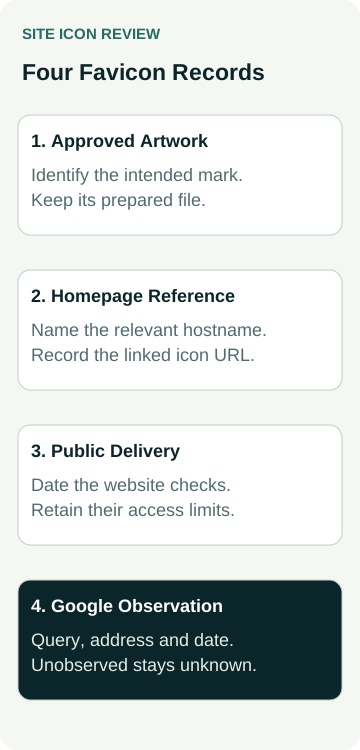
They use this short handover record:
| Review Item | Evidence to Keep | Decision or Remaining Check |
|---|---|---|
| Approved icon | Identified artwork and prepared website file | Owner confirms the intended small-format mark |
| Website reference | Relevant hostname, homepage and delivered icon-file reference | Developer explains the current setup or proposed correction |
| Public delivery | Dated file and appropriate access checks, with their limits | Record what was actually verified on the website |
| Google display | Dated query, result address and observed icon | Mark unobserved or unchanged results separately |
Suppose the public implementation is checked after an authorised correction, but nobody has observed a new Google result yet. The website-work field can describe that completed check. The search-display field stays not observed. Neither field establishes better rankings or more enquiries.
The record helps the owner understand what was delivered and what remains to be checked. It does not demonstrate an uploaded icon, crawler visit, Google refresh or commercial result.
Set a Follow-Up Without Promising the Display
Google says a favicon is not guaranteed to appear even when its guidelines are met, and processing after a change takes time. Its documentation discusses requesting homepage recrawling through URL Inspection. Treat an appropriate request as a request, not confirmation that the result has changed.
Ask who will retain the implementation record and perform the later observation. If the icon remains unexpected, compare the exact hostname, file and current evidence before commissioning more work. Repeatedly replacing artwork or renaming files makes it harder to follow what was actually supplied.
Include the agreed favicon check in a website launch review when replacing a site. Keep any later search-appearance observation beside it. A successful launch check does not settle what every searcher will see afterwards.
To discuss the issue, review AWE's SEO services or contact Australian Web Experts with the public result example and intended icon. Agree the investigation, any asset or website correction and the follow-up included in the proposal.