

Ask your designer how an important page should look when its link is shared. Agree the title, image and intended destination, then separate the proposed design from the preview a particular messaging or social platform actually displays.
A useful service page can look confusing in a shared card if it appears under a generic homepage title or an unrelated picture. The owner needs to recognise the offer before approving the work. A polished card also needs to lead to the page it describes.
Include this review in the website scope if shared links matter to your business. Name the pages and platforms you want considered. “Social media integration” can mean profile buttons, embedded posts or other work; ask whether page-specific sharing information and its checks are included.
Start With the Page Someone Will Share
Choose a realistic task. Perhaps a customer wants to send a partner the page about fence repairs, or a staff member needs to point an enquirer to preparation instructions. Use that exact public page rather than review only the homepage.
Record the intended address, customer question and useful next step. If the link redirects, ask the website person to identify the final destination. A card describing repairs should not quietly lead to a general page that leaves the reader searching again.
Our service-page or PDF guide helps decide what each format is for. A web page, a PDF attachment and an image posted directly to a platform are different sharing tasks. Agree which one the designer is preparing before discussing its appearance.
Use an already public, approved address for any external inspection. A platform or preview service may fetch the supplied URL. Keep private drafts, customer information and access details out of an ordinary sharing check.
Agree the Words and Image Together
Write a title that identifies the page's actual subject. A short description can explain what the visitor will find, without inventing a special offer, guaranteed result or new service area. Review any business name or displayed address alongside the content.
Choose an image the business has permission to use in this context. It should represent the page at the small size of a card. A detailed project photograph may become hard to understand when reduced; a familiar logo may still need suitable spacing and contrast.
Ask to see the proposed composition with the real wording. Check the important subject, readable text where used and the relationship between image and title. Avoid relying on a tiny line of text embedded in the picture to explain an essential exclusion.
The homepage crop guide explains why fitting a photograph into a different frame can remove useful detail. Apply that principle to the proposed sharing image, while keeping the homepage design and sharing asset as separate deliverables. Do not assume one image file or dimension will look identical everywhere.
Know What the Website Supplies
The Open Graph protocol describes properties for a page's title, type, representative image and URL, with optional description and site-name information. It also provides an image-description property. Ask the developer to explain which relevant metadata the site delivers and where staff will maintain it.
This information can differ from the large heading and image visible inside the page. Seeing a correct heading in your browser does not establish that the sharing metadata describes the same page. Equally, a proposed card in a design tool does not show what the deployed website supplies.
Slack's developer documentation gives one platform-specific example: its classic link previews fetch a URL and look for Open Graph and X Card metadata when an app handler is not used. Slack also supports other preview mechanisms. That example is not a promise about every platform's layout or behaviour.
Ask the technical person to keep the requested page information, delivered metadata and platform observation in separate fields. You can approve the wording while still recording that a platform check is outstanding.
Keep three records: what you approved, what the public page supplies and what the named platform displayed.
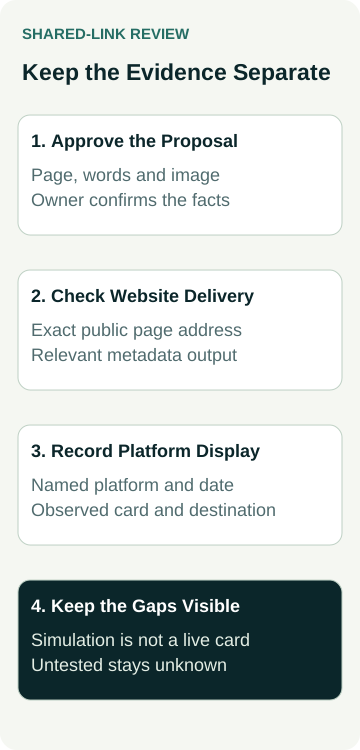
A Worked Example: Sharing a Fence-Repair Page
Imagine a fencing business preparing a page about repairs. A customer may share it while discussing whether an existing fence can be repaired. The business wants the link to describe that service clearly, with an approved repair photograph and a route to request an assessment.
The owner and designer use this record before launch. It is a hypothetical planning example, not an AWE client, a working card or a result from a social account.
| Review Stage | Evidence to Keep | Decision or Remaining Check |
|---|---|---|
| Owner approval | Proposed repair-page title, description, image and destination | Confirm the facts and permission for the image |
| Website delivery | Public repair URL and the relevant metadata delivered there | Check that a generic homepage default has not replaced the agreed page information |
| Platform observation | Named platform, date and observed preview of that exact public URL | Compare the displayed title, image and destination; mark any untested platform unknown |
| Later edits | Person responsible and record of changed service information or image | Recheck affected metadata and the relevant platform observation |
During the design review, the owner notices that the proposed image shows a new installation. They choose an approved repair image instead, because it better represents the page. This is a content decision; it does not establish that the image has been delivered in any platform preview.
The technical handover might later confirm the correct public metadata while the platform observation remains pending. Keep that gap visible. A mock-up is useful for approval, but it is not evidence of a fetched or displayed card. No share, customer enquiry or increase in visits has occurred in this example.
Review the Actual Platform Within the Agreed Scope
Ask which current platform-specific inspection or controlled review method the provider will use. Where a real post or message is needed, agree its audience and content beforehand. Testing appearance should not unexpectedly publish an announcement or contact a customer.
Record the exact URL, platform, date, environment and observed result. A general preview generator can help compare wording and composition, but label its output as a simulation. A missing preview also needs investigation; it does not by itself identify an incorrect image or missing tag.
If an old card remains visible after a website change, retain both observations. Have the provider investigate the current page output and the platform's current retrieval or refresh process. Do not repeatedly rename public URLs or alter unrelated content simply to make one preview look different.
Keep Google search appearance separate. Our Google site-name guide explains identifying the name and title within a search result. Correcting a shared-link card does not establish that Google has changed its result, or that rankings and enquiries have improved.
Include Sharing Information in the Handover
Ask who updates page-specific metadata, where the default image is set and what happens when someone adds a new page. Staff should know which fields they can edit and when the website person needs to help. Include the approved image file and its relevant permission record.
Add the agreed sharing checks to the website launch review. Mark each item passed, failed or not tested against its actual scope. Later referral visits and qualified enquiries need their own measurement; a recognisable card is not a measured commercial outcome.
To discuss a new site or redesign, review AWE's website options or contact Australian Web Experts with the public pages and sharing tasks that matter. Confirm the metadata, image preparation, platform checks and ongoing editing responsibilities in the proposed scope.